todds89006332
Participant
August 12, 2019
Question

Lightroom Classic: Processed RAW images removing edits and showing "Camera Raw Settings" in the history state

  • August 12, 2019
  • 8 replies
  • 1159 views

I hope everyone is doing well. I'm running into an issue with LR Classic and my RAW files. I process the files, export them, don't touch them after export, then the files are getting reset with a bunch of entries for 'Camera Raw Settings' (see attached photo). The Camera Raw Settings removes a lot of my processing steps, but doesn't reset the image to import. This only seems to happen with RAW files and occurs pretty consistently.

I do use LR mobile on my I-pad, which is synced with the collections where some of these images reside.
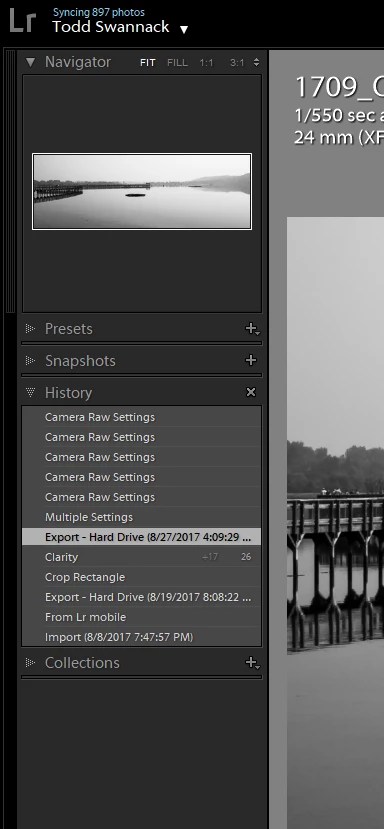
Has anyone else run into this? I've scoured the web and can't find an answer.

Thanks for any assistance.

Message was edited by: Akash Sharma

    This topic has been closed for replies.

    8 replies

    DdeGannes
    Community Expert
    Community Expert
    March 1, 2020

    Just a thought, are you using Adobe Camera Raw to do edits outside of Lightroom and then updating Lightroom when you get a warning message?

    Regards, Denis: iMac 27” mid-2015, macOS 11.7.10 Big Sur; 2TB SSD, 24 GB Ram, GPU 2 GB; LrC 12.5,; Lr 6.5, PS 24.7,; ACR 15.5,; (also Laptop Win 11, ver 24H2, LrC 15.0.1, PS 27.0; ) Camera Oly OM-D E-M1.
    josh45217
    Participant
    February 21, 2020

    Did you ever figure this out? I'm having the same issue. Thanks!

    Winston Gee NZ
    Participant
    March 1, 2020

    Yep, me too when using a brush tool. Very odd.

    GoldingD
    Legend
    August 12, 2019

    Have you considered resetting the preferences file:

    https://m.youtube.com/watch?v=bARt-hoCc2Q

    GoldingD
    Legend
    August 12, 2019

    In the back of my head the History State “Multiple Settings” occurs when you copy Develop settings from one image to one or more other images.

    No, I do not have a link to back that up.

    Not sure if that comes across from sync via Mobil.

    But the Camera RAW one?? Google search has been not so helpful

    todds89006332
    Participant
    August 12, 2019

    Thank you all for your responses. Here's a batch set of answers

    To clear up some of the confusion: LR CC is saving my edits, but it is adding new edits on top of my old ones. These are labeled as 'Multiple Settings' followed by several 'Camera Raw Settings' in the LR History panel. The entries for Camera Raw Settings appear to be all the same for each picture, but the edits can be different for different pictures. For example, on one picture, the Camera Raw Settings entry removes the saturation. On another it resets the cropping.

    1) Lightroom is up to date (8.3.1)

    2) This occurs on both my Nikon and Fuji Raw Images

    3) I'm not importing originals again. I import the images once, then never import again. All of the effected images seem to be in collections that I sync to LR Mobile. I use an LR mobile on an I-pad.

    4) I looked at my metadata settings and all three boxes are checked (i.e., offer suggestions from recently entered values, include develop settings in metadata inside JPEG, TIFF, ..., and automatically write changes into XMP).

    I am lucky that I can get back to the edit I liked, but it's frustrating having to scan the develop settings for each image (this has affected 100s of images).

    Any help would be most appreciated.

    TS

    Community Expert
    August 13, 2019

    Try turning off the automatic xmp writing. The ‘camera raw settings’

    language looks a lot like it is something interfering between the sync and

    the xmp sidecars.

    On Mon, Aug 12, 2019 at 4:06 PM todds89006332 <forums_noreply@adobe.com>

    Community Expert
    August 12, 2019

    My first guess was that you were exporting and overwriting the original. Make sure you're not doing that! Do you by any chance use the automatic metadata saving to files or synchronize your folder the images are in in Classic?

    99jon
    Legend
    August 12, 2019

    I’ve not seen this. But the history will relate to the original file not an exported file. Are you adding expoted files back into the catalog. Or are you syncing a smart preview from a collection and then re-importing the original via Lightroom Mobile?

    Akash Sharma
    Legend
    August 12, 2019

    Hi Todds,

    Sorry that Lightroom Classic is not saving your raw images with all the edits. Do you see what all changes occur on the overall look of the image when go through each history state item of "Camera Raw" ?

    Which version of Lightroom Classic are you using? Latest is 8.3.1(Check under Help>>System info)

    Also, does the issue occurs with a specific raw image or camera/lens type?

    Thanks,

    Akash