
Participant
March 15, 2022
Question

lightroom classic stopped soft proofing

  • March 15, 2022
  • 1 reply
  • 448 views

hi,


i was wondering if anyone could help me. i am trying to soft proof in lihgtrrom classic only to find this message. 
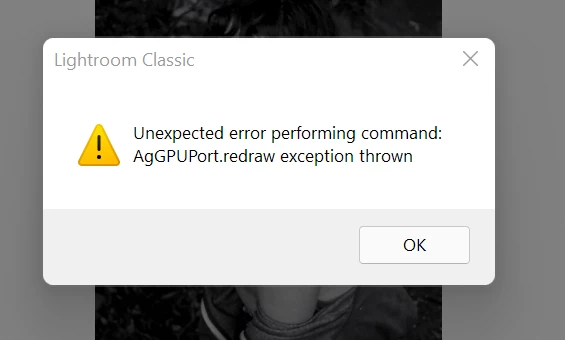
I am also unable to see any of my soft proofing settings such as the change of icc profiles
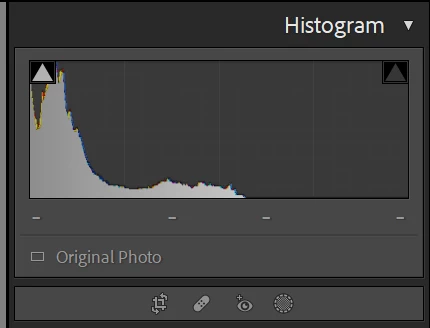
could anybody help me please. 


many thanks

jade 

This topic has been closed for replies.

1 reply

AxelMatt
Community Expert
Community Expert
March 15, 2022

Try resetting the preferences of Lightroom Classic:  https://helpx.adobe.com/lightroom-classic/help/setting-preferences-lightroom.html


Backup your preferences prior to resetting the preferences: 

https://helpx.adobe.com/lightroom-classic/kb/preference-file-and-other-file-locations.html


If this doesn't help we need more informations about your environment.

Which operating system do you use?

Which version of Lightroom do you use?

Please post the exact version and not only phrases as "recent", "latest" and so on.

My System: Intel i7-8700K - 64GB RAM - NVidia Geforce RTX 3060 - Windows 11 Pro 25H2 -- LR-Classic 15 - Photoshop 27 - Nik Collection 8 - PureRAW 5 - Topaz Photo
Participant
March 16, 2022

hello,

 
thank you for getting back to me, this still hasn't helped. 
 
my operating system is Windows 10 Home Premium Edition
 
version of lightroom is : Lightroom Classic 11.2 
 
many thanks


TheDigitalDog
Inspiring
March 16, 2022

First, try disabling GPU in the preferences (Performance tab). Any better?
If not, recalibrate and build a new ICC display profile, the old one might be corrupted.
If you are using software/hardware for this task, be sure the software is set to build a matrix not LUT profile, Version 2 not Version 4 profile.
If turning OFF GPU works, it's a GPU bug and you need to contact the manufacturer or find out if there's an updated driver for it.
Also see: https://helpx.adobe.com/photoshop/kb/acr-gpu-faq.html
Also see: https://community.adobe.com/t5/photoshop-ecosystem-bugs/weird-ps-bug-psd-file-looks-messed-up/idi-p/12780573

Author “Color Management for Photographers" & "Photoshop CC Color Management/pluralsight"