
Known Participant
November 16, 2022
Answered

Lightroom classic, unable to find custom creative profile

  • November 16, 2022
  • 2 replies
  • 1303 views

Hello,

- LRC v.12 on mac.


I created a creative profile a while ago and did some edits with it. Now I am unable to find the xmp file, but when I open a photo edited with that specific profile it is still appearing in the edits (see photo). The problem I am facing is that I can't find a way to export that creative profile or locate it (I checked the camera raw folders and all the other presets folders, and I also searched my whole HD with the exact name but can't find it).

The reason why it is so important it's because it is use in some presets I created, and since the profile is missing the presets including that profile are not showing up in my presets.

I would be glad if someone could tell me if there is a way to find it (still don't understand hpw can be that it is in use in LRC but could not find it in my HD which contains ALL my files).

Ps. I store my presets with my catalog since a while but still could not find it in the old backups so I really assume I probably had it on ym desktop and deleted it or something like that.
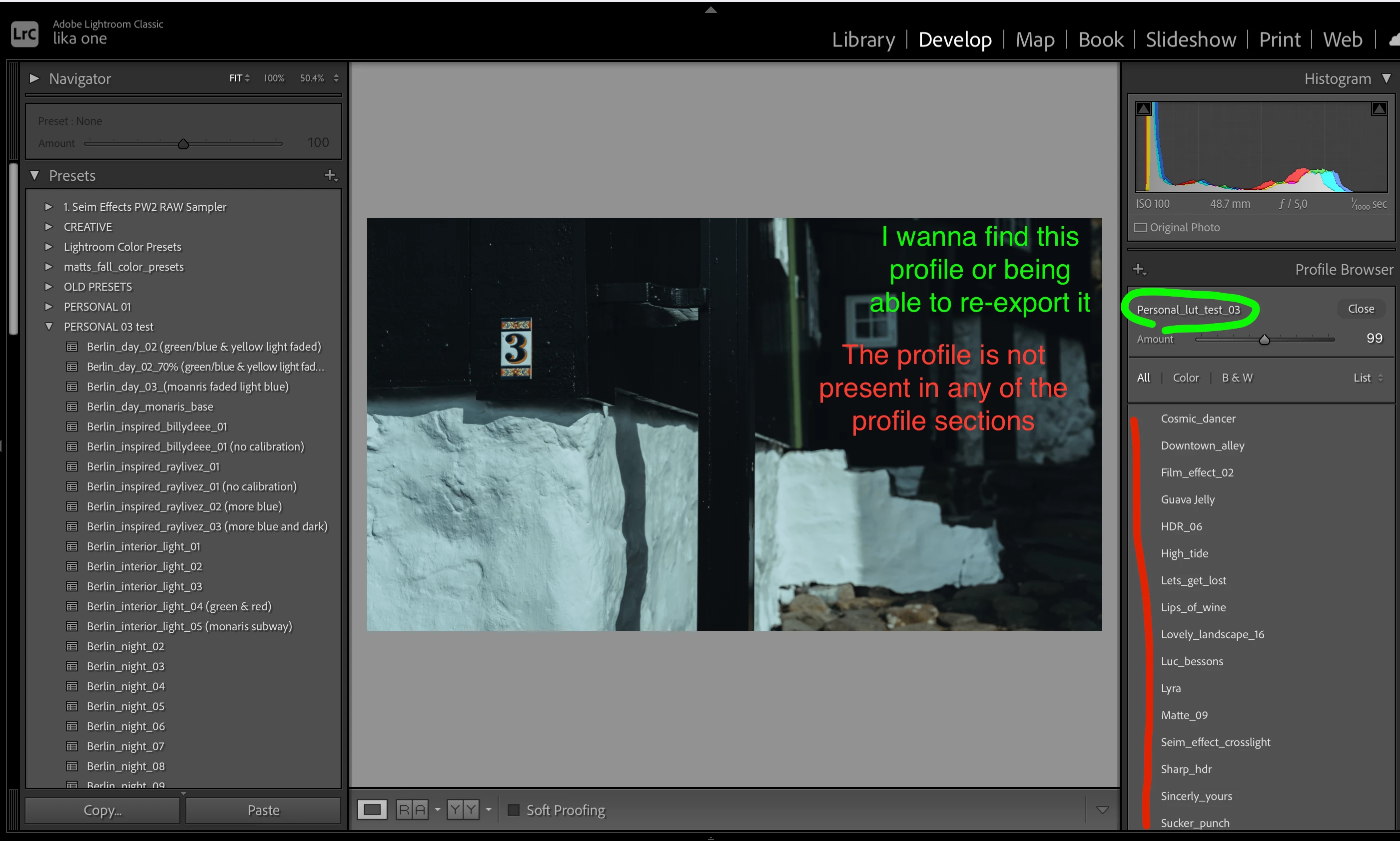
 

Thank you in advance in someone can help it would be great!

This topic has been closed for replies.
Correct answer johnrellis

Camera Raw doesn't know about LR catalogs. So if you created presets and profiles from within Camera Raw, you should indeed copy them to the <catalog folder>/Lightroom Settings folder if you have Store Presets With This Catalog enabled.

2 replies

johnrellis
Legend
November 16, 2022

"still don't understand how can be that it is in use in LRC but could not find it in my HD which contains ALL my files"


When LR applies a Develop preset or creative profile to a photo, it copies all of the preset or profile settings into the photo's Develop settings.  Thus, even if the preset or profile gets subsequently deleted, the photo can still be displayed and edited.


It's easy to extract all the Develop settings of a creative profile from a photo's internal develop settings. But the name of your profile suggests it included a LUT -- LUTs are not easy to extract. (I've never done it, though I know where the documentation is to do it -- it would involve a fair amount of programming.)


"I store my presets with my catalog since a while but still could not find it in the old backups so I really assume I probably had it on my desktop and deleted it or something like that."


At the time you applied the profile to that photo, the profile must have been imported into LR and stored either in one of these two three locations:


/Users/<user>/Library/Application Support/Adobe/CameraRaw/ImportedSettings

/Users/<user>/Library/Application Support/Adobe/CameraRaw/Settings

<catalog folder>/Lightroom Settings/Settings


depending on the setting of Preferences > Presets > Store Presets With This Catalog.


So I recommend you examine the backups of those two folders again, for the time that you first applied the profile to the photo.

johnrellis
Legend
November 16, 2022

"since the profile is missing the presets including that profile are not showing up in my presets."


If you create a new profile with the same name, then the presets should appear in the Presets panel again. Though of course when you apply one of those presets, it won't produce the same result (until you recover the original profile).

GoldingD
Legend
November 16, 2022