Participant
April 28, 2022
Question

Lightroom Classic view

  • April 28, 2022
  • 3 replies
  • 325 views

Hi,


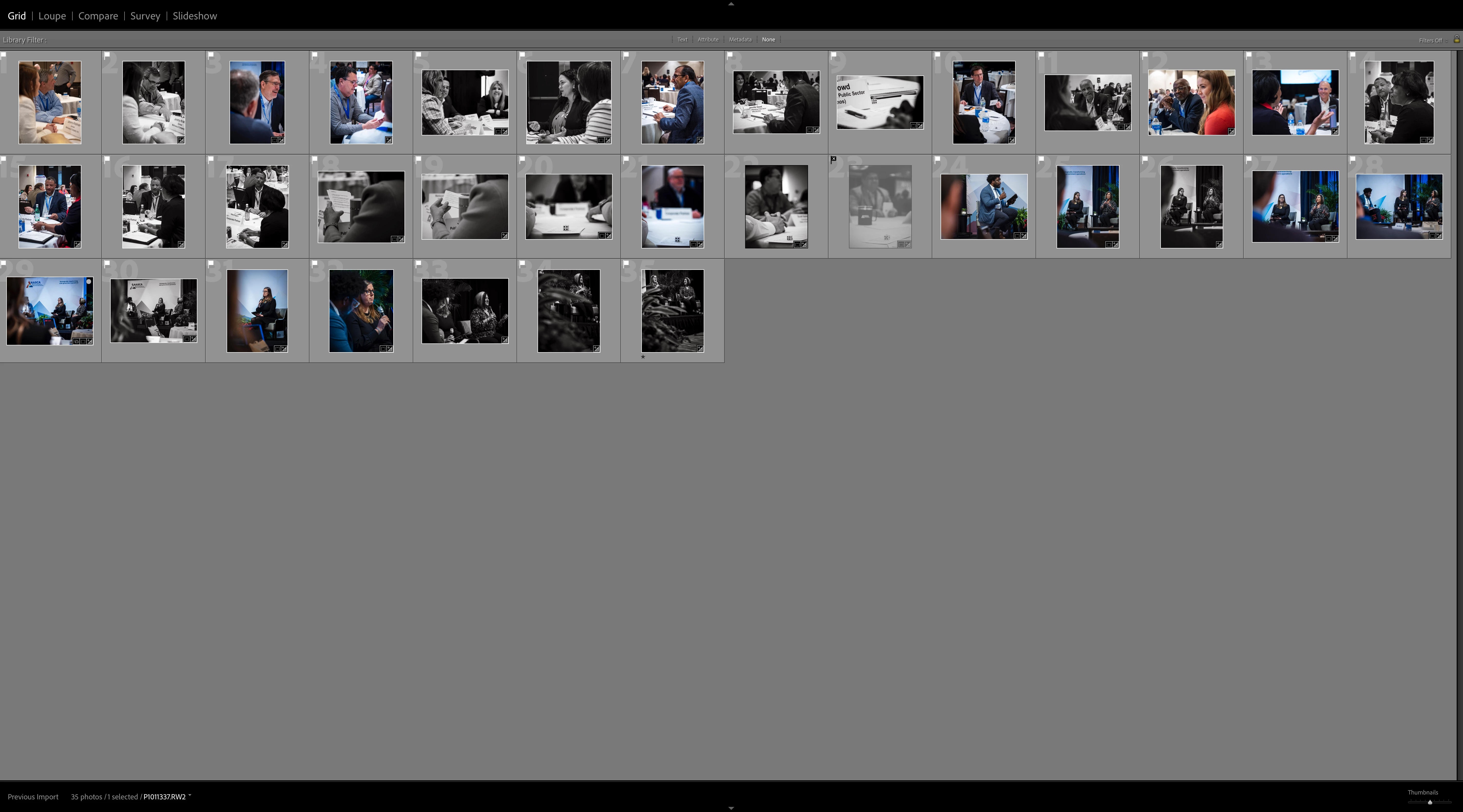
I've just opened Lightroom and it's displaying in a strange format that I can't get out of. Any ideas? It was working fine yesterday.

This topic has been closed for replies.

3 replies

Conrad_C
Community Expert
Community Expert
April 28, 2022

This looks like a problem that continues to plague at least some Mac users. A major clue is the top panel in the screen shot. It does not list the modules (Library, Develop, Map…) as you would expect. Instead, the top panel lists views on the left (Grid, Loupe, Compare…), and the right side is blank. Why? Because those labels are normal for the Secondary Display window, so what you are seeing is the Secondary Display window on top of, and blocking access to, the normal application window. This problem, which happens randomly on my own Mac (not every day, but often enough), is that when Lightroom Classic starts up, the Secondary Display position gets screwed up and appears on top of the application window.


If this is happening, the usual application window panel shortcuts such as Tab or Shift-Tab do not help, because although the shortcuts are working, you never see the result because the application window is totally blocked by the Secondary Display window, and the Secondary Display window doesn’t use side panels.


The first thing to do here is turn off the Secondary Display so it stops blocking everything. You can deselect the Window > Secondary Display > Show command, or press its keyboard shortcut Command+F11. When it goes away, you should now see the normal application window, and you’re back in business.


Next, especially if you have multiple displays connected, go into Lightroom Classic Preferences, click the Secondary Display tab, and select the display you actually want the Secondary Display window to appear on. This is the preference that gets screwed up at random.


This has been an ongoing problem, and with various releases Adobe finds another cause and lists the bug as “fixed” in the public release notes, but it has never totally gone away.

Participant
May 1, 2022

Thanks for this Conrad, seems to explain what I'm experiencing. I haven't got around to trying your solution yet but when I do I'll respond properly. Just wanted to thank you for taking the time to explain it in the meantime. 

Rob_Cullen
Community Expert
Community Expert
April 28, 2022

And- [Ctrl/Command + / ] will give you a screen of keyboard shortcuts for 'View' and 'Panel' changes.


Regards. My System: Windows-11, Lightroom-Classic 15.3, Photoshop 27.5, ACR 18.3, Lightroom 9.3, Lr-iOS 10.4.0, Bridge 16.0.3 .
JP Hess
Inspiring
April 28, 2022

I'm a Windows user, but you should try pressing shift + tab.