
hermjeral
Participant
November 25, 2021
Answered

Lightroom Classic - xmp files no longer created

  • November 25, 2021
  • 4 replies
  • 7456 views

Hello,
I have been using xmp files for a few years now but until recently, edits that I do in Lightroom Classic doesn't create the xmp sidecar files.

What am I doing wrong? How do I get the xmp files back?
I have that catalogue setting for xmp files, checked.

Thanks for helping out. Much appreciated.
This topic has been closed for replies.
Correct answer DS256

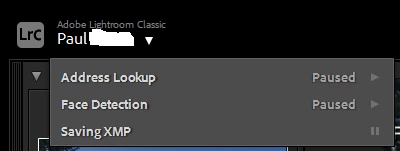
What version of LrC are you using? In 11, there is a background task which creates the XMP files. If you've paused this, I don't believe it will write XMP's.


4 replies

Participant
May 11, 2022

I just found this  thread and it turns out that LR had paused the "saving XMP files" function. I had not touched it. After pausing and then unpausing I find LR is resynching over 600 photos. I hope this fixes the problem of LR not writing xmp files. Apparently that solved the problem for some others

DdeGannes
Community Expert
Community Expert
May 11, 2022

It's a bit confusing, changes made in version 11 in October 2021 and then another change introduced in version 11.1 which reverted the write process in Develop module. See the screen capture.


Regards, Denis: iMac 27” mid-2015, macOS 11.7.10 Big Sur; 2TB SSD, 24 GB Ram, GPU 2 GB; LrC 12.5,; Lr 6.5, PS 24.7,; ACR 15.5,; (also Laptop Win 11, ver 24H2, LrC 15.0.1, PS 27.0; ) Camera Oly OM-D E-M1.
Participant
March 7, 2022

I had the same issue. My Catalog Settings were all set up for XMP data to be automatically written, however, for some reason, it was not creating the XMP sidecar files. I solved this by clicking on the name plate, and then pausing and unpausing  the "saving xmp" option that is available. As soon as I did that, xmp files were once again being created, even though i had never paused the function. It appears there might be a bug somewhere in the recent update. 

Participating Frequently
July 25, 2022

Just did the same. Paused and unpaused the Saving XMP control in the identity plate and now my Lightroom Classic has written almost 3000 XMP files for the CR2 files from January 2022 till now (July 2022). Thanks for tip!

DS256Correct answer
Inspiring
November 25, 2021

What version of LrC are you using? In 11, there is a background task which creates the XMP files. If you've paused this, I don't believe it will write XMP's.


Participating Frequently
December 30, 2021

Thanks...that was the issue!  

hermjeral
hermjeralAuthor
Participant
November 25, 2021

May I also add, I am a simple user - I take RAW photos from my Canon cameras, and edit the CR2 in Lightroom. I always have the xmp files created after editing them. Recently, they no longer appear. I can't remember when this started.

Rob_Cullen
Community Expert
Community Expert
November 25, 2021

Maybe a stupid question-  But are you positive the files you are editing are CR2? Camera settings have been known to mysteriously change!

Next, check the actual Folder location of the CR2 you are editing. Then view it in Finder [Right-Click] > [Show in Finder]. Is this the same image you were saving the XMP for?  Is it possible LrC is using files in a folder different to that you are looking at with Finder.

Is Finder sorting you files by "File-type" so that the XMP is not seen 'next to' the CR2 file?

Note that the way Metadata is saved has changed in a big way in the October 2021 upgrade to v11.

Scroll down this document to the chapter- 'Auto Save into XMP'

https://helpx.adobe.com/lightroom-classic/help/whats-new/2022.html#metadata


Regards. My System: Windows-11, Lightroom-Classic 15.1.1, Photoshop 27.3.1, ACR 18.1.1, Lightroom 9.0, Lr-iOS 10.4.0, Bridge 16.0.2 .
Sunil_Bhaskaran
Inspiring
November 25, 2021

What happens when you press CMD + S.
Does it save the xmp?
Please check if the Auto Save XMP option is ON.
(Lightroom Classic > Catalog Settings > Metadata > Automatically Write Changes into XMP)


Thanks,
Sunil