
Known Participant
August 25, 2017
Answered

Lightroom connection to Google Chrome fails for displaying collection

  • August 25, 2017
  • 2 replies
  • 1053 views

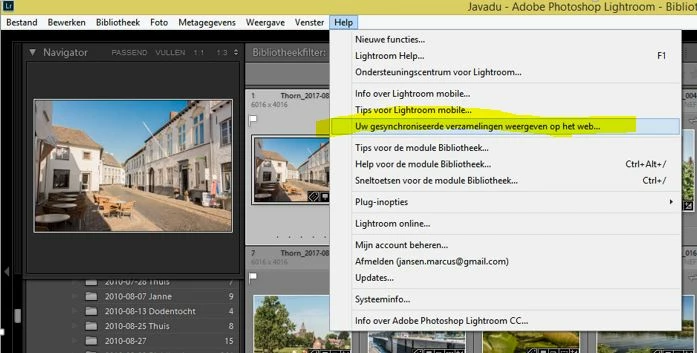
@11215354 I try to view my Synchronised collections using the menu-option in Lightroom, Google Chrome opens but doesn't load correctly.

The browser is looping and ends up with "{"error":"bad_request"}"

When I use Internet explorer (not my default browser), it's all working, but some functions aren't available in this browser (as documented).

I'm using:

  • Lightroom CC - most recent version
  • Windows 8.1
  • Google Chrome - most recent version

I cleared the cache etc.
This topic has been closed for replies.
Correct answer 99jon

Click or copy the web link directly into your browser and log-in with your Adobe ID:

https://lightroom.adobe.com/

2 replies

99jon
99jonCorrect answer
Genius
August 25, 2017

Click or copy the web link directly into your browser and log-in with your Adobe ID:

https://lightroom.adobe.com/

Just Shoot Me
Legend
August 25, 2017

Works fin here with chrome and Win 7.

Go to Help then About Adobe PS LR or System Info and post the actual version number listed for LR.

Known Participant
August 25, 2017

This is what I get from System info or About-info:

Lightroom-version: CC 2015.12 [ 1125239 ]

But now it seems to work after copy/paste of https://lightroom.adobe.com directly in the browser.

So, problem solved...