
Rhiael
Inspiring
December 23, 2018
Question

Lightroom crashing on import with pCloud

  • December 23, 2018
  • 1 reply
  • 1413 views

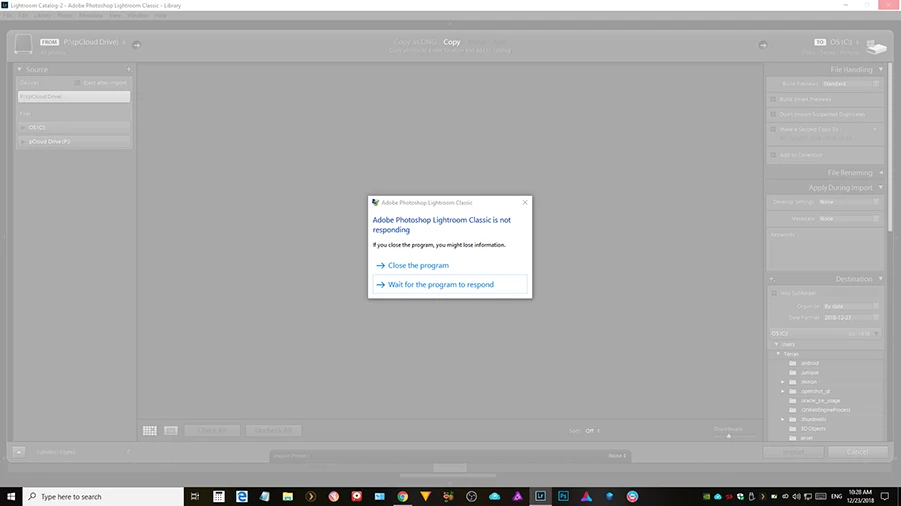
Lightroom crashes every single time I try to import or add files while my cloud service, pCloud is running. If I close pCloud, it doesn't crash. I have no problem importing with Luminar or On1 Photo Raw, just Lightroom. Also, pCloud shows up as a drive to import from automatically (see top left of image) and there is no way to disable this.

Prior to the update, I had no problem importing or adding photos to my catalogue.

If this can't be fixed, I'll be asking for a refund.
This topic has been closed for replies.

1 reply

John Waller
Community Expert
Community Expert
December 23, 2018

Which version of Lightroom are you running? Help > System Info

Participant
December 23, 2018

Hey, I am having the same problem too; but with OneDrive. I am also using the version 8.1. I didn't open lightroom for a while; today I was in need and tried to open it. I could not import file in any way! Clicking on the import button, drag and drop adding the folder to the left panel folders... every way I tried I failed.

I uninstalled it > restarted > upgraded all drivers including the graphics > restarted > installed Lightroom classic 8.1 > restarted..... and it also did not help me!

Hope you reply soon and give us a solution

johnrellis
Legend
December 25, 2018

Ok will do, but why are they not checking these official Adobe forums? When searching for help, Adobe points me here. Are they expecting the community to solve their problems? Is there any way to communicate with tech support directly, rather than submitting one of hundreds or more bug reports along with others that may or may not get addressed eventually?


I don't have any inside information as to why they've set up two separate forums, but this FAQ explains their request: Which forum should I post to? (Feedback vs Forums)

You can contact technical support by chat or phone by starting here: Contact Customer Care . However, be forewarned that while Adobe technical support can help with licensing and installation issues and well-known issues that are recorded in the bug database, they're generally not experts in LR, they're rarely helpful with bugs and complicated misbehaviors, and they have a reputation for saying anything to "close" an issue.   Reporting an issue via the feedback forum is more likely to get qualified responses from Adobe, though many bug reports do indeed go unanswered.  The more people who click Me Too on a bug report and add details of their issue, the more likely Adobe will respond.