

davescm
Community Expert
Community Expert
October 21, 2017
Question

Lightroom.exe Bad Image

  • October 21, 2017
  • 5 replies
  • 1725 views

Lightroom Classic was working perfectly yesterday but on starting this morning I get the message below:
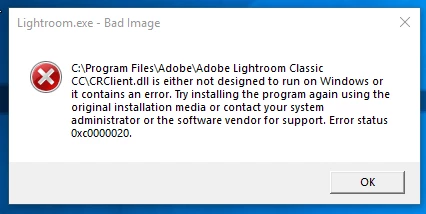
I have uninstalled - restarted the PC then re-installed and I get the same message

Bridge , Photoshop and other Adobe apps are still working correctly

Any ideas where to go next?

Edit to add : I am running on Windows 10 v1709

Dave

    This topic has been closed for replies.

    5 replies

    Participant
    December 4, 2017

    I had the same error with Xrite and Lightroom.

    The Xrite technician said that they think that Mcafee is the problem.

    The temporary work around is to uninstall and reinstall the affected software.

    I am going to contact  Mcafee before I decide whether to renew my subscription next month.

    Known Participant
    November 28, 2017

    Wow, and how you managed the amount of money payed for the mcafee signature? They gave your money back?

    davescm
    Community Expert
    davescmCommunity ExpertAuthor
    Community Expert
    November 28, 2017

    No, McAfee came free with my broadband package so no refund needed

    Dave

    Known Participant
    November 28, 2017

    I'm having the same problem, someone from adobe could please help us?

    davescm
    Community Expert
    davescmCommunity ExpertAuthor
    Community Expert
    November 28, 2017

    Hi

    As I posted, in my case it was not an Adobe problem. It was caused by my McAfee Antivirus software

    Dave

    Participant
    October 24, 2017

    Hi Dave, having the same issue, each day I open lightroom and I get one of these errors for a different file. But this one I cannot fix. Did you find a solution? Ever since the Classic CC update LR has been a nightmare.

    davescm
    Community Expert
    davescmCommunity ExpertAuthor
    Community Expert
    October 24, 2017

    Hi
    I uninstalled, ran checks on the disk for errors and for virus' and found nothing.

    I reinstalled but this time clicking the download link in My Account rather than the button in the desktop app. To be honest I have no idea as to whether that download is any different - what I do know is that it has worked OK since then.

    Dave

    davescm
    Community Expert
    davescmCommunity ExpertAuthor
    Community Expert
    November 8, 2017

    I have come back to update this as I believe I finally isolated the problem.

    A few days after having the Lightroom issues I had a similar problem with Techsmith's SnagIt. Dll files were being set to zero bytes.

    I ran various virus scans, McAfee, Malwarebytes and HitManPro which showed nothing. Finally, I uninstalled my normal antivirus software ( Mcafee ). All the problems stopped.  After a few days I re-installed Mcafee and the problems started again.

    So now I have replaced my McAfee antivirus with BitDefender and have experienced no issues since.

    I hope that may be useful to anyone else who experiences similar issues.

    Dave

    davescm
    Community Expert
    davescmCommunity ExpertAuthor
    Community Expert
    October 21, 2017

    I had a look at the "offending" file -  CRClient.dll and it was shown as having 0 bytes !

    So I renamed it as CRClient.old and copied the CRClient.dll from Photoshop CC2018 and Lightroom opened.

    Although it worked, I would welcome some feedback from Adobe as to whether the Lightroom and Photoshop dll files should be the same and if not why an empty file was installed, and how can I install the correct file.

    Dave

    99jon
    Legend
    October 21, 2017

    Dave I don’t think you should be seeing these Windows bad image errors. If you have Norton or something similar it could be worth running a scan for malware, rather than relying on Windows Defender!

    davescm
    Community Expert
    davescmCommunity ExpertAuthor
    Community Expert
    October 21, 2017

    I have McAfee and I'm running a scan now John - no issues so far.

    What was strange was after uninstalling and re-installing the CRClient.dll file still showed as 0 bytes

    I'll update this when scan is complete

    Dave