
Exit
  • Global community
    • Language:
      • Deutsch
      • English
      • Español
      • Français
      • Português
  • 日本語コミュニティ
  • 한국 커뮤니티
1

Lightroom folders show as dates and not folder names

Community Beginner ,
Jan 27, 2018 Jan 27, 2018

I'm working in Lightroom Classic and always name my folders after the subject of the shoot when I import.  The folder names (i.e. "Bob's high school graduation") are reflected correctly on my hard drive, but the Lightroom folder structure only shows dates - no folder names.  The dates are not at all useful to me, and I have to believe that there is a way to get Lightroom to show me the actual folder names. 

Here is the view of Lightroom showing dates for folders:
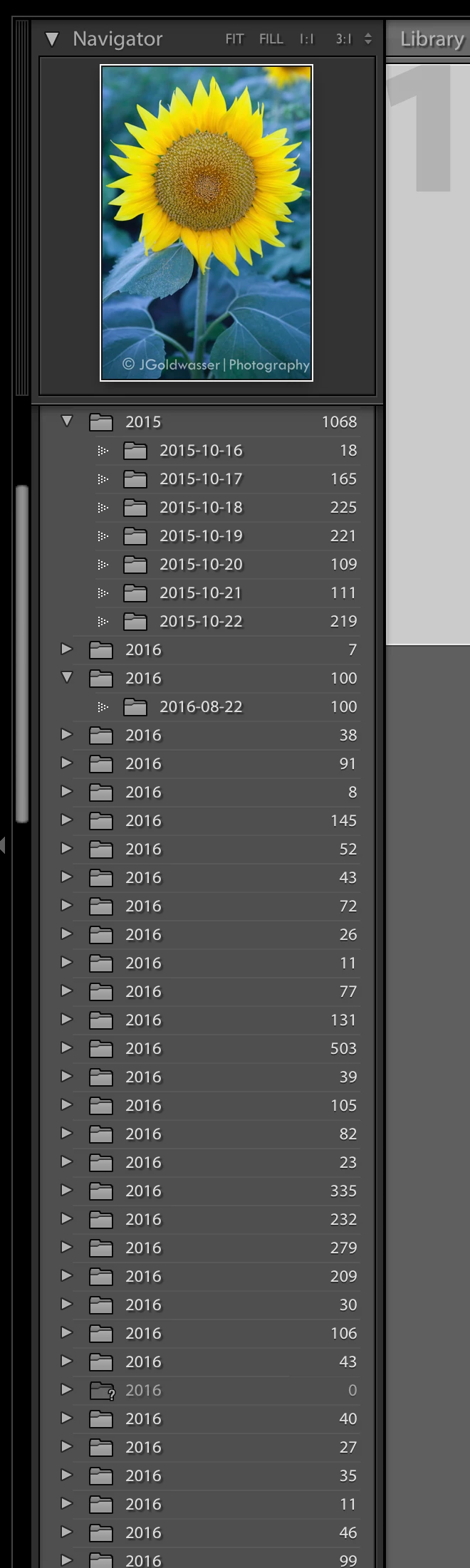
Folder structure with dates.png

But then I've noticed that Lightroom seems to know the actual folder names that I want it to show when I look to import files into the catalog, as shown in this second view below:
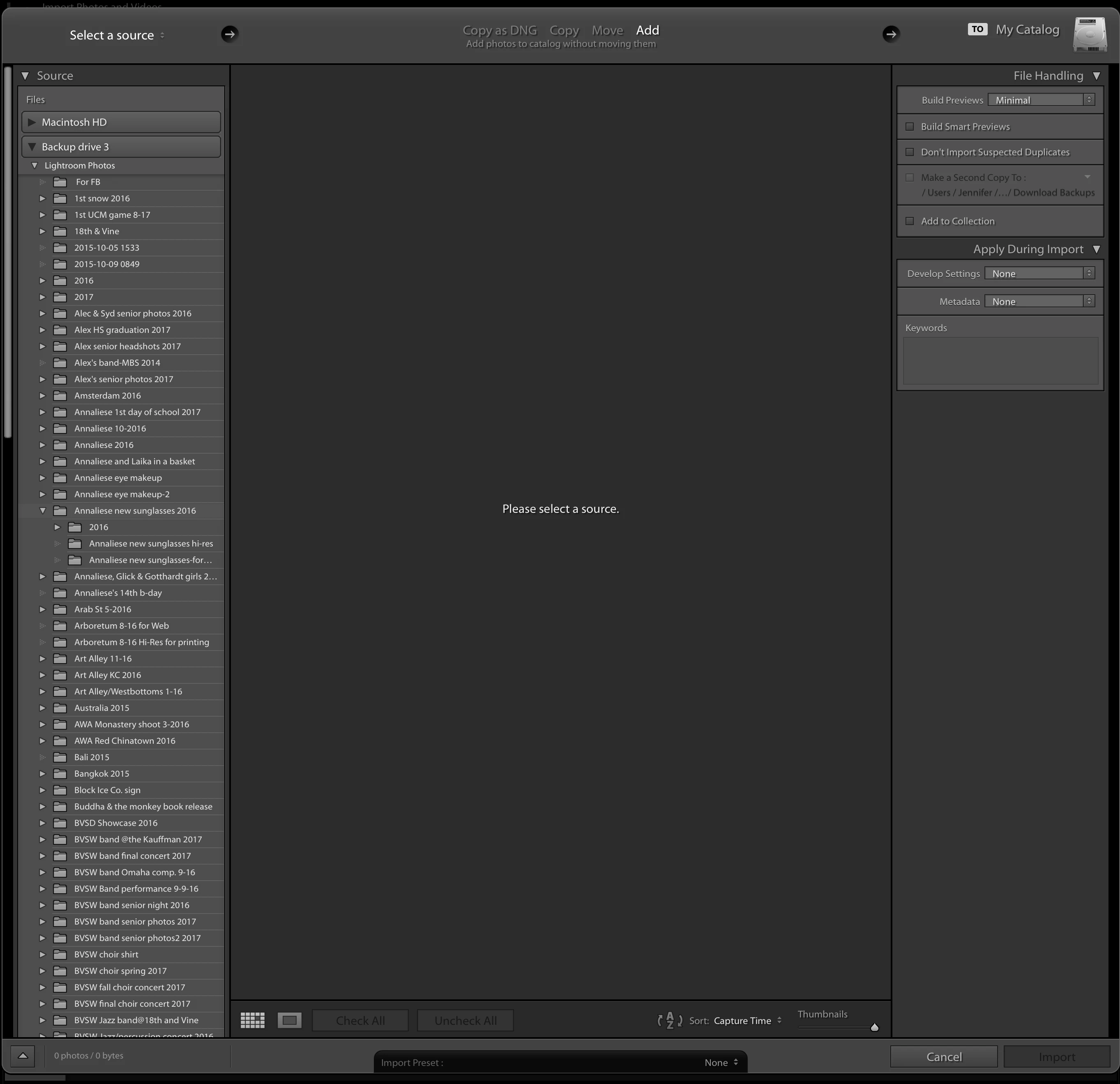
Folder names for import into LRCAT.png

I'm thoroughly confused.  Is there some setting somewhere that I'm missing where I can tell Lightroom to show me the folder names in instead of the folder dates?

Any help would be greatly appreciated.  Thanks.
7.3K
Translate
Report
Community guidelines
Be kind and respectful, give credit to the original source of content, and search for duplicates before posting. Learn more
community guidelines

correct answers 1 Correct answer

Community Expert , Jan 29, 2018 Jan 29, 2018

I keep looking for the "right click"option that says "show folder names" instead of "show folder dates", but as far as I can tell, no such toggle exists.

The Lightoom Folder panel shows the names of folders as they appear on a hard-drive. There is no "view" that toggles name/date.

A menu item appears if you Right-click on a Preview thumbnail. So  select one of the 'Year' dated folders, then Right-click on one of the photos in that folder. Then you can select -  [Show in Finder] which will show yo

...
Translate
Community Expert ,
Jan 27, 2018 Jan 27, 2018

You're probably telling Lightroom in the import dialog to create these dated folders. This happens when you have Copy or Move selected when importing instead of Add. You'll get a destination panel that has options to organize the images by date. You probably have those options selected.

Translate
Report
Community guidelines
Be kind and respectful, give credit to the original source of content, and search for duplicates before posting. Learn more
community guidelines
Community Beginner ,
Jan 29, 2018 Jan 29, 2018

Thanks Jao vdL.  I'm not sure if I've been doing that or not.  I'll check this the next time I go to import and see what the settings are in case this is somehow the cause of it.  But if it were, I would think the folder names on my drive would be the same as in LR and they are not.  I have never named any of the folders on the drive - these have all been created by what I told LR to call the shoot, and were created by LR as I did my import. 

Somehow I have managed to take something that should be simple and make it complicated.  I keep looking for the "right click"option that says "show folder names" instead of "show folder dates", but as far as I can tell, no such toggle exists. 

Translate
Report
Community guidelines
Be kind and respectful, give credit to the original source of content, and search for duplicates before posting. Learn more
community guidelines
Community Expert ,
Jan 27, 2018 Jan 27, 2018

The folder names inside of Lightroom will match the folder name on the hard drive where the images reside. It sounds like you moved or copied your images during the import. Try doing a right click (or control click for Mac) on any one of the folders shown here. You will get a contextual menu option to show in Explorer (PC) or reveal in Finder (Mac). That will jump you out to the actual location on your hard drive where the folder lives. I’m pretty sure you will find the same named folder when you do this.

Translate
Report
Community guidelines
Be kind and respectful, give credit to the original source of content, and search for duplicates before posting. Learn more
community guidelines
Community Beginner ,
Jan 29, 2018 Jan 29, 2018

Thanks Theresa - I thought the same thing as what you mentioned here - that the folder names on the drive must have the same names, and all Lightroom was doing was reflecting the folder name on the drive.  So I went to the drive and looked, but the drive has the names of the shoots like I want.  The folder names on the drive are the same as the ones in the import screenshot I noted above, but not the same as the dated folder names in the Lightroom folders. 

I'll upload a screenshot of the folder listing just so you don't think I'm completely nuts....

The drive shows these names, but the Lightroom folders only show dates.  I am thoroughly perplexed....

Screen Shot 2018-01-29 at 7.03.46 PM.png

Translate
Report
Community guidelines
Be kind and respectful, give credit to the original source of content, and search for duplicates before posting. Learn more
community guidelines
Community Beginner ,
Jan 29, 2018 Jan 29, 2018

Somehow I think this is connected to something in my LRCAT file for LR.  I've used LR on an old computer for a while now, then just gotten a new computer and installed LR on it also. When I first viewed my photos on the drive through my new computer within LR (but before I imported my LRCAT file from the old computer), the folders in LR matched those on the drive.  They were listed by name in LR and not by date.  But without my old LRCAT file on the new machine, I didn't have any of my edit info on the photos since that is carried in the LRCAT file.  Now I have the edit info on the new machine, but the screwy folder names by date.  Arghhhh.....

Translate
Report
Community guidelines
Be kind and respectful, give credit to the original source of content, and search for duplicates before posting. Learn more
community guidelines
Community Expert ,
Jan 29, 2018 Jan 29, 2018

I keep looking for the "right click"option that says "show folder names" instead of "show folder dates", but as far as I can tell, no such toggle exists.

The Lightoom Folder panel shows the names of folders as they appear on a hard-drive. There is no "view" that toggles name/date.

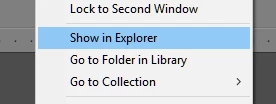
A menu item appears if you Right-click on a Preview thumbnail. So  select one of the 'Year' dated folders, then Right-click on one of the photos in that folder. Then you can select -  [Show in Finder] which will show you where that image is located, and the exact folder it is located in.

Capture2.PNG

Another suggestion-

Right click on the very top-most folder in the Lightroom Folder panel and choose- [Show Parent Folder]. This may reveal a  better view of your folder hierarchy.

Regards. My System: Windows-11, Lightroom-Classic 15.0, Photoshop 27.0, ACR 18.0, Lightroom 9.0, Lr-iOS 10.4.0, Bridge 16.0 .
Translate
Report
Community guidelines
Be kind and respectful, give credit to the original source of content, and search for duplicates before posting. Learn more
community guidelines
Community Expert ,
Jan 29, 2018 Jan 29, 2018

jenniferg578690​ follow WobertC directions. This is what I was suggesting you try. You have a Mac so your option will say Reveal in Finder instead of Show in Explorer. This will jump you out to exactly where the folder lives on your hard drive. Most likely the dated folders are nested inside of the named folders. If you follow the last part of WobertC’s directions you will see those nested folders inside of Lightroom.

Translate
Report
Community guidelines
Be kind and respectful, give credit to the original source of content, and search for duplicates before posting. Learn more
community guidelines
Community Beginner ,
Jan 31, 2018 Jan 31, 2018

Ah-ha!  Thanks WobertC and Theresa J.  This worked.  I got to the "Show Parent Folder" option, clicked it, and voila!  The folder names showing in LR now match the folder names on the drive, and all is right with the world again.  Many thanks to you both.

Translate
Report
Community guidelines
Be kind and respectful, give credit to the original source of content, and search for duplicates before posting. Learn more
community guidelines
New Here ,
Jul 25, 2020 Jul 25, 2020

That worked for me too! Fresh install on a new computer, have never seen the dates only problem. Your solution saved me hours of trying things.

Translate
Report
Community guidelines
Be kind and respectful, give credit to the original source of content, and search for duplicates before posting. Learn more
community guidelines
New Here ,
Sep 15, 2024 Sep 15, 2024
LATEST

Select the {date} and than selct {Show Parent Folder} from the opening manu

Translate
Report
Community guidelines
Be kind and respectful, give credit to the original source of content, and search for duplicates before posting. Learn more
community guidelines