
Participating Frequently
August 29, 2017
Answered

Lightroom most of my images are mirrored

  • August 29, 2017
  • 1 reply
  • 1467 views

This is really weird, most of my images in my catalog now show in thumbnail view and even in develop mode as mirrored. I do not have the show mirrored option checked under view, and my newer images (in the past several months) do not do this. I tried telling it to dump all my thumbnails and regnerate it but they're still mirrored.

If I click on the image and do "Show in Explorer" then open the image in photoshop or other app (if it's png, jpeg, or raw) then it shows correct orientation, but Lightroom keeps showing me mirrored images. Can I correct this at all?

thank you!
    This topic has been closed for replies.
    Correct answer johnrellis

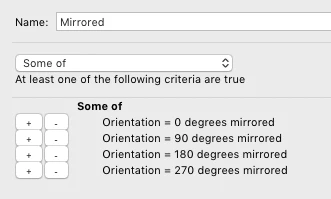
    I don't know how this happened to you.  But to correct it, you could use the Any Filter plugin to find all photos have been mirrored (what LR calls "flipped"), using this filter:

    Then you could select all the photos that are mirrored and rotated 0 or 180 degrees and do the Library command Photo > Flip Horizontal. Then select all the photos that are mirrored and rotated 90 or 270 degrees and do Photo > Flip Vertical.

    1 reply

    johnrellis
    johnrellisCorrect answer
    Legend
    August 29, 2017

    I don't know how this happened to you.  But to correct it, you could use the Any Filter plugin to find all photos have been mirrored (what LR calls "flipped"), using this filter:

    Then you could select all the photos that are mirrored and rotated 0 or 180 degrees and do the Library command Photo > Flip Horizontal. Then select all the photos that are mirrored and rotated 90 or 270 degrees and do Photo > Flip Vertical.

    Participating Frequently
    August 29, 2017

    I don't think this is the correct answer. I believe if I do this I will end up with my files flipped. What is happening is only the view of the file in Lightroom is flipped, if I look at the actual file on disk with Photoshop the file is correct, but lightroom shows it mirrored.

    dj_paige
    Legend
    August 29, 2017

    TheGremlin  wrote

    I don't think this is the correct answer. I believe if I do this I will end up with my files flipped. What is happening is only the view of the file in Lightroom is flipped, if I look at the actual file on disk with Photoshop the file is correct, but lightroom shows it mirrored.

    This isn't how Lightroom works. Lightroom doesn't actually change the image on the disk, so looking at the photo in Photoshop is irrelevant. The information that causes Lightroom to display the photo mirrored is in Lightroom's database, and so you have to query the database to find mirrored images. John R. Ellis has given you the correct answer. If you "un-flip" your images in Lightroom, the original image still doesn't change, but the appearance in Lightroom will be correct.