
gabrielp59405382
Participant
February 6, 2019
Question

Lightroom Oversaturates Blue in RAW Photos

  • February 6, 2019
  • 7 replies
  • 2273 views

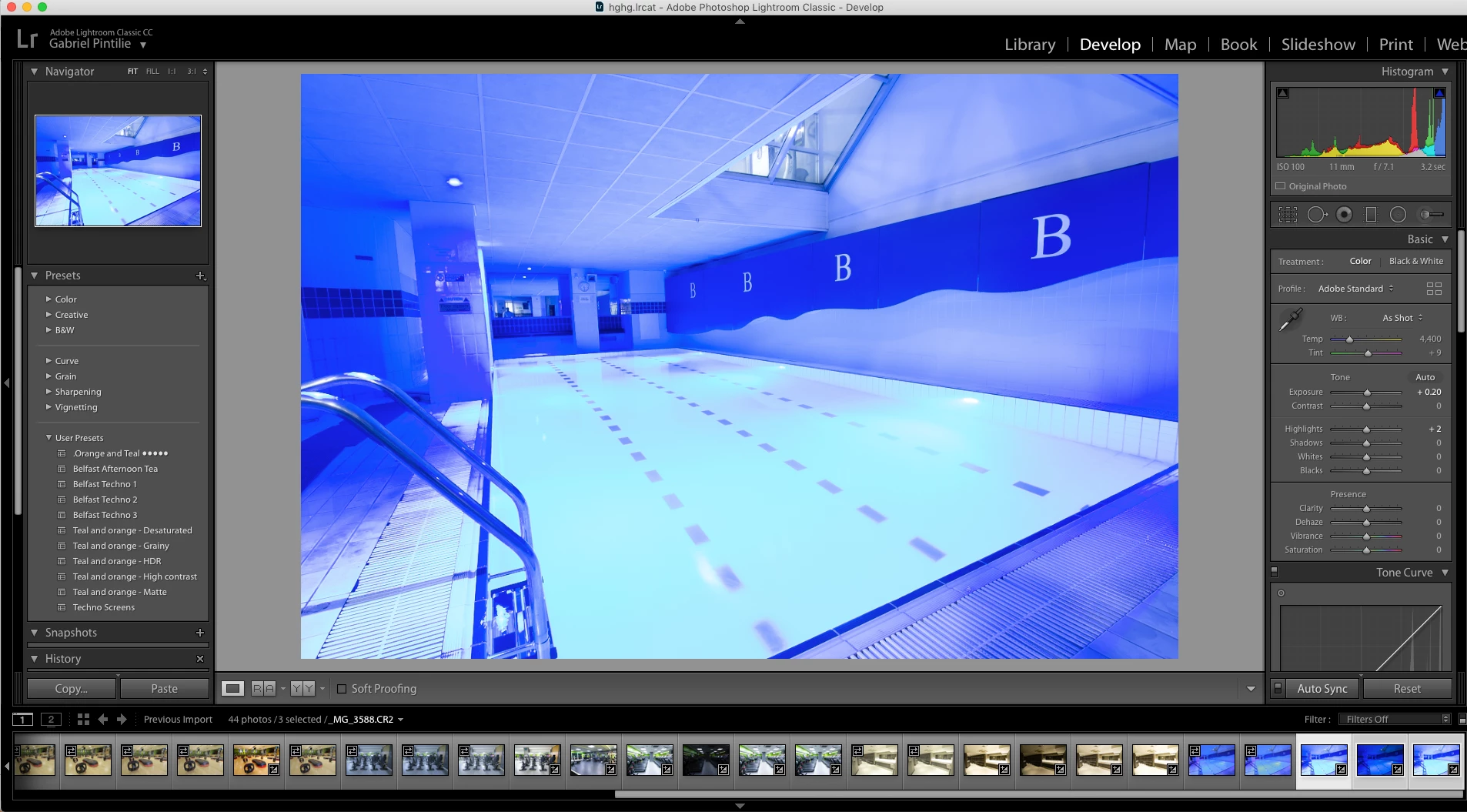
Hi guys, I'm using a Canon 7D & Nikon 5100. Something interesting happens when I import RAW files in Lightroom, files which have a bit more blue than usual. It does the same with pink/purple. For some reason, it just over-saturates the images in a way that it makes it look like it's something more than just oversaturation. I believe the best thing is to show you, as it's hard to describe.
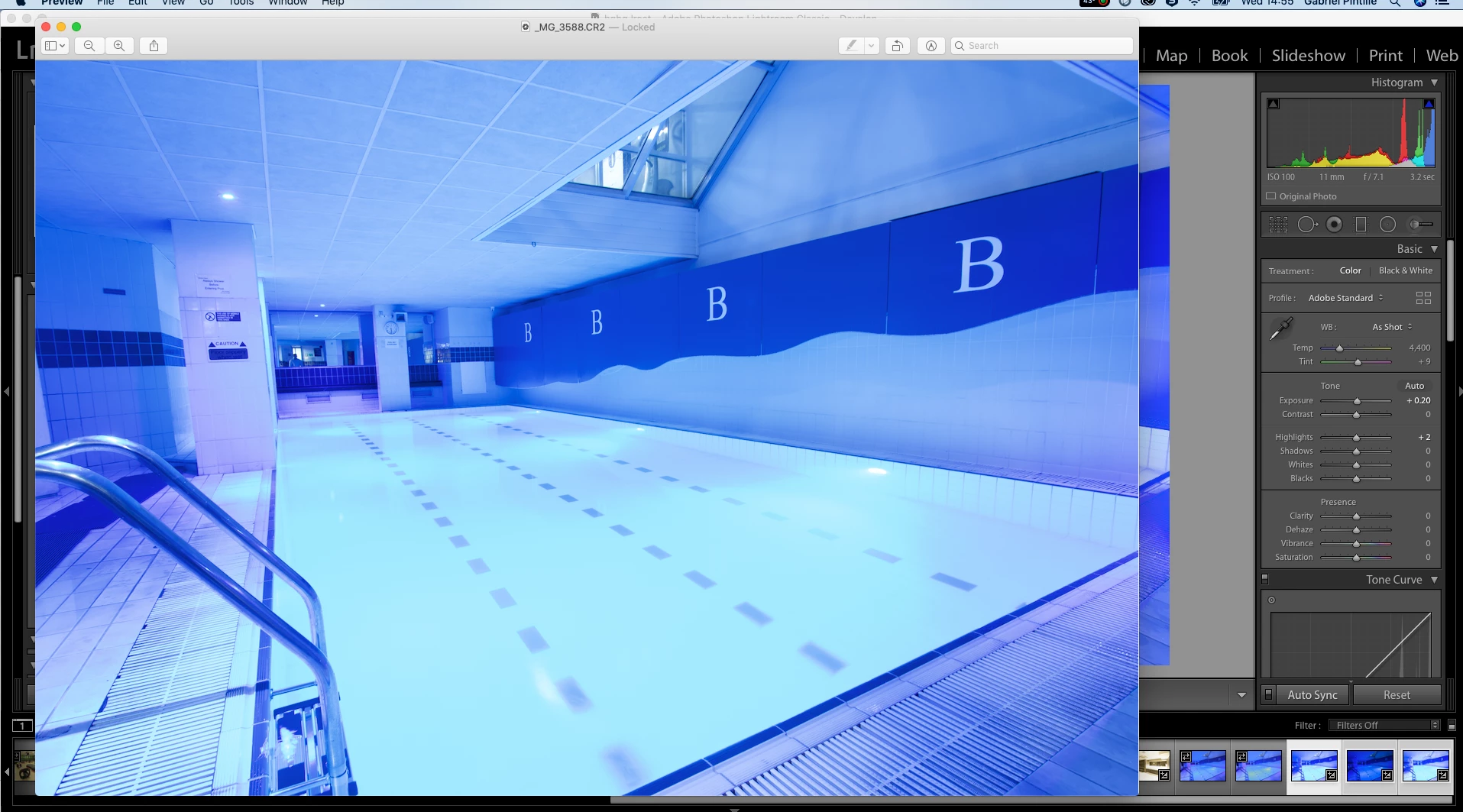
I have also attached a screenshot of how the photo should look like:
I tried changing Color Profile, but it doesn't do anything. The only thing I can do is to desaturate the blue, but it still doesn't make it look normal.

This is definitely an issue of Lightroom, so how can it be fixed?

This topic has been closed for replies.

7 replies

GoldingD
Legend
February 6, 2019

By the way Lightroom version?

Todd Shaner
Legend
February 6, 2019

gabrielp59405382  wrote

Something interesting happens when I import RAW files in Lightroom, files which have a bit more blue than usual. It does the same with pink/purple. For some reason, it just over-saturates the images in a way that it makes it look like it's something more than just oversaturation.

This is a known limitation of the current camera profiles as described by Mad Man Chan, Adobe Senior Engineer at the below link:

Re: raw development versus camera JPG

As mentions creating a custom camera profile may help to resolve the blue spectrum lighting issue.

gabrielp59405382
Participant
February 7, 2019

So I guessed right then. It is indeed a problem which Adobe has yet to solve. I've been dealing with this issue for years now and it's a shame they still haven't been able to solve it.

Inspiring
February 7, 2019

Looks to me that you've just chosen the wrong WB in your camera when you took the shots.

Bob Frost

GoldingD
Legend
February 6, 2019

So, in your screenshot the history is not expanded. Is that image straight out of camera, with no presets, and no Develop mods? Looks like a bit of exposure and why is as shot WB a bit low? Was it shot at a bit cool?

Also, have you perhaps at some point changed the camera develop defaults.

GoldingD
Legend
February 6, 2019

Is the image still available on the card? Look at it in camera, was WB where you wanted it?

JohanElzenga
Community Expert
Community Expert
February 6, 2019

You use 'As Shot' for the White Balance. I doubt that is the correct value, so start there.

-- Johan W. Elzenga
Daniel E Lane
Inspiring
February 6, 2019

Where did the version that you say is right come from?

Legend
February 6, 2019

Try switching from Adobe Standard. I prefer the older Camera Neutral myself. You can also get a colorchecker and profile the camera yourself.

gabrielp59405382
Participant
February 6, 2019

Already mentioned in my post that changing Colour Profile in neither camera or Lightroom doesn't fix the issue.

TheDigitalDog
Inspiring
February 6, 2019

gabrielp59405382  wrote

Already mentioned in my post that changing Colour Profile in neither camera or Lightroom doesn't fix the issue.

Because what you need is a custom DCP profile for that specific illuminant. Then custom White Balance which is a totally separate operation from the profile itself.

Everything you thought you wanted to know about DNG camera profiles:

All about In this 30 minute video, we’ll look into the creation and use of DNG camera profiles in three raw converters. The video covers:

What are DNG camera profiles, how do they differ from ICC camera profiles.

Misconceptions about DNG camera profiles.

Just when, and why do you need to build custom DNG camera profiles?

How to build custom DNG camera profiles using the X-rite Passport software.

The role of various illuminants on camera sensors and DNG camera profiles.

Dual Illuminant DNG camera profiles.

Examples of usage of DNG camera profiles in Lightroom, ACR, and Iridient Developer.

Low Rez (YouTube):

http://youtu.be/_fikTm8XIt4

High Rez (download):

http://www.digitaldog.net/files/DNG%20Camera%20profile%20video.mov

Author “Color Management for Photographers" & "Photoshop CC Color Management/pluralsight"