

Lightroom Panels Not Displaying Correctly
Hi,
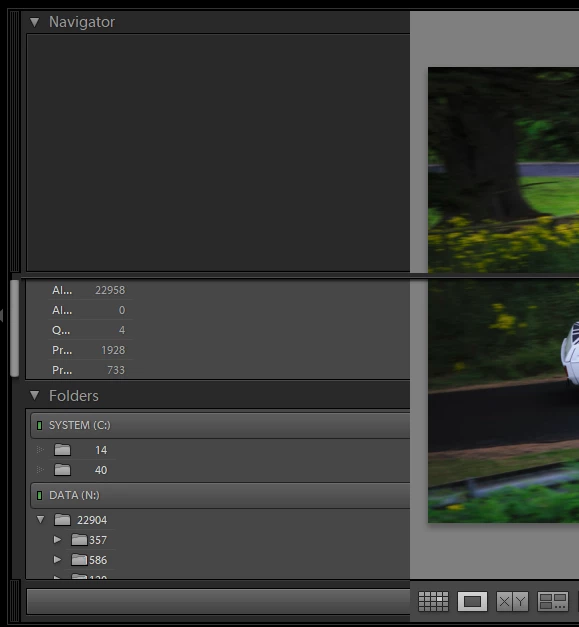
This is a bit of a strange one to try and describe but basically the left-hand panel of Lightroom is not displaying it's content correctly. It's almost as if there is a column which is not wide enough to display the usual information.
In this included image you can see that what is usually an expanded view of folders, showing their names to the right of them and then the image count right-aligned in the panel, but here you can see there's no room for the folder name and the image count is almost overlapping the folder icon.
In the lower-left corner there's usually the import button, but now I appear to have just a blank button which if I click on does actually open the import dialogue window.
Also the navigator window does not display the different options usually displayed in its title bar.
It only appears to effect the left panel, except for the following item - what appears to be, the bottom edge of the navigator panel that continues across the main previewed image.
There's possibly other items not displaying correctly but that's the main things.
Win 10 64bit (8GB) - up to date.
Intel i7-2700K @ 3.50GHz
Nvidia GeForce GT740 (2GB) - up to date.
I've had this happen a couple of months back and after resetting prefs etc I resorted to re-installing Lightroom which did fix it at the time, but it's now back. Unfortunately, I've now gone through the same process as before but none of it has resolved the problem this time around.
PLEASE HELP!
Thanks in advance
Steve


 AdChoices