
Inspiring
January 9, 2019
Answered

Lightroom presets for camera profiles?

  • January 9, 2019
  • 2 replies
  • 1930 views

I just bought an iMac Pro and installed Lightroom CC Classic 8.1. On my previous iMac, I had a bunch of presets that applied Fujifilm camera profiles like Acros, Classic Chrome, etc. I tried to recreate these presets in LR on my iMac Pro, but they aren't working.

Here's what I did:

  1. I selected the camera profile in the Develop panel.
  2. I created a new preset with all boxes unchecked except "process version" and "calibration".

Here's a screenshot:
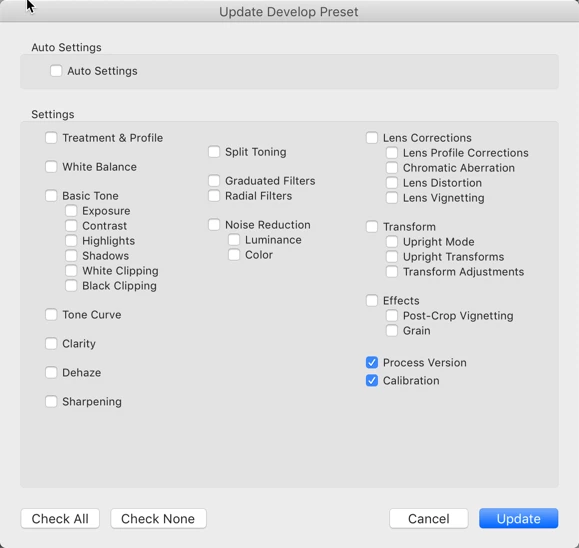
I'm virtually certain that this is what I did on my previous iMac. However, when I select a new photo and then click on the preset, nothing happens.

Any ideas?

    This topic has been closed for replies.
    Correct answer richardplondon

    Check "Treatment and Profile" (option at top left in the dialog) to have your preset include the selection of a particular profile.

    Checking "Calibration" as set currently, just captures the manual hue sliders that make up the Calibration panel.

    Selection of colour profile no longer sits within the Calibration panel either: it has moved up to the top of Basic.

    2 replies

    richardplondonCommunity ExpertCorrect answer
    Community Expert
    January 9, 2019

    Check "Treatment and Profile" (option at top left in the dialog) to have your preset include the selection of a particular profile.

    Checking "Calibration" as set currently, just captures the manual hue sliders that make up the Calibration panel.

    Selection of colour profile no longer sits within the Calibration panel either: it has moved up to the top of Basic.

    Inspiring
    January 9, 2019

    Can't believe I missed that! Thanks so much, that solved it.

    TheDigitalDog
    Inspiring
    January 9, 2019

    Me too.

    Author “Color Management for Photographers" & "Photoshop CC Color Management/pluralsight"
    TheDigitalDog
    Inspiring
    January 9, 2019

    See the post marked as correct here, that may be the issue:

    https://forums.adobe.com/message/10850788?et=watches.email.thread#10850788

    Do you see, when on an actual raw image, the profile you desire showing up in the new browser?

    Author “Color Management for Photographers" & "Photoshop CC Color Management/pluralsight"
    Inspiring
    January 9, 2019

    Thanks for getting back to me. I am on 8.1. All of my images are RAW files, and the profiles do appear in the browser—which is how I selected them when I created the presets.

    TheDigitalDog
    Inspiring
    January 9, 2019

    Assuming you've selected a raw, and the associated camera profile, your settings above are correct.

    One thing to do is examine the settings for where presets are accessed in preferences. There's a "Store presets with catalog' option that may or may not be on, so toggle and see if they reappear.

    Also, if you still have access to the older Mac, you can if so desired, move them to the new machine.

    Author “Color Management for Photographers" & "Photoshop CC Color Management/pluralsight"