callej95372726
Participating Frequently
May 12, 2018
Answered

Lightroom Presets Not Working

  • May 12, 2018
  • 3 replies
  • 45518 views

Hey!

When I try to apply my Lightroom presets nothing happens. I've tried to reinstall Lightroom but it didn't solve the problem!

What do I do?

Correct answer Rob_Cullen


Yes, you definitely have a corrupt install of Lightroom. (maybe another one caught out by Adobe's links to upgrade)

LR-Classic v 7.0 to 7.3.1 are only available as subscription to Creative Cloud plans.

If you are NOT a subscriber to the Creative Cloud then you are not entitled to v7 as an upgrade (or update).

As a Perpetual purchaser, you can only use Version 6,  up to v6.14

If you DO subscribe, you will need to contact Adobe to correct the problem.

If you do NOT subscribe you will need to un-install v7.xx and revert to v6.xx

Read another similar forum thread- https://www.lightroomqueen.com/community/threads/presets-not-working.34488/

3 replies

Participant
March 25, 2021

Can someone please help me. I have the same problem. I have the Lightroom app version 6.2.1, and my presets are also mot showing. PLEASE HELP!!!

Participating Frequently
June 29, 2023

I need help with this too. Did you find an answer?

Rikk Flohr_Photography
Community Manager
June 30, 2023

You’ve posted to a very old thread. It is highly unlikely that the issue described in this thread, though not impossible, is the same issue which you are currently experiencing. Rather than resurrect an old thread that is seemingly similar, you are better posting to a new thread with fresh, complete information including system information, a complete description of the problem and step-by-step instructions for reproduction. 


In the unlikely event the issue is the same, we will merge you back into the appropriate location. 


Thank you!


Rikk Flohr: Adobe Photography Org
Known Participant
December 18, 2019

When I click on a preset in LR Classic CC 9.1 I can see the adjustments made to the photo however, when I click on the preset the sliders in develop module do not change. When I move the cursor over the photo away from the preset, the adjustments disappear and the photo goes back to its original state (i.e. no change).


I've tried creating a new preset but problem persists.

Participant
January 28, 2020

I have the same problem. Did you find a solution? 

selondon
Community Expert
Community Expert
May 13, 2018

Hi,

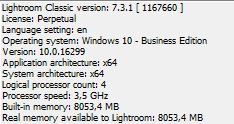
Could you give some more information like what version of Lightroom and what Presets, then other users may be able to assist you better?

callej95372726
Participating Frequently
May 14, 2018

Lightroom Classic CC 7.3.1, all presets that you can use (self made & downloaded presets).

Participating Frequently
December 3, 2018

In what way are they not working? Can you upload a screen shot? Hard to diagnose or try to reproduce the issue without information...

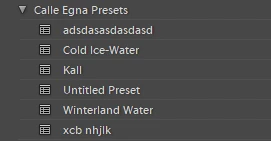
Have you moved the location of your Lightroom directory? Can you post a screen shot showing your settings folder with your presets?


Hey there,

Perhaps you can help me as I'm at my wits end and have posted this question on a different Adobe forum as well as an Apple forum. Any insight you might be able to provide would be greatly appreciated.

"I switched from LR6 to LR Classic CC very recently and now the presets (both LR basic presets and my own) don't work. I will click on a preset and the preview of my image will show the preset effect but the effect actually doesn't "stick". After multiple calls with Adobe, and most recently spending 1.5 hours on the phone with Adobe today the following conclusion was reached and Adobe told me they couldn't provide me further assistance as my issue is an Apple/Mac issue. This is how Adobe came to the conclusion:

Adobe had me create a new Mac OS Mojave User Account "AdobeTest" and we opened LR Classic CC and played with a photo, the built-in LR preset that I tried worked/stuck. Thereafter Adobe concluded my issue isn't an Adobe CC software issue but rather some sort of issue with my Mac OS Mojave User Account that I always use for all of my computer needs (vs. the "AdobeTest" account). He suggested I used the AdobeTest account when I want to use LR and that isn't a reasonable solution. I need my personal user account to allow LR Classic CC to function to its full capacity.

To that end, does anyone have a clue as to why my Apple user account system preferences, or whatever, won't allow LR presets to function?"