
adrianb20587999
Participant
May 7, 2020
Answered

Lightroom Print button greyed out

  • May 7, 2020
  • 1 reply
  • 3845 views

I am printing for the first time from Lr CC to Epson R2400 since updating Apple notebook to Catalina (this is only variable since last Print session pre-lockdown). Issue = Print button is greyed out. Driver working as I can display ink levels. Can print ex Word. Thanks. 
Correct answer Rob_Cullen

Assuming you have Lightroom-CLASSIC:

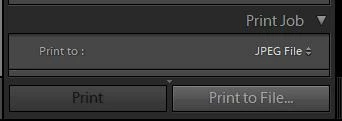
Check your 'Print To:' setting in the Print Job panel- "JPEG File" will grey-out the [Print] button.

Have you tried a re-install of the Printer Driver? (I assume so, as working with Word)

If you are using a Print Template- have you 'updated' the template since the Catalina update? (Select the Printer again in Printer Setup and update the Template)


1 reply

Rob_Cullen
Community Expert
Rob_CullenCommunity ExpertCorrect answer
Community Expert
May 8, 2020

Assuming you have Lightroom-CLASSIC:

Check your 'Print To:' setting in the Print Job panel- "JPEG File" will grey-out the [Print] button.

Have you tried a re-install of the Printer Driver? (I assume so, as working with Word)

If you are using a Print Template- have you 'updated' the template since the Catalina update? (Select the Printer again in Printer Setup and update the Template)


Regards. My System: Windows-11, Lightroom-Classic 15.1.1, Photoshop 27.3.1, ACR 18.1.1, Lightroom 9.0, Lr-iOS 10.4.0, Bridge 16.0.2 .
stefank22602839
Participant
March 25, 2023

hello rob. your my hero of today, as i just had the same issue ... thank you very very much !!! stefan