
Known Participant
May 1, 2017
Answered

Lightroom RAW format file image quality degradation?

  • May 1, 2017
  • 6 replies
  • 4858 views

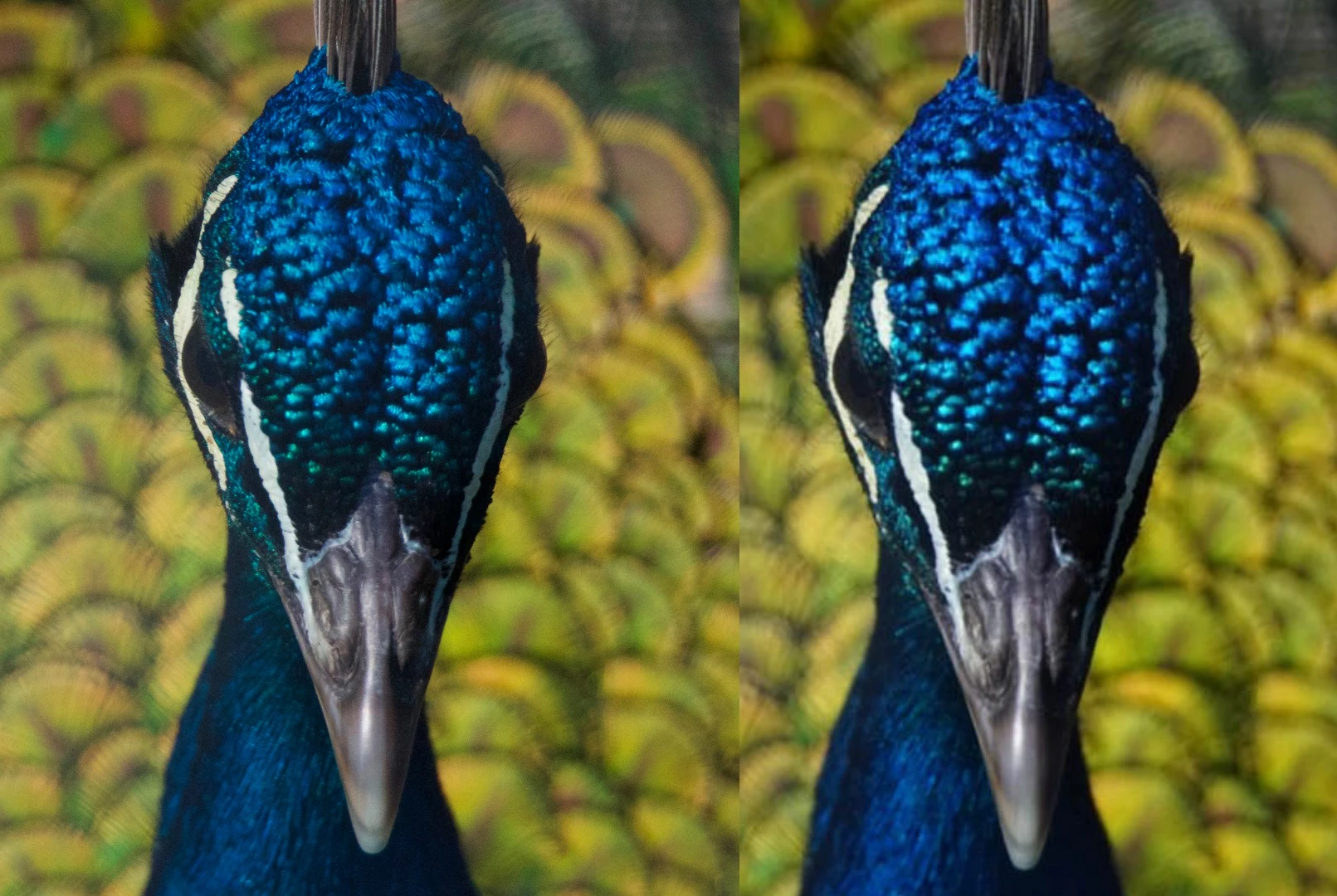
In the image below, you will see the face of a peacock. Both are the same image, however, the image on your left is how the picture looks when it is downloaded onto my Macbook Pro and called up from my photos. The image on the right is how it looks when it is put through Lightroom CC (with zero adjustments). If you look closely at these two images, you will see some distortion and blurring of the minute details. It is most evident around the peacocks neck area where you can see the fibres of the feathers on the left but not in such a level of detail on the right. It is also readily visible around the peacocks eye on the left side of the image. I've asked this question (using a different picture) in a Facebook group. I'll put the settings below, not that I would think they matter, given that I have been able to download the images to my computer with a level of quality that I am pleased with and the issue seems to be with LRCC. Anyone know what is going on?


Settings:

Sony A77 M2

ISO 1600 (via auto)

F 8.0

SS 1/1000

Tamron 600mm.
This topic has been closed for replies.
Correct answer Conrad_C

@Seraj90 wrote:

What is even worse is that if you try to compare the before and after (using the before and after tool in LR) even without applying any edits

you will notice the quality drop inside LR (you don't have to export them !!)


That comparison is competely unfair, because if the image viewed outside Lightroom is a JPEG preview of the raw (or if the image viewed in Lightroom “Before” view is the embedded JPEG preview), then it is showing you fully corrected tone, color, sharpening, noise reduction, chromatic aberration that the camera applied. In comparison, the image viewed in Lightroom is not yet corrected except for the current default settings. That is why the Lightroom version looks “worse” — you are looking at a starting point, not a finished image like the camera-generated preview of the raw.


It is as unfair as comparing an airport restaurant meal to the same meal as raw ingredients in a gourmet restaurant kitchen and saying that the airport meal has “higher quality.” Of course the airport meal looks better, it is finished and ready to eat, it is cooked. The raw ingredients in the gourmet kitchen look worse because they are not yet cooked. But after the gourmet chef finishes cooking the same ingredients, it will have “higher quality” than the airport version.


The entire point of opening a raw file in a raw editor is to cook it yourself, because opening it in a raw editor assumes that you know how to produce a better rendition than the camera did, using your own choices that have not yet been made when you first view the raw file in a raw editor.


After you make your raw editing decisions, you should end up with a photo you like better than what the camera gave you in the preview.


But it is unfair to criticize the display of a raw image that you have not begun to correct.

6 replies

Sean McCormack
Community Expert
Community Expert
July 24, 2021

If you've imported via Photos, you're probably looking at JPEGs. To get to the Raw, you need to right click on the Photos Library.photoslibrary file in Pictures and choose Show Package Contents. The window that opens has a folder called 'originals', which contains the imported files. Unfortunately it's not designed for user search, so it may be hard to find the those raw files. 

Sean McCormack. Author of 'Essential Development 3'. Magazine Writer. Former Official Fuji X-Photographer.
DdeGannes
Community Expert
Community Expert
July 24, 2021

At, Conrad and Sean, be aware that Seraj90 has reignited a thread that was discussed over 4 years ago, without any clear resolution, so it's unlikely the original Author will re-appear to clarify any of the unanswered questions. I do not use Photos but a short while ago I booted the Photos app and imported a raw image from my camera and it does have the ability to process and edit RAW image files.

Photos App is Apple's replacement for Aperture which was discontinued a few years ago.

\ 


Regards, Denis: iMac 27” mid-2015, macOS 11.7.10 Big Sur; 2TB SSD, 24 GB Ram, GPU 2 GB; LrC 12.5,; Lr 6.5, PS 24.7,; ACR 15.5,; (also Laptop Win 11, ver 24H2, LrC 15.0.1, PS 27.0; ) Camera Oly OM-D E-M1.
Seraj90
Participant
July 24, 2021

Hi
I Completely agree with you

in fact the issue occurs as you import raw files in LR


What is even worse is that if you try to compare the before and after (using the before and after tool in LR) even without applying any edits

you will notice the quality drop inside LR (you don't have to export them !!)


unfortunately I was looking for solution on the web but nothing seems to work

I tried using different RAW editor they it seems to have the same issue

if you have already found the solution please let me know


My advice to you "don't waste your time arguing with such use less people @Heubs77 @Just Shoot Me @Bob Somrak @dj_paige @Joe Foe Toe "

because you are looking for a solution for a problem

you are not trying to prove that there is a problem that is already proven

DdeGannes
Community Expert
Community Expert
July 24, 2021

At Seraj90, just so you are aware this is a user-to-user forum so responses are from users like yourself. You are unlikely to receive responses from Adobe Engineers in this forum.

You can view a neutural response at the link below.

https://en.wikipedia.org/wiki/Raw_image_format

In your post above you stated “ I tried using different RAW editor they it seems to have the same issue “. Well it's because they are “ different “ and unique!


Regards, Denis: iMac 27” mid-2015, macOS 11.7.10 Big Sur; 2TB SSD, 24 GB Ram, GPU 2 GB; LrC 12.5,; Lr 6.5, PS 24.7,; ACR 15.5,; (also Laptop Win 11, ver 24H2, LrC 15.0.1, PS 27.0; ) Camera Oly OM-D E-M1.
dj_paige
Legend
May 1, 2017

given that I have been able to download the images to my computer with a level of quality that I am pleased with and the issue seems to be with LRCC. Anyone know what is going on?

Adding to my other comment ... I don't think this is an "issue" with LR. One converter, by default, applies more sharpening than another. I don't see that as an issue, you can have LR add more sharpening if you want. Nor do I see this as "image quality degradation" as your title implies.

Heubs77Author
Known Participant
May 1, 2017

dj_paige,

Here is a better image that highlights the issue I am having. The image on top is how the picture appears in macbook photos, the default program that opens pictures on my laptop. The image on bottom, is the untouched version of the exact same image file having been uploaded into LR and exported with no adjustments. Do you see what I mean? I get that these are two different programs but I can not even manually readjust these settings to recover any of that lost detail.        

Heubs77Author
Known Participant
May 1, 2017

There has definitely been some massive amounts of sharpening applied to that bird photo. It is actually out of focus which you can see in both images. The sharpening applied to the one that looks clearer has tons of noise.


I was unaware that RAW also embedded a JPEG. Part of my confusion there is that my camera settings allow me to shoot in RAW and JPEG, but I am assuming this means that it saves 2 separate photos (because it does). When you say massive amounts of sharpening, I presume you mean the top photo (as displayed by MacBook photos). This is the photo sitting in LRCC. I have made no changes to the sharpening or noise reduction as you can see. To me, as an amateur photographer, I am going for detail. In the top photo, with the massive amounts of sharpening, I can not apply any combination of sharpening with its subset detail, radius or masking to recover (or create then I guess) anything even close to that level of detail. It actually makes the photo worse. (Just read Bob Somrak's comment - I'll upload this photo to Dropbox).   

Geoff the kiwi
Community Expert
Community Expert
May 1, 2017

Neither are right or wrong, just different. As Paige states.

Different processors produce different results and have different defaults. You can easily change settings for sharpens, clarity, etc in Lightroom and have those applied to file upon import as default.... that is you can change the default settings for each camera and ISO....

JP Hess
Inspiring
May 1, 2017

I'm not sure what your point is of showing the Lightroom rendering with no adjustments. You haven't tried to improve anything. The whole point of bringing an image into Lightroom is to improve it. If you aren't going to use the tools, what is the point?

Heubs77Author
Known Participant
May 1, 2017

"I'm not sure what your point is of showing the Lightroom rendering with no adjustments." - I am still very new to all of this and the point of showing an untouched image having been uploaded and then exported from LR was to demonstrate that some sort of adjustment had been made without my asking it to do so. The adjustment in question resulting in detail which was lost which suggests to me that the program did something I didn't ask it to, which is what I am hoping this community can help me with.    

Just Shoot Me
Legend
May 1, 2017

I think you have that backwards. I think the Photos app is applying sharpening where LR is not.

Also the Photos app may be showing you the embedded JPG image found in all RAW files. If you have the camera set to add sharpening to JPG images that will be added to the embedded JPG in the RAW where the actual RAW file won't show that.

dj_paige
Legend
May 1, 2017

But the two images don't have to match. Any two different RAW converters will give slight differences. Neither is correct, neither is wrong. But if you like one better than the other, then maybe you should use a different RAW converter that matches your needs.

Legend
May 1, 2017

What dj said is true; at the same time, there could be other factors at work.  "Put through" - is this an export from Lightroom?- a screen shot @ 1:1 from the Develop module?  "Zero adjustments" - is RAW sharpening applied, default settings or otherwise? Those are immediate things that occur to me as possible degrading possibilities.

Heubs77Author
Known Participant
May 1, 2017

The image on left is the photo as it looks from MacBook photos. The image also has this level of detail when viewed directly on my camera's LCD screen. The image on the right was uploaded directly into Lightroom, then immediately exported with no adjustments in order to demonstrate that some sort of adjustments were being made without my having done so as the user. A number of folks have made reference to sharpening. If you look at the image below of the hummingbird, the issue is even more pronounced when you look at the detail where you can see feather fibres in the above picture, but not the one in the image below (where I did the same experiment, uploaded into LR but exported with no adjustments). I am not sure how to determine if RAW sharpening is applied as a default. In the develop module, sharpening is turned off completely, in that, it is set to the far left (for both cases). In the image below, no amount of adjustments to sharpening or noise reduction can recover the detail I have lost in the photo after having imported into LR and then exported 9with no adjustments of any kind).