


Participant
October 7, 2022
Answered

Lightroom taking up too much memory on my MacBook

  • October 7, 2022
  • 2 replies
  • 432 views

I have a MacBook Pro and I have been saving part of my imges in 2 separate hard drives. One personal and one for product photography. 

I have set the lightroom preview files it stores to the lowest setting. I am not sure what Lightroom does every time I run an upgrade, it tells me it has to save "...something" (I can't remember what or why) to a new compatible format of folder (sorry, i cannot remember what the promp was).

I keep getting prompts that I am running out of memorey/storage in the laptop HD. 

Here is the screenshot of what the top files taking up the memory (mosly Lightroom!). Can anyone help me identify what all of thsese are? 
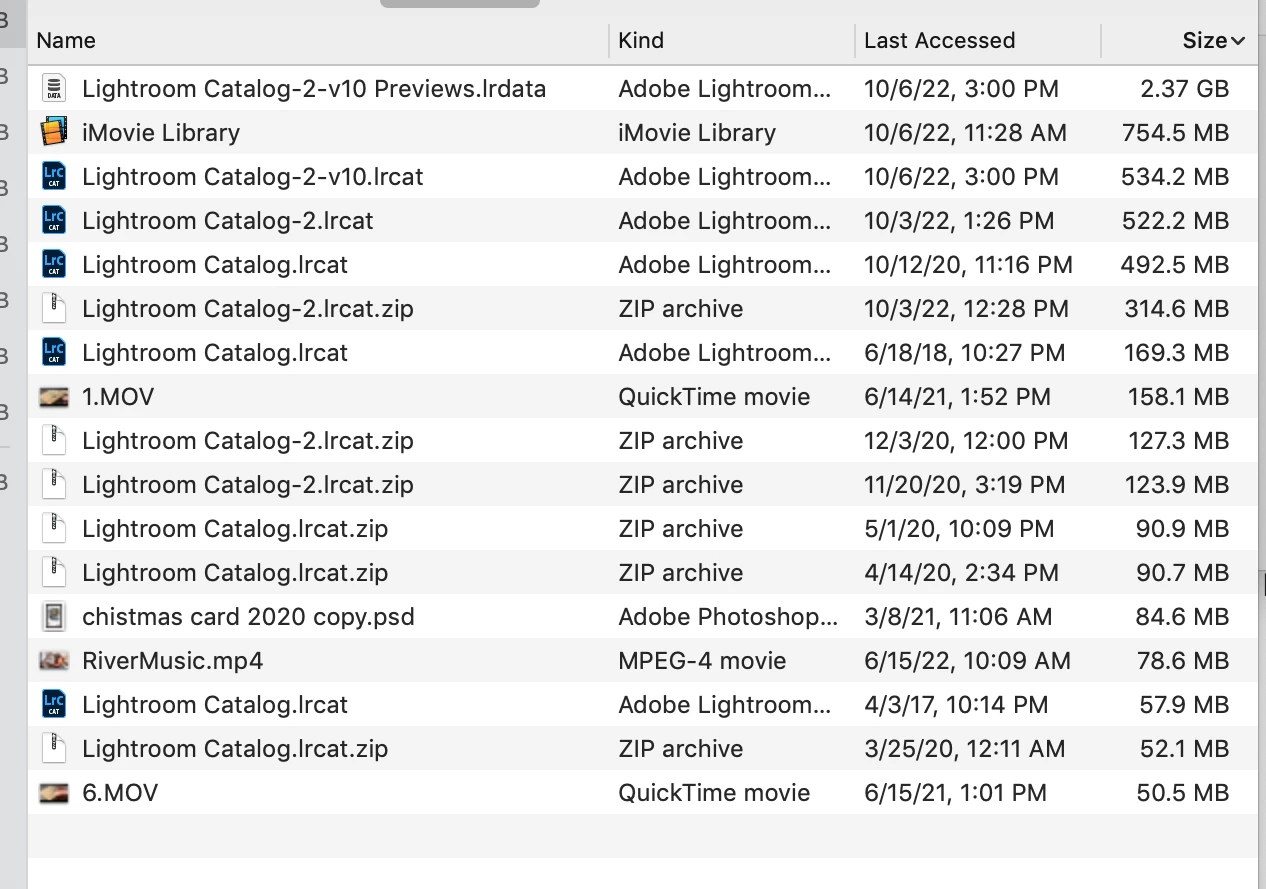
Can I delete any of them are they repeated information I no longer need?

I am afraid of deleting anything I don't know what it does. Can I move any of these to either one of the external HD that I use for personal or biz photos?


Thank you for your help!!

This topic has been closed for replies.
Correct answer dj_paige

This is not a memory problem, this is a disk space problem. How much free disk space do you have left on ALL of your disks? Where (which disks) are your photos stored? You could move all of the .zip files to some other disk. You could move the .lrcat files — except the one with the date of 10/6/22 — to a different disk.

2 replies

GoldingD
Legend
October 7, 2022
 I am not sure what Lightroom does every time I run an upgrade, it tells me it has to save "...something" (I can't remember what or why) 


Adobe Lightroom Classic 101. At upgrades, not updates:


Why is Lightroom asking to upgrade my catalog and what does it do?: The Lightroom Queen


Participant
October 7, 2022

Thank you!! There is so much to learn 🙂

dj_paige
dj_paigeCorrect answer
Legend
October 7, 2022

This is not a memory problem, this is a disk space problem. How much free disk space do you have left on ALL of your disks? Where (which disks) are your photos stored? You could move all of the .zip files to some other disk. You could move the .lrcat files — except the one with the date of 10/6/22 — to a different disk.

Participant
October 7, 2022

Hi! 

Thank you for your reply and help correcting my terminology 🙂

I have 2 external HD that I use (one personal one biz) I have plenty of space there. I save the raw and processed images in both of these external hd.  I just don't know what needs to stay on my Macbook's HD.


Could you help me understand what I am looking at on the list of files:


I am having a hard time figuting out their function?

Are there any duplicates in the list? 

When I move them do I move them directly through from my computer or do I have to do it somehow through lightroom? 


Appraciate your help! 


dj_paige
Legend
October 7, 2022

With regards to moving the files, you move them using your operating system.