
Lightroom Video Cache Problem Still Exists
I have been running LR ever since version 3 and never experienced the documented Video Cache bug until two weeks ago. I'm running LR ver 8.2.1 and on April 14 it loaded over 30 GB of video into the cache on my OS drive. I looked at all the previous threads on this but I'm faced with a problem that when I open the LR Preferences and go to try to clear the cache and set it to a low number there are no settings showing on the file handling tab to do this. I'm surprised that this well known bug continues to haunt LR users and I'm fortunate in not having a lot of videos and have a 500GB OS drive so the additional 30 or so GB of videos didn't affect things too much.
I would appreciate suggestions on how to procede from here. Do I need to do an uninstall/reinstall of LR to clear this problem up? Has the video cache setting moved to a new location? Will Adobe fix this once and for all for those of us who never do video in LR?
TIA, Alan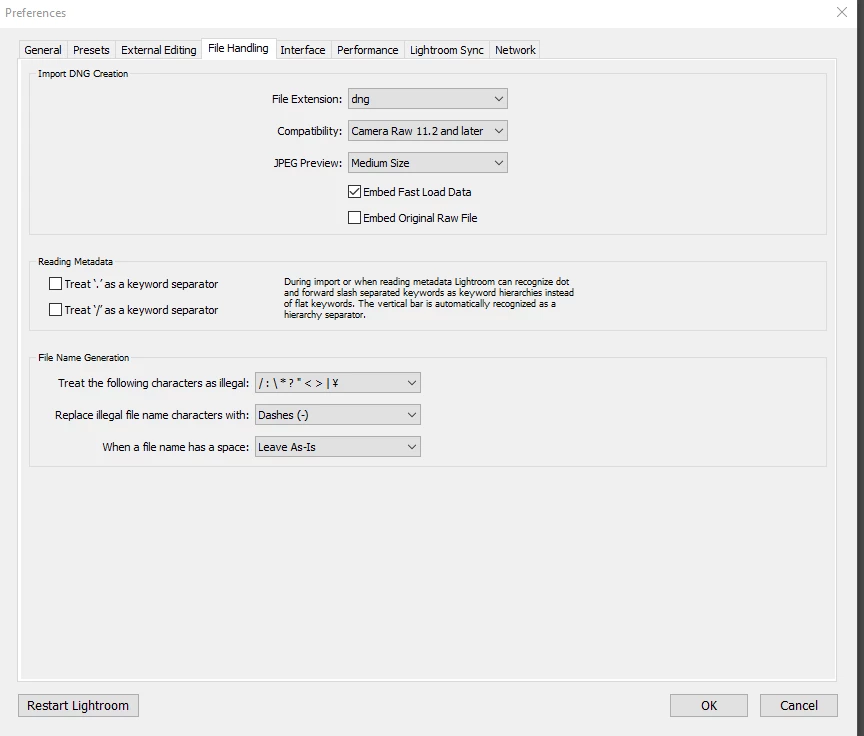
 AdChoices