
stefanf58290378
Known Participant
September 6, 2022
Answered

LightRoom while off line

  • September 6, 2022
  • 17 replies
  • 2633 views

I'm a travel photo and videographer and often spend a few weeks in remote locations. I had now several instances where Lightroom would not work because I had no Internet, and it could not validate my license. This is very annoying as I'm paying for the software, and I'm restricted to where I'm geographically using it.


I would hope there is a way around it?
This topic has been closed for replies.
Correct answer JohanElzenga

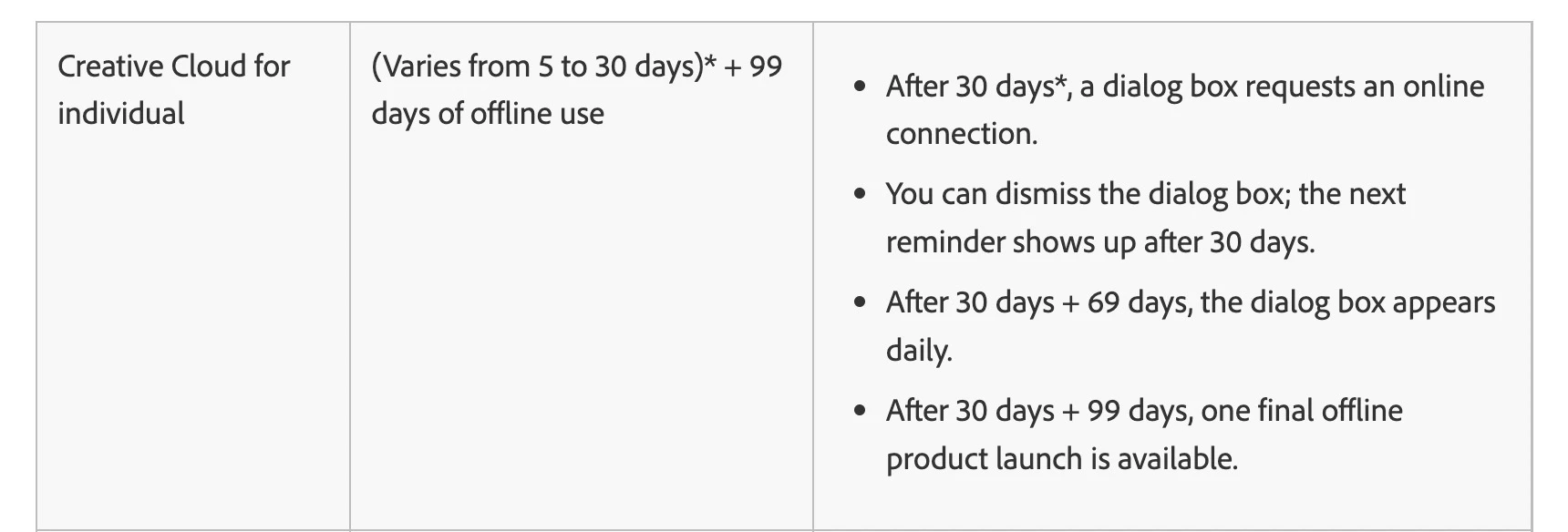
Even with my subscription paid monthly, I should have 60 days of use which would be sufficient but that's not how it works unfortunately


@stefanf58290378 wrote:

Even with my subscription paid monthly, I should have 60 days of use which would be sufficient but that's not how it works unfortunately


It looks like there might be a problem with this Adobe information page. At least until recently, the above quoted schedule only applied if you pay yearly. If you pay monthly, then the grace period was only one month in total. The page used to clearly explain these differences, but now the info about monthly payments is gone. So either Adobe changed this (but maybe the system still uses the old periods), or Adobe removed the info about monthly payment by mistake.


17 replies

stefanf58290378
Known Participant
September 8, 2022

Thanks for the advice, and how it should work in theory according to adobes guidelines unfortunately, that is not the case. Adobes Overseas Telephone Support is useless as they don't know their own product and the rules. After many calls now, non of the adviser had the foresight to offer me a solution to switch to yearly payment as you pointed out, this theoretically should solve the issue. Looking up my account, there seems to be no option for a yearly payment option. However, now being on the call with Adobe support, they tell me that even a yearly subscription does have only anywhere from 5 to 30 days of non-online use (directly contradicting what their website says) WTF. Interestingly they also tell me they have hidden terms and conditions they can't share which govern that particular section. I'm just recording the one-hour conversation with adobe as this may warrant a video it's incredible the BS I have been told by their team. I'm now talking to supervisors who are also baffled so stay tuned. So the latest now is that the grace period only applies if you fail a payment but has nothing to do with having no internet for a few weeks if your subscription is active, and that would fall under anywhere between 5-30 days. I'm recording the whole telephone call as it's quite incredible.

TheDigitalDog
Inspiring
September 7, 2022

The Creative Cloud software verifies the account status on Adobe servers once a day. If the account is in good standing (that is, payment is up-to-date) when the last verification happens, the software status refreshes to run for at least 99 days offline.

See:

https://helpx.adobe.com/ie/creative-cloud/kb/internet-connection-creative-cloud-apps.html

https://helpx.adobe.com/creative-cloud/help/manage-apps-services-desktop.html

The amount of data to check is so tiny, if you can teather the Mac to a cell (satellite) phone, you're set. 

Author “Color Management for Photographers" & "Photoshop CC Color Management/pluralsight"
stefanf58290378
Known Participant
September 7, 2022

unfortunately, that's not the case. I assume that if my home PC is switched off and hence has no Lightroom open this is enough to not cause a licence conflict. I don't need to sign out of Adobe cloud on my Mac before I travel.

TheDigitalDog
Inspiring
September 7, 2022

ok, that is exactly what I'm doing, and I don't have 99 days I don't even have 2 weeks. I updated all Adobe apps before I left, and within 2 weeks no use.


@stefanf58290378 wrote:

ok, that is exactly what I'm doing, and I don't have 99 days I don't even have 2 weeks. I updated all Adobe apps before I left, and within 2 weeks no use.


I don't understand your issue. 

You can work offline for at least 99 days. 

Just before you leave, you open your Laptop and log into your account. Now you have at least 99 days before you'll have to do so again. You do not need any access to the web. 

IF you're at day 99 and you need to go another 99 days, you need to log into your account which again, could be done via a cell phone. Rince and repeat. 

Author “Color Management for Photographers" & "Photoshop CC Color Management/pluralsight"
JohanElzenga
Community Expert
Community Expert
September 7, 2022

I have seen some reports that suggest that changing the time zone on your computer triggers the Creative Cloud app to try and verify the license, so if you do not have an internet connection at that time, there may be a problem. That means you may be able to solve this by setting your computer to the new time zone before you leave (and while you still have internet), and then start the apps one more time. May be worth trying.


-- Johan W. Elzenga
stefanf58290378
Known Participant
September 7, 2022

Thanks, but I don't change the time zones it's all in Australia

stefanf58290378
Known Participant
September 7, 2022

Yes I'm testing it now leaving the computer offline, I had that actually in several instances and never have seen a message where I could extend use after the first and only message that Adobe can't connect to the server. Just a lot of effort to go trough to ensure I can use a paid application in different geographical locations in the same country, again no other applications but Adobe have this issue. The day Affinity brings out something similar to Lightroom I'm leaving the Adobe train

GoldingD
Legend
September 7, 2022

@stefanf58290378 wrote:

I had that actually in several instances and never have seen a message where I could extend use after the first and only message that Adobe can't connect to the server. 


Hmm, that laptop, what OS? I know your post indicates MACOS, but what if? Not WIN 7 perhaps?

johnrellis
Legend
September 7, 2022

The current policy is that annual subscribers can go up to 129 days without connecting to the Internet, while month-to-month subscribers can go up to 60 days:

https://helpx.adobe.com/creative-cloud/kb/internet-connection-creative-cloud-apps.html


There have been a few other reports here in the past year of people not being able to use LR while disconnected less than the maximum number of days.  


Before you travel again, you might try disconnecting your laptop from the Internet for 3 - 7 days and verify you can continue to use LR.  If you get errors, post back here with screenshots of the entire LR window, including the error messages.

stefanf58290378
Known Participant
September 7, 2022

no mate I can't organise my travel based on one application where often I go simply is no connection 

www.youtube.com/alloffroadau 


DdeGannes
Community Expert
Community Expert
September 7, 2022

Ok so you just need to concentrate on how to keep connected while traveling.

Do you have Adobe Creative Cloud application active on your travel laptop?


Regards, Denis: iMac 27” mid-2015, macOS 11.7.10 Big Sur; 2TB SSD, 24 GB Ram, GPU 2 GB; LrC 12.5,; Lr 6.5, PS 24.7,; ACR 15.5,; (also Laptop Win 11, ver 24H2, LrC 15.0.1, PS 27.0; ) Camera Oly OM-D E-M1.
stefanf58290378
Known Participant
September 7, 2022

Sorry, you are correct, I can only use one computer at a time however, I can stay signed in tow two computers. I don't use my Laptop at home, so never try to open LightRoom on two machines at the same time. If I'm away I only use my laptop at home my Mac Studio

DdeGannes
Community Expert
Community Expert
September 7, 2022

You stated “no, I don't sign out I can use Adobe on my Desktop at home and on my Laptop and I'm always signed in.”

You can have two units signed in, with one in use at any point in time. When I travel abroad my Desktop is signed in but the Computer at home is shut down.

Lightroom Classic is a single user application. You can have multiple Lr mobile apps running.

I believe when you reboot your laptop and LrC app if there is an internet connection it will verify your subscription, if you have the Creative Cloud application installed and running.

I usually open LrC using the Creative Cloud application.

When you boot the Creative Cloud app it will verify your subscription, so if you have access for a couple minutes then that will reset things.

Regards, Denis: iMac 27” mid-2015, macOS 11.7.10 Big Sur; 2TB SSD, 24 GB Ram, GPU 2 GB; LrC 12.5,; Lr 6.5, PS 24.7,; ACR 15.5,; (also Laptop Win 11, ver 24H2, LrC 15.0.1, PS 27.0; ) Camera Oly OM-D E-M1.
DdeGannes
Community Expert
Community Expert
September 7, 2022

Just a thought, do you make your payment monthly or annually?

If you pay annually you may have a better experience. When you pay monthly you have to be connected every 30 days, annually it's 90 days as far as I am aware. Is your computer running 24 / 7 at home when you are away from home?

Regards, Denis: iMac 27” mid-2015, macOS 11.7.10 Big Sur; 2TB SSD, 24 GB Ram, GPU 2 GB; LrC 12.5,; Lr 6.5, PS 24.7,; ACR 15.5,; (also Laptop Win 11, ver 24H2, LrC 15.0.1, PS 27.0; ) Camera Oly OM-D E-M1.