ians86193080
Participant
March 26, 2015
Answered

lightroom will not read sony ARW files

  • March 26, 2015
  • 13 replies
  • 235297 views

I understood the latest version of Lightroom supported the recent Sony A7 series, whose RAW files are Sony's own ARW files. I have the latest Lightroom but it will not read these files.

    This topic has been closed for replies.
    Correct answer JP Hess

    Here is a list of the Sony A7 series cameras that Lightroom supports, and the version of Lightroom required. The Lightroom versions are in the highlighted area.
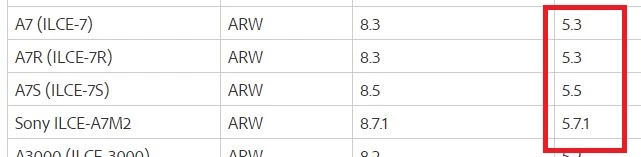
    If you are certain you have the appropriate version of Lightroom installed, then provide more information. Can your operating system browser see the raw files? Have they been downloaded to your hard drive? What operating system are you using? What is the exact version of Lightroom?

    13 replies

    RPMartinez
    Participant
    September 13, 2022

    Latest PS and LR cannot open the latest Sony ARW Lossless Uncmpressed Files of mt A7iv

    JP Hess
    Inspiring
    September 13, 2022

    The A7R IV Has been supported since version 8.4.1 And Lightroom (the cloud version) since 2.4.1.

    wesleys47818336
    Participant
    November 11, 2019

    This is crazy. I also just purchased ther new Sony A9ii and can't get the photos into Lightroom or Photoshop. Come on Adobe. Get an update out.

    Participant
    December 4, 2021

    For now I'm using https://rawtherapee.com/ before update.


    Sony A7 IV user...

    Participant
    December 27, 2017

    Gents,

    I am on Release 7.1 and Camera Raw 10.1 ... but unable to read a6000 ARW files.

    Am I doing something wrong ?

    Just Shoot Me
    Legend
    December 27, 2017

    What is the exact error message you are getting and or what exactly do you see or don't see on the screen when trying to import.

    We need specifics. Also a screen shot will help.

    Participant
    December 27, 2017

    Yes sure, pls see below ... I do not get any error message, the image is not displayed in Develop mode.

    Participant
    December 13, 2017

    I have the same problem with RAW files from my a7 and an older version of LR that has worked perfectly well with RAW files from my a850. I expect that Adobe in its benevolence has issued a free patch to address the issue and is not using the same extortionate technique employed by the video playback software companies of periodically disabling their software to force an upgrade when they want more money. Can someone tell me where I can dowmload the patch?

    F. McLion
    Community Expert
    Community Expert
    December 13, 2017

    Which 'same' problem?

    What is your exact version of LR and which exact camera do you try to import RAW from?

    --- Got your issue resolved? Please label the response as 'Correct Answer' to help your fellow community members find a solution to similar problems. ---
    robbertf47248719
    Participant
    June 25, 2017

    Hello,

    I downloaded a test version of the Lightroom and it functions with my A7ii

    Now i bought a version in the store lightroom 6 and i all my Sony files are not working. Is it now really that i bought it for nothing?

    Thanks for the help

    Robbert Fielemon

    JP Hess
    Inspiring
    June 25, 2017

    If what you have is the Sony A7RII and you just installed Lightroom 6, you only have Lightroom 6.0. You need at least Lightroom 6.1.1 but Lightroom has progressed to Lightroom 6.10.1 at this point. You need to update in order to have support for your camera.

    Community Expert
    August 28, 2017

    I have downloaded Lightroom from that exact location 3 times already. The installer runs and completes successfully, but my Lightroom version remains at 2015.0


    There is a nasty bug in the 2015.12 updater that manifests itself on some

    machines. I have seen it on a few machines of people I teach Lightroom now.

    It will install the update but will actually revert the installed version

    of Lightroom to 2015.0. The only solution that always works is to

    completely wipe creative cloud and Lightroom from your machine using

    creative cloud cleaner from Adobe:

    https://helpx.adobe.com/creative-cloud/kb/cc-cleaner-tool-installation-problems.html

    and then reinstall creative cloud from Adobe and install Lightroom from

    there. This will get you to 2015.12. Nothing else seems to work if you

    have this problem. Not just wiping Lightroom and reinstalling. Not manually

    downloading the updater. It just reverts Lightroom to 2015.0.

    On Mon, Aug 28, 2017 at 11:14 AM, alecr75723364 <forums_noreply@adobe.com>

    mekilie
    Participant
    June 22, 2017

    This is incorrect.  I have Lightroom 10.12 [4] and my .ARW files shot on my Sony A7xII will not import into Lightroom.

    KR Seals
    Community Expert
    Community Expert
    June 23, 2017

    10.12 is not a Lightroom  version number. That looks like a MacOS version number.

    In Lightroom, go to Help/About Photoshop Lightroom (the bottom selection in the drop down menu and you will see something like this:

    The number on the left is the LR version number. If you are using LR 6 and not CC, the first number will be "6"

    Ken Seals - Nikon Z 9, Z 8, 14mm-800mm. Computer Win 11 Pro, I7-14700K, 64GB, RTX3070TI. Travel machine: 2021 MacBook Pro M1 MAX 64GB. All Adobe apps.
    Participant
    April 7, 2017

    I'm having the same problems with A6300 ARW files. I just got lightroom yesterday. Only imports the jpegs. But I just want the ARW files. Looked around and thought I downloaded The Camera Raw Installer but that didn't work either. I'm lost on what to do next. I got this to edit Raw files and not jpeg. I have lightroom on my phone for jpegs. If anyone has solved this problem please help. I'm running LR on windows 10. Thanks

    JP Hess
    Inspiring
    April 7, 2017

    If you just got Lightroom 6 yesterday, you probably installed Lightroom 6 .0. You've got to upgrade to Lightroom 6 .5 or later in order to have support for your camera.  I don't know Why you are trying to download the Camera Raw installer because it won't have any effect on Lightroom. All of that technology is part of the Lightroom program. You have to update the Lightroom program which is currently out Lightroom 6.9. If you update the program then you will have support for your camera. Trying to update Lightroom with the camera raw plug-in will have no effect on Lightroom at all.

    Participant
    April 7, 2017

    Ok. I didn't know if the camera raw had anything to do with it. That was a shot in the dark because I got desperate. I will see if I can find the update because of late I've been unlucky. I went through the Lightroom's interface itself to have it manually check for updates. Then I went through creative cloud to which told me I was updated as far as possible. I didn't get the creative cloud version though. I had to search deep to find the non subscription Lightroom. I'm now in the process in checking to see f the camera drives are all updates and downloaded to my computer. I'll try t look for the 6.9 because from what my version is telling me is that I have 6.0. Which I'm questioning the truth in that because its telling me I have downgraded from Windows 10 to 8. Thanks for your help.

    This is the info I get regarding the version:

    Lightroom version: 6.0 [1014445]

    License: Perpetual

    Operating system: Windows 8.1 Home Premium Edition

    Version: 6.3 [9600]

    Application architecture: x64

    System architecture: x64

    Participant
    May 31, 2016

    Hello,

    I'm on LR 6.5.1 on a Mac El Capitan 10.11.5 and it reads and is able to import Sony's ARW files.

    Cheers.

    Participant
    September 3, 2016

    Hi all,

    I just downloaded a free trial of Creative Cloud in order to just check it out and purchase the software.

    I took some photos today on my Sony RX100IV in both JPEG and ARW format. I tried to import them into Lightroom but only the JPEGs will populate.

    I was using a 32BIT computer so maybe that has something to do with it.

    But I tried to convert to DNG but no luck.

    Why can't I import RAW files for editing? Am I doing something wrong?

    If not, what can I do?

    I am using Lightroom 5.7.1 on a Windows 10 32 bit laptop.

    Community Expert
    September 3, 2016

    The Sony RX 100 IV was first supported in LR 6.1.1. Lightroom 5.7.1 can't read it. Unfortunately LR 6 can only run on 64 bit machines, so your laptop will not work. You should be able to read the files in 5.7 after you convert to dng using Adobe's dng converter though so I am curious why that didn't work. Can you post one of the dng files, perhaps through a dropbox link?

    Participant
    May 9, 2016

    I have the same problem. I am unable to open AWR files in Lightroom even though I just did the update. I have a Sony A7ii camera with the latest firmware. First I get a message when in Import screen that says "Not a able to preview file" and then when I import the files to the catalogue I get an error that says "Files not recognize" or something like that. Not sure what the issue is and hopefully someone can help me.

    Thanks.

    Community Expert
    May 9, 2016

    rlopez, this means you are not running a new enough Lightroom version. Check which version you are running either in the splash screen when you open it or by doing a system info from the help menu. It should be at least 6.1.1 (or CC 2015.1.1) to open A7rII files. Lightroom 6/CC2015 updates are done from the creative cloud app, not the update item in the help menu (indeed very confusing!). If you are still on Lightroom 5 and you are loading A7II, it should be 5.7.1 (not 5.7!). Lightroom 5 will not load A7rII files at all except if you transcode them to dng files first. the 5.7.1 update does not download automatically from the update menu for some unknown reason, but has to be downloaded directly from Adobe.

    Participant
    May 9, 2016

    I too am having this problem. Hard to believe adobe cant handle this better. Anyway, I think I need to update from Creative CLoud, which is interesting but I have no idea what that is.  Any link? or?

    thanks

    Lightroom version: 6.0 [1014445]

    License: Perpetual

    Operating system: Windows 8.1 Business Edition

    Version: 6.3 [9600]

    Application architecture: x64

    System architecture: x64

    Logical processor count: 4

    Processor speed: 2.4 GHz

    Built-in memory: 8097.0 MB

    Real memory available to Lightroom: 8097.0 MB

    Real memory used by Lightroom: 271.5 MB (3.3%)

    Virtual memory used by Lightroom: 217.3 MB

    Memory cache size: 0.0 MB

    Maximum thread count used by Camera Raw: 2

    Camera Raw SIMD optimization: SSE2,AVX,AVX2

    System DPI setting: 144 DPI (high DPI mode)

    Desktop composition enabled: Yes

    Displays: 1) 1920x1200

    Input types: Multitouch: Yes, Integrated touch: Yes, Integrated pen: Yes, External touch: No, External pen: No, Keyboard: Yes

    Graphics Processor Info:

    Intel(R) HD Graphics 4400

    Check OpenGL support: Passed

    Vendor: Intel

    Version: 3.3.0 - Build 20.19.15.4331

    Renderer: Intel(R) HD Graphics 4400

    LanguageVersion: 3.30 - Build 20.19.15.4331

    Application folder: C:\Program Files\Adobe\Adobe Lightroom

    Library Path: C:\Users\tsackett\Pictures\Lightroom\Lightroom Catalog.lrcat

    Settings Folder: C:\Users\tsackett\AppData\Roaming\Adobe\Lightroom

    Installed Plugins:

    1) Behance

    2) Canon Tether Plugin

    3) Facebook

    4) Flickr

    5) Leica Tether Plugin

    6) Nikon Tether Plugin

    Config.lua flags: None

    Adapter #1: Vendor : 8086

      Device : a16

      Subsystem : 51414

      Revision : b

      Video Memory : 112

    Adapter #2: Vendor : 1414

      Device : 8c

      Subsystem : 0

      Revision : 0

      Video Memory : 0

    AudioDeviceIOBlockSize: 1024

    AudioDeviceName: Speakers (Realtek High Definition Audio)

    AudioDeviceNumberOfChannels: 2

    AudioDeviceSampleRate: 44100

    Build: Uninitialized

    Direct2DEnabled: false

    GPUDevice: not available

    OGLEnabled: true

    ericd87384758
    Participant
    March 17, 2016

    Hi all,

    Seems I was a bit naive in terms of understanding Lightroom's update feature. I has assumed that, being on 5.7, when I check for updates and see I am up to date, I would be on 5.7.1. Not true after looking slightly deeper (which admittedly I should have done originally).

    I was able to import RAW files from my Alpha 7 II by first going to the Adobe site and forcing the upgrade to 5.7.1. I also went to the Sony site and upgraded camera body firmware to 3.10

    I don't see anywhere to selected 'uncompressed raw' so I have to assume that RAW format is now uncompressed by default. Would this be true?

    Everything is working perfectly now ..... thanks for your help. Love this community,

    Eric

    Community Expert
    March 17, 2016

    Eric, the option for uncompressed raw on your A7II is shown here: http://briansmith.com/sony-a7ii-firmware-update-fw-2-00-adds-pdaf-uncompressed-raw/ You won't be able to read those files in LR 5.7.1 directly unfortunately. You can read them by first converting the files to dng using the latest dng converter which is a free download from Adobe.