Known Participant
December 17, 2019
Answered

Lightroom with auto import EOS Utility watch folder

  • December 17, 2019
  • 3 replies
  • 3641 views

I am using EOS Utility 3 to shoot live view and I want to auto import the photos into Lightroom.

I have created a watch folder, but LR is not auto importing the photos. I have to click "import" before I can view it in LR.

It was working fine about ago, I was able to shoot live view with EOS Utility and it automatically import without a glitch into LR. Not sure what changed now.

I am using the LR Classic 9.1


This topic has been closed for replies.
Correct answer Todd Shaner

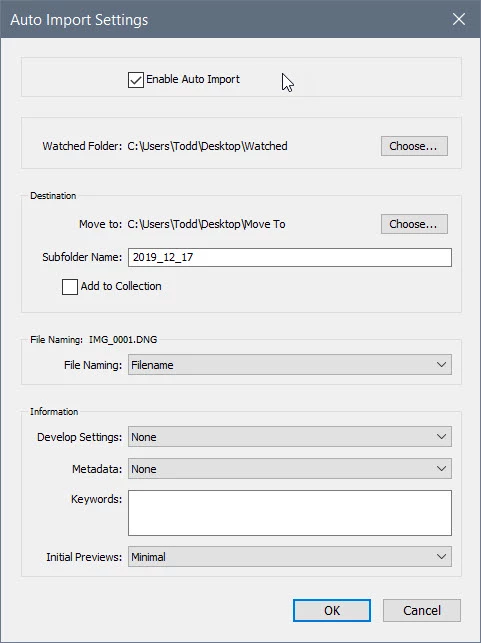
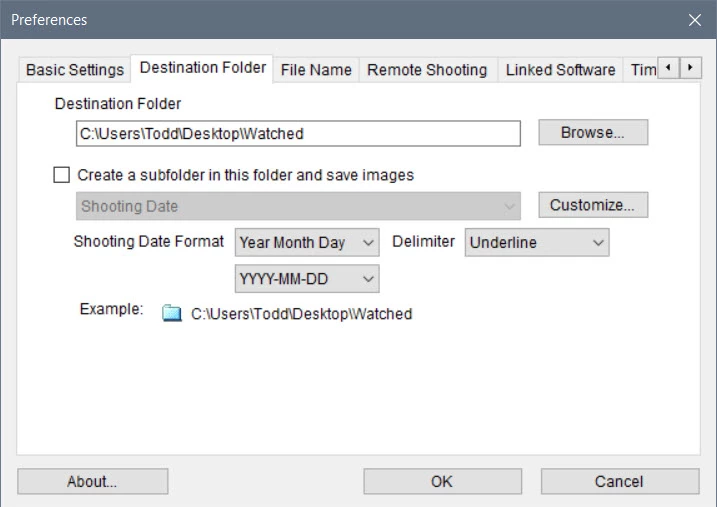
It's working for me using a Canon 6D on WiFi with EOS Utility 3.11, LR Classic 9.1, and Windows 10. Here are my EOS Utility Destintaion Folder settings and LR Auto Import Settings. Please provide screenshots of your settings for both. Thank you.

3 replies

Todd Shaner
Legend
December 18, 2019

I have Software Link set to None so wouldn't have seen the issue. Glad to hear Adobe Customer Support was able to track that down as the cause. 

Todd Shaner
Todd ShanerCorrect answer
Legend
December 17, 2019

It's working for me using a Canon 6D on WiFi with EOS Utility 3.11, LR Classic 9.1, and Windows 10. Here are my EOS Utility Destintaion Folder settings and LR Auto Import Settings. Please provide screenshots of your settings for both. Thank you.

MandytaxiAuthor
Known Participant
December 17, 2019

Hi Todd,

I was online with the customer service a moment ago. Found out it was the linked software in EOS Utility. I have linked it to LR.exe and is causing the auto import of the watched folder to work errantically. When the linked software is changed to NONE, it worked again.

Thanks for your help.

Known Participant
January 24, 2021

How did you get in touch with customer service? I can't find anywhere to get in touch with them...;-(

GoldingD
Legend
December 17, 2019

What is your OS?


MandytaxiAuthor
Known Participant
December 17, 2019

I am using Windows 10.

I justed tested Auto Import using Sony A7R3 and there is no problem. It automatically import the photo from the watch folder into LR. But with Canon EOS Utility there is a problem.