
Lightroom won't import
I have a mid 2010 mac pro w/four internal hard drives, one of which has all things photo, including the Lightroom catalog; it's running OS X 10.10.5 Yosemie
I’m running Lightroom CC 2015.3 Release Camera Raw 9.3
I’ve been using Lightroom for a year, current catalog has ~35k files.
My issue: Lightroom won’t import files likely because I aborted an import.
What happens: With Lightroom open I click on the <Import…> tab, navigate to the folder I want and click on it.
It opens, but the grid contains no thumbnails, only file names. If I double click a “picture”, a preview of the file opens; if I right click the “picture” and click on “show in finder” a finder window opens with the proper file hi-lighted and in the correct location on the hard drive. In other words, Lightroom is acting as if the file has already been imported (because of the aborted import?).
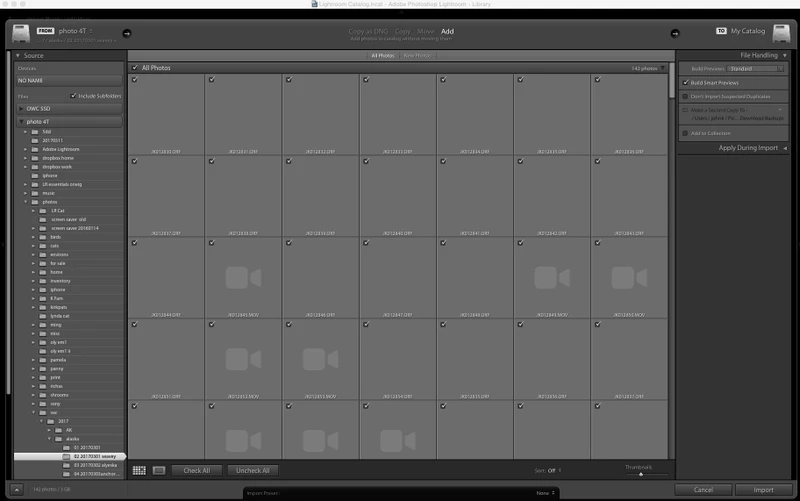
I have tried:
unchecking the “Don’t Import Suspected Duplicates” box under “File Handling"
resetting the presets folder
deleting the preset folder and rebooting
restoring the catalog to a previously dated backup
importing to a new catalog
restoring the entire photo hard drive to a previously dated time machine backup
None has worked.
There might be some Lightroom files resident on the home drive that’s preventing a proper reset, but I’d rather not do random time machine restorations on that drive.
A final twist - I have loaded these files onto a late '07 13" macbook running OS X 10.7.5 and Lightroom 5.7.3 with no problems.
Any thoughts on what to do?
Thanks
 AdChoices