
beatricel64691267
Inspiring
February 11, 2025
Question

Lignes blanches

  • February 11, 2025
  • 2 replies
  • 407 views

Bonjour

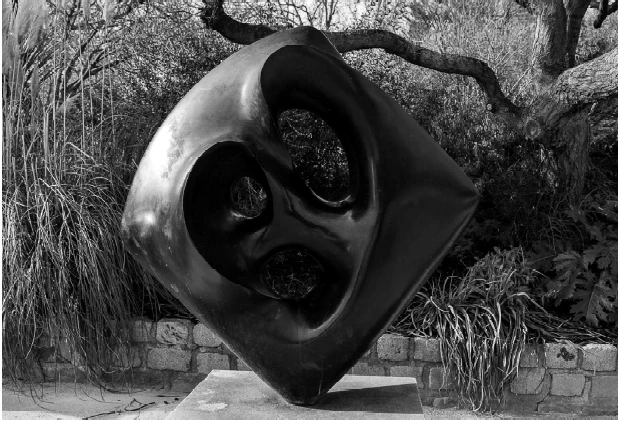
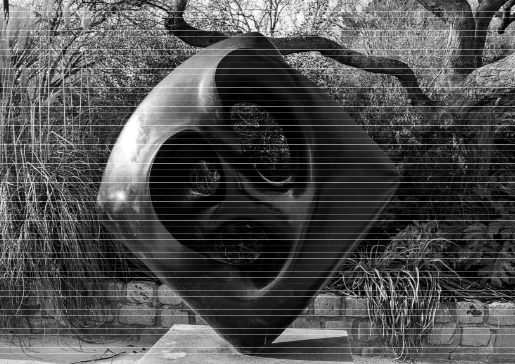
J'ai exporté en PDF une planche de contact de Lightroom Classic, sur mon écran la photo est bien mais en envoyant ce fichier par email des fines lignes blanches appparaissent. J'ai décoché "dessins au trait" et "optimiser les traits fins". Que puis-je faire pour supprimer ces lignes blanches ?
2 replies

dj_paige
Legend
February 11, 2025

This is either a bad graphics card driver (install the latest studio driver), a bad graphics card, or a corrupted file (try restoring the file from either the camera card or your backups)

beatricel64691267
Inspiring
February 12, 2025

Thanks for your reply. So I will uninstall de Nvidia Studio driver version 572.16 dated 30 January. If the same problem appears I will contact Nvidia.

dj_paige
Legend
February 19, 2025

Hello

I just finished my communication with Nvidia and it seems that the graphic cards maybe faulty so I must find a solution to repair them. I unstalled the cart and reinstalled the latest Nvidia Studio driver 572.16 then I receipt a message that a new download is available, Nvidia has no explanation for that.

I imported the original file and after my modification the image was correct. Now selecting a sky in Photoshop I received a message "program error", I close Photoshop and reopen it the sky can be selected. It seems that I must open Photshop 2 times then it works much better.


Photoshop? This belongs in the Photoshop forum, not the Lightroom Classic forum.

JR Boulay
Community Expert
Community Expert
February 11, 2025

[MOVED TO THE LIGHTROOM CLASSIC DISCUSSIONS]

Acrobate du PDF, InDesigner et Photoshopographe