
Participating Frequently
October 26, 2019
Question

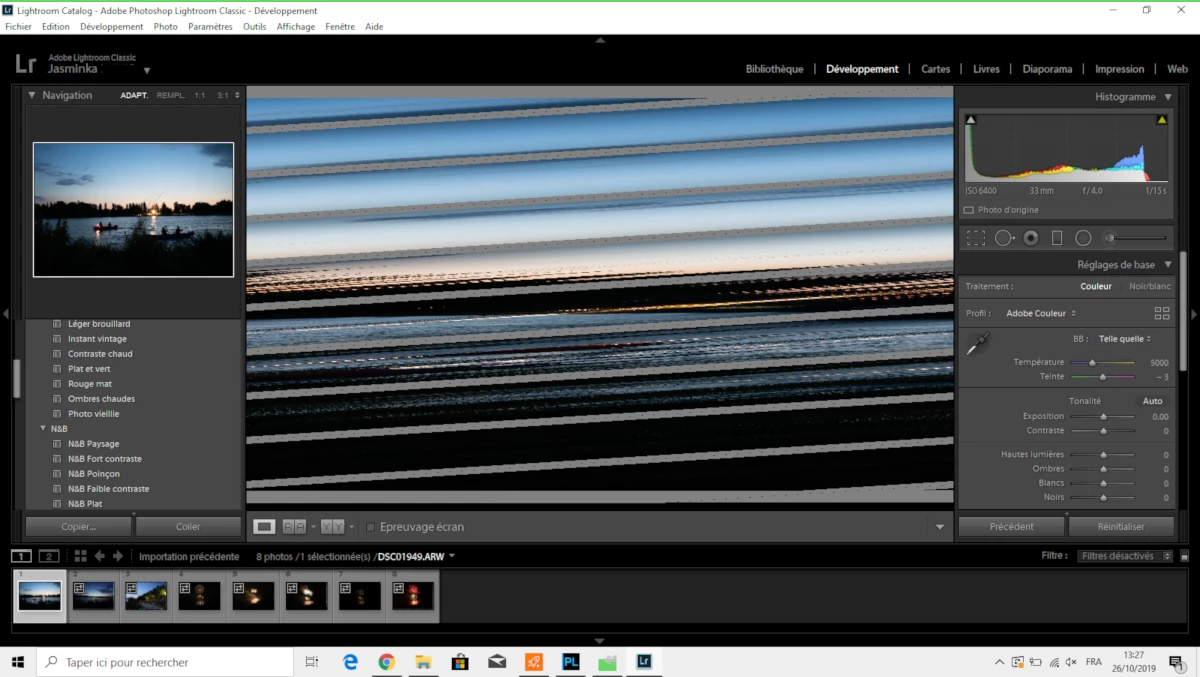
Ligthroom classic view Develop Module corrupted view

  • October 26, 2019
  • 5 replies
  • 314 views

Hello

When I chose a photo in Library and I go to the Develop Module I only see a streaked image. 

Correct comparative view, as well as thumbnails.

I uninstalled and installed Lightroom Classic several times, but nothing to do. Bug still there. 

In this context, impossible to work on the photo.

I made all the updates (graphics card, components, ...) In Lightroom, Edit> preference> use graphics card checked
 

    This topic has been closed for replies.

    5 replies

    Participating Frequently
    October 26, 2019

    Problem resolved ! Thanks to your advice.

    Update all my drivers

    - update graphical card

    - update other softwars ...

    - reboot PC ...  a numbers of PC reboots

    - Ligthroom : Edit> preference> use graphics card UNCHEKED (reboot) CHECKED (reboot) UNCHEKED (reboot)...

    ....a force to search and snoop in LT, I had the question "delete (refresh, I know more exactly) previews real size" => Yes, and eureka: the display is OK I can not find how I did that ...

    Thank you all for your time 🙂


    Just Shoot Me
    Legend
    October 26, 2019

    Since all drivers are up to date and turning off the GPU option (You DID Turn that Off by unchecking that option? If not you really need to U-Check that option and test, Reboot the system and test) then I have to say those image files are corrupted. What you see in the filmstrip is previews and not the real image and since you have LR set to use the Embedded JPG file included in every RAW file they may not be corrupted where the actual RAW data might.

    Participating Frequently
    October 26, 2019

    I have no problem to consult and work these RAW files from DxO PhotoLab for example. And even exporting a TIFF file from DxO, this file does not display correctly in LT ... (I can work with all other software, GIMP for example). But LT is stubborn. LOL

    Raw example: Sony Alpha 7R camera. But ditto with Nikon, Canon eos 700 .... whether old or new images. 😞


    Participating Frequently
    October 26, 2019

    Hello, all drivers are updated, problem not resolved ! Heeeeelp 

    JP Hess
    Inspiring
    October 26, 2019

    Usually if you uncheck the GPU option that resolves that problem. Are you saying that when you did that it did not fix it in your case?

    Participating Frequently
    October 26, 2019

    naturally, I tried without the check mark, with the check mark ...

    Just Shoot Me
    Legend
    October 26, 2019

    First thing to try is turn off the option to use the GPU in the LR preferences. It is on thew performance tab.


    If that fixes the problem then try updating the video drivers.

    Participating Frequently
    October 26, 2019

    Than you
    I found this solution on the forum, that's what I did first
    Edit> Performance> use graphics card

    Not resolved...

    according to your advice, I will try to update my video drivers and GPU

    October 26, 2019

    Hi

    Looks like it could be an issue with your GPU driver, have you tried updating it from the manufacturers website

    Participating Frequently
    October 26, 2019

    Thank you, i will do that...