
andreash34478082
Participant
December 12, 2022
Answered

Locating correct folder for Presets

  • December 12, 2022
  • 2 replies
  • 6088 views

Hello,

I have Issues with my presets. According to several sources on the net, the default location for presets is

...\AppData\Roaming\Adobe\Lightroom\

Now I have activated the option to store Presets within the Catalog. The Location should be therefore <PathToCalatlog>\<Catalog>\Lightroom-Settings.

After getting a new PC (Windows) and reinstalling Lightroom Classic and restoring the Catalog, I found out there are no presets in at least one catalog (catalog A). So I reimported the (thankfully backed up separately) presets in catalog A. However Lightroom has stored them under ...\AppData\Roaming\Adobe\CameraRaw\ImportedSettings.

In catalog B I now have those reimported presets twice, once from the CameraRaw folder and once from its catalog folder.
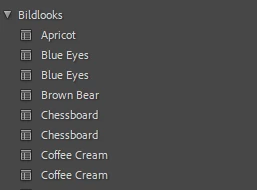
But even there is a huge mess.

Some presets are stored within <PathToCalatlog>\<Catalog>\Lightroom-Settings\Developer-Presets but also under <PathToCalatlog>\<Catalog>\Lightroom-Settings\Settings I have all the folders, the presets were grouped in Lightroom, though the folders are empty and the presets are stored under <PathToCalatlog>\<Catalog>\Lightroom-Settings\Settings\User-Presets.
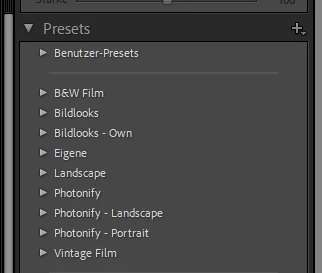
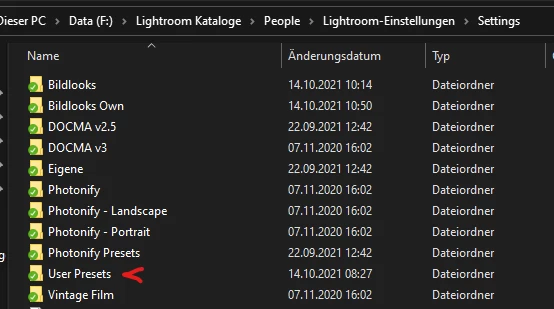
 

So I would appreciate if you can tell me where and how to properly store my presets and how to restore them when doing a fresh installation. Ideally within the catalog as it gets automatically backed up.


Correct answer C.Cella

@andreash34478082 


Presets management is a mess across all Adobe apps.

I suggest the following for LrC and ACR


  • In LrC use the option: "Store Presets with catalog"...the presets will end up in the "LightroomSettings" next to your catalog.


  • Copy manually your presets form the "LightroomSettings/Settings" folder to the "CameraRaw/Settings" folder if you want to have the same presets across the two applications.


  • Never, ever use the "Import Presets"option because your presets will be removed from LrC evniroment and end up in ACR folder EVEN if you have the option"Store Presets with Catlaog"


LrC no longer creates folders when we create a Preset Group which leads to another mess..but you can fix it using Fix Presets Plug-in by @johnrellis 


I do wonder @johnrellis if for Fix Presets you could implement a "Copy Presets to ACR" and make so that the presets we have in LrC are automatically copied to "CameraRaw/Settings" folder.


The solution to all our problems would be to have a "Shared Presets Environment" with the Cloud.

Any change/deletion/addition made to the preset folders in either ACR or LRC or LrD or Lr Mobile would be synced to the cloud and then be synced to the other apps.


E.G.

Add/delete/edit a preset in LrC > when you open ACR or LrD or LrMobile the changes are synced there as well.


.

2 replies

C.Cella
C.CellaCorrect answer
Inspiring
December 13, 2022

@andreash34478082 


Presets management is a mess across all Adobe apps.

I suggest the following for LrC and ACR


  • In LrC use the option: "Store Presets with catalog"...the presets will end up in the "LightroomSettings" next to your catalog.


  • Copy manually your presets form the "LightroomSettings/Settings" folder to the "CameraRaw/Settings" folder if you want to have the same presets across the two applications.


  • Never, ever use the "Import Presets"option because your presets will be removed from LrC evniroment and end up in ACR folder EVEN if you have the option"Store Presets with Catlaog"


LrC no longer creates folders when we create a Preset Group which leads to another mess..but you can fix it using Fix Presets Plug-in by @johnrellis 


I do wonder @johnrellis if for Fix Presets you could implement a "Copy Presets to ACR" and make so that the presets we have in LrC are automatically copied to "CameraRaw/Settings" folder.


The solution to all our problems would be to have a "Shared Presets Environment" with the Cloud.

Any change/deletion/addition made to the preset folders in either ACR or LRC or LrD or Lr Mobile would be synced to the cloud and then be synced to the other apps.


E.G.

Add/delete/edit a preset in LrC > when you open ACR or LrD or LrMobile the changes are synced there as well.


.

andreash34478082
Participant
December 13, 2022

Thank you! That explains my issue and helped me cleaning everything up.

JohanElzenga
Community Expert
Community Expert
December 12, 2022

I have Issues with my presets. According to several sources on the net, the default location for presets is ...\AppData\Roaming\Adobe\Lightroom\


Those are old sources, giving you the location before this changed in Lightroom Classic 7.2. The current location is ...\AppData\Roaming\Adobe\CameraRaw\Settings. Also note that folders on disk are no longer used to group presets. The group info is stored inside the preset itself.


-- Johan W. Elzenga
andreash34478082
Participant
December 13, 2022

So all Presets are stored there and shared with all catalogues even if if activate the option to store presets within the catalog?

JohanElzenga
Community Expert
Community Expert
December 13, 2022

@andreash34478082 wrote:

So all Presets are stored there and shared with all catalogues even if if activate the option to store presets within the catalog?


No. This is the default location, used if you do not store presets with the catalog.


-- Johan W. Elzenga