

Robert Ripps
Inspiring
January 23, 2023
Question

Long time issue of LR modifying keywords I enter

  • January 23, 2023
  • 1 reply
  • 1129 views


I have been trying to get an answer to this issue of over 10 years, so here I go again- sometimes when I add a keyword to an image(s) in Lightroom Classic (and before LR, in Bridge), I see it, but then pretty quickly afterwards, it changes what I entered, adding extra information, based on an older image I keyworded maybe 15 or more years ago in Bridge.


So, when I enter Reflection, see it in there…
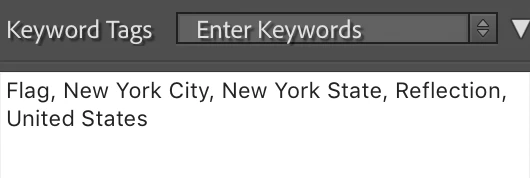


But a moment later, LR has added all of this extraneous information.
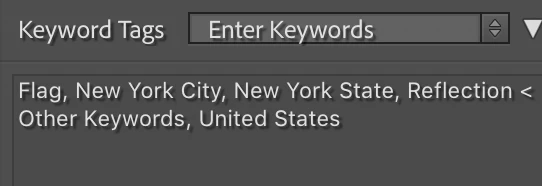


This happens with many other keywords that I add, that I used to have set up in a hierarchy in Bridge a long time ago, before LR came along.


When I go to Keyword List in LR, and type Refection, this is what it shows.
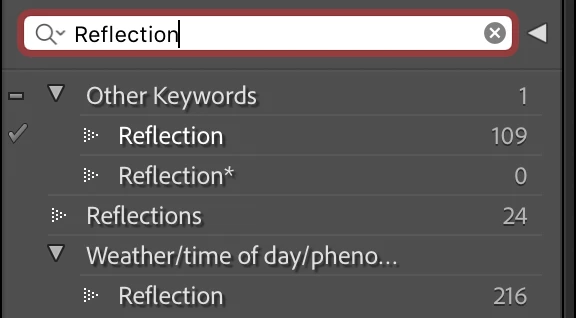


I have Auto-complete text in the Keyword Tags field turned off in Interface preferences.


I am sure there is a simple way to stop this from happening, but I have been unable to figure it out, nor can anyone else give me an answer.


I am running LR Classic 10.4, macOS 10.14.6.


Thanks.

This topic has been closed for replies.

1 reply

Rob_Cullen
Community Expert
Community Expert
January 23, 2023

You need [Auto-complete] turned 'ON' when you enter KWs, otherwise how will you know which of your "Reflection" keywords you are adding to a photo?

The "Reflection<Other Keywords" is simply indicating (by the < ) which of your multiple "Reflection" keywords has been added to the selected photo.


Regards. My System: Windows-11, Lightroom-Classic 15.1.1, Photoshop 27.3.1, ACR 18.1.1, Lightroom 9.0, Lr-iOS 10.4.0, Bridge 16.0.2 .
Robert Ripps
Inspiring
January 23, 2023

Hi Rob, thanks for reaching out. Maybe I am not understanding how LR is supposed to work, but to me, all I need is the keyword, in this case, Reflection, to be added. I do not care which of my keyword sets I got it from, nor do I need to see a parent added. I could live with it showing up in only LR, but when I open an image in Photoshop, I see all that other information in there, so instead of Reflections, I see “Reflections <Other Keywords” which looks sloppy.


Also, most of the time, the keywords it is adding extra text to are not in multiple LR keyword sets but LR is merely pulling that info from an old, obsolete way I had created keyword sets in Bridge version 4 or earlier. It is not set up that way in LR, but perhaps pulling from older images, so mistake gets compounded each time I add those certain keywords.


I just don’t understand why LR can’t keep the keyword the way I type it or pick from my created sets, and feels like it needs to amend it.

Robert Ripps
Inspiring
January 30, 2023

My first suggestion- Stop using Bridge for keywords, or any thing in Bridge that might affect image metadata. Or better still Stop using Bridge!

Next do some learning to help you tidy the LrC keyword list. You will get more advice from the links than if I were to try and explain here in the forum.

How to Use Hierarchical Keywords In Lightroom Classic

https://helpx.adobe.com/lightroom-classic/help/keywords.html#import_and_export_keywords

Controlling Keywords - Lightroom Killer Tips

Organize Your Lightroom Keywords into Keyword Hierarchies | Laura Shoe's Lightroom Training Tutorials and Tips


As I have said previously, I only started keywording in Bridge maybe 20 years ago, and but then started using LR only for keywording maybe 15 years ago. Only reason I mentioned Bridge is that seems to be where my troubles are coming from- legacy keywords used on a few images a long time ago that LR still applies to images today. I never set up a hierarchy in LR, just keyword sets, so it is pulling it from elsewhere. So when discussing cleaning things up, I wondered if I should delete all the keyword set up in Bridge, to prevent issue going forward.


Those links look really helpful, so I will try to see what I can learn to improve my keywording, and hopefully stop that extraneous information from being entered in LR. Thanks Rob & Sean.