
Participant
January 25, 2022
Question

LR 5.7 slowing to a crawl on MacOS Monterey (12.0)

  • January 25, 2022
  • 4 replies
  • 939 views

Hi there, 

I have been having performance problems since i moved to this new Mac, however when searching through forums and support pages all reported issues relate specifically to image processing. This is different, I click-and-wait on pretty much *any* action, from flipping through thumbnails to moving from Library to Develop, to actual image processing commands


my specs:

LR 5.7, running on MacOS Monterey(12.0), MacBookPro, M1 Pro GPU 16 cores, 16GB RAM, 300GB free on SSD storage.


All tips i have found involve disabling HW acceleration but I don't think this is the issue, besides on my LR 5.7 there is no such option in the prefs (in fact there is no Performance tab at all??)
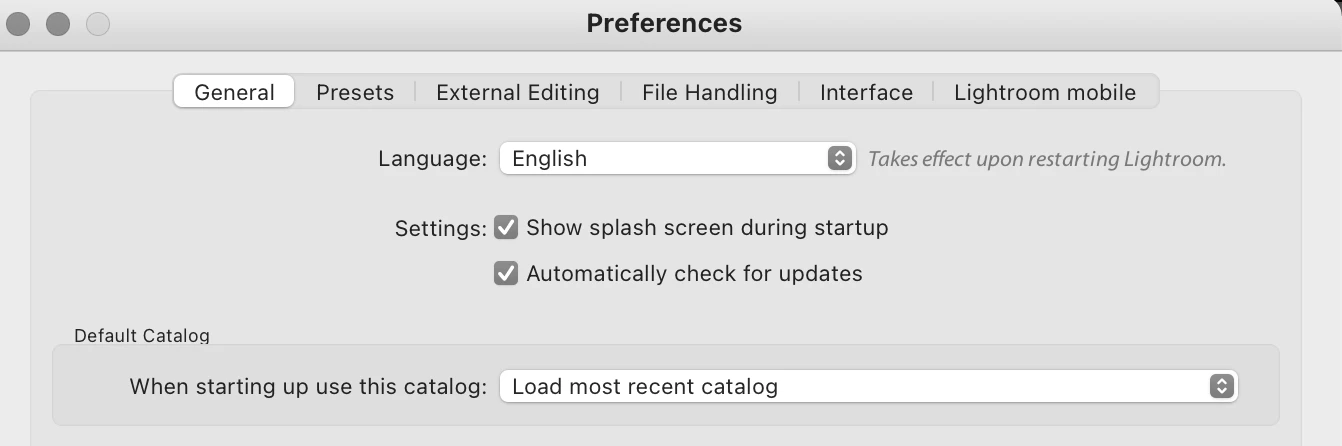
 

any suggestion greatly appreciated, thank you

-Paolo

This topic has been closed for replies.

4 replies

Conrad_C
Community Expert
Community Expert
January 2, 2024
quote

All tips i have found involve disabling HW acceleration but I don't think this is the issue, besides on my LR 5.7 there is no such option in the prefs (in fact there is no Performance tab at all??)

By @Paolo22834033mojk


That’s because most of the work done to optimize the application for modern computers, such as more fully using all CPU cores, and taking advantage of today’s powerful GPUs for accelerated graphics processing, were done in versions after Lightroom 5.7. Much of the reason there is now a Performance tab is because so many enhancements were done in versions later than the one you are using, probably starting around version 7.


The Apple Silicon M1 Pro processor is very good (I use it with Lightroom Classic daily), but Lightroom 5.7 is particularly unsuited for it. Lightroom 5.7 lacks optimizations for multi-core CPUs, GPU acceleration, and Apple Silicon processors (because Lightroom 5.7 was built for Intel computers), so on an M1 Pro, that’s three strikes against Lightroom 5.7. There is all this powerful performance-oriented hardware on an M1 Pro that Lightroom 5.7 is too old to know how to use, so it isn’t using it.

Ian Lyons
Community Expert
Community Expert
January 26, 2022

my specs:

LR 5.7, running on MacOS Monterey(12.0), MacBookPro, M1 Pro GPU 16 cores, 16GB RAM, 300GB free on SSD storage.


Bold text above is one of the more significant reasons for your performance issue. Lightroom 5.7x can only run in emulation mode (i.e. Rosetta 2).

JP Hess
Inspiring
January 26, 2022

The only thing that will "carry over" is that your catalog will upgrade so that it will enable you to continue working with all of your work in Lightroom Classic. But to use Lightroom Classic it will be necessary to subscribe because there are no one time purchase options for Lightroom anymore.

JohanElzenga
Community Expert
Community Expert
January 26, 2022

Lightroom 5.7 is an ancient version of what is now called Lightroom Classic. If you keep upgrading your version of MacOS and at the same time continue to use this ancient software, then sooner or later it won't run just slower, but won't run at all.


-- Johan W. Elzenga
Participant
January 26, 2022

thanks!  much appreciated

ok fine, let me crawl out of my cave  🙂 to ask if I need a brand new license to move to LR CC or perhaps I can carry over from my current LR license?  probably a question for the sales team though


--Paolo

dj_paige
Legend
January 26, 2022

Lightroom Classic (which should not be called Lightroom CC) is a subscription only software. Your current Lightroom 5 license does not  carry over to Lightroom Classic.