Pie Lover
Inspiring
July 17, 2019
Answered

LR 6.14 desktop runs on Mac OS X Catalina (10.15 fourth beta)

  • July 17, 2019
  • 6 replies
  • 12246 views

Despite my initial pessimism, Lightroom 6.14 (desktop) may actual work with the upcoming Mac OS X Catalina. I tested LR 6.14 using the latest 10.15 beta release which I installed on an external SDD drive. I also updated the Adobe Creative Cloud app but am not sure whether this is necessary. I am using a Mac mini (2018) 3 GHz Intel Core i5 wilth 8 GB of RAM.

- David
This topic has been closed for replies.
Correct answer Pie Lover

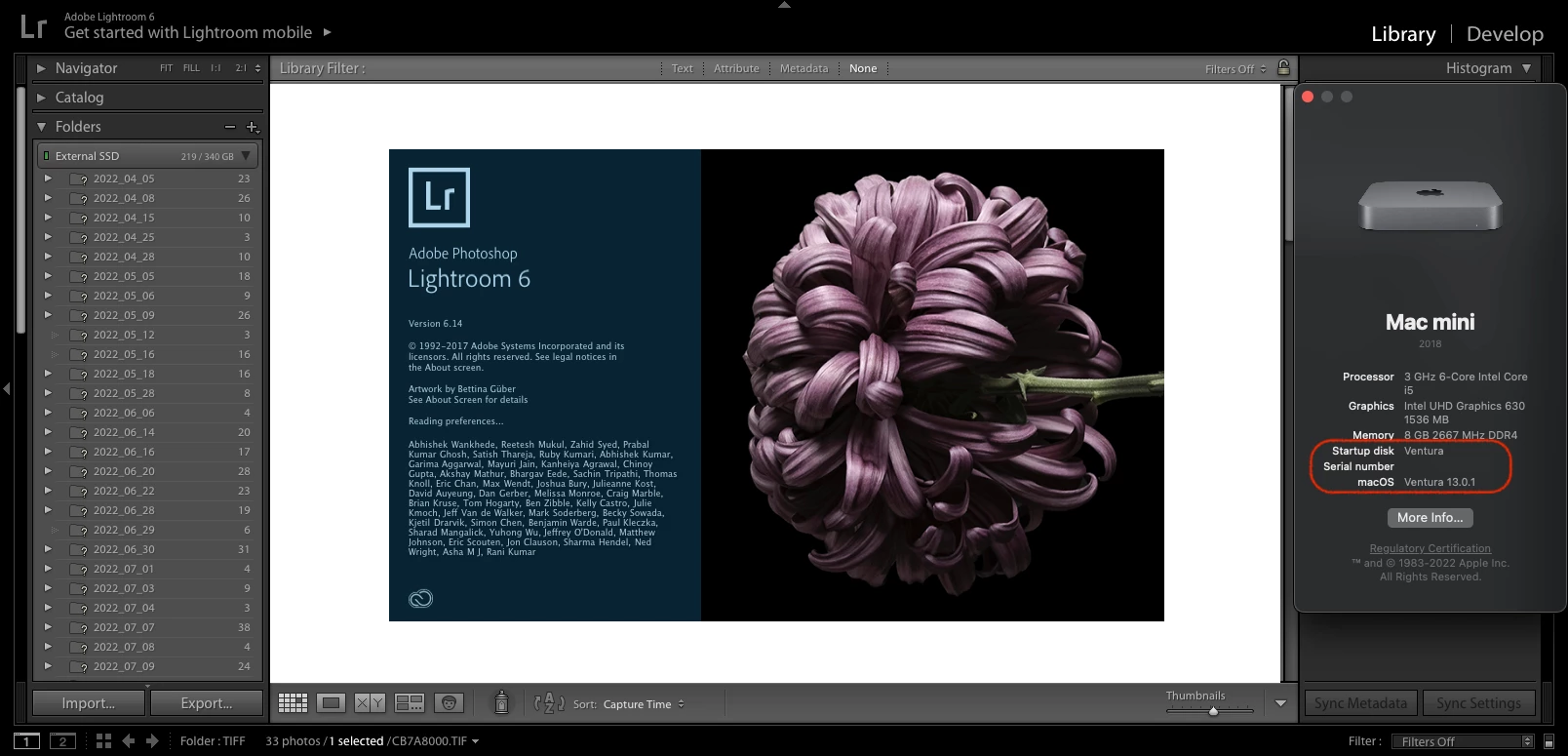
An unexpected surprise ...


LR 6.14 (installed with Mojave) has (mostly) continued to function onh the latest version of macOS Ventura (13.0.1).


6 replies

Pie Lover
Pie LoverAuthorCorrect answer
Inspiring
November 26, 2022

An unexpected surprise ...


LR 6.14 (installed with Mojave) has (mostly) continued to function onh the latest version of macOS Ventura (13.0.1).


Participant
October 30, 2019

Generally speaking, LR 6.14 continues to work just fine on my Mac mini (late 2012) running Catalina 10.15.1. However generating a slide show doesn't. The error message: "Dynamic Link Media Server failed to launch". Has anyone found a solution around this problem?

Participant
October 30, 2019

I went back to my Mac and found I had a Lightroom V 5 lying around. I thought I give it a try, and to my amazement, LR 5 could create and play a slideshow, something LR 6 cannot do any longer. Weird! With this finding I can push a bit further out having to lease LR.

DdeGannes
Community Expert
Community Expert
October 10, 2019

See the screen capture for some relevant info from Adobe.

Regards, Denis: iMac 27” mid-2015, macOS 11.7.10 Big Sur; 2TB SSD, 24 GB Ram, GPU 2 GB; LrC 12.5,; Lr 6.5, PS 24.7,; ACR 15.5,; (also Laptop Win 11, ver 24H2, LrC 15.0.1, PS 27.0; ) Camera Oly OM-D E-M1.
Participating Frequently
October 11, 2019
Thanks, but I'm not seeking advice from Adobe! Its position on LR 6.x has been clear for a very long time.
Participating Frequently
October 8, 2019

Can anyone proovide any update on this in the light of actual experience?

Thanks

Inspiring
October 10, 2019

Lr 6 will not run on the released version of Catalina. The Photography Plan, $10 per month for Lr, Lr Classic, Photoshop, and the mobile app as well as the upcoming Photoshop for iPad, is a bargain.

Participating Frequently
October 10, 2019
You know because you've tried it? I wasn't asking about the virtues of alternative products!
Pie Lover
Pie LoverAuthor
Inspiring
July 21, 2019

FYI, below is the warning generated by Mac OS X Mojave (10.14.5) ... This message turn out to be inaccurate at least for Catalina (beta).

- David

Ian Lyons
Community Expert
Community Expert
July 21, 2019

The message is likely correct in so far as it is indicating that Lr 6.14 is not optimised for macOS Mojave (10.14.x). I have  lots of applications that display a similar message. For the most part it can be ignored. Your comments re Catalina have already been addressed.

Pie Lover
Pie LoverAuthor
Inspiring
July 21, 2019

Hi Ian,

According to the Mojave legacy software report (see below) LR6.14 depends on some 32-bit code which may be the reason for the warning message. However, based on some preliminary testing, exclusion of these modules doesn't seem to prevent LR6.14 from operating correctly under Catalina 10.15.0 (beta4).

- David

Sahil.Chawla
Adobe Employee
Adobe Employee
July 17, 2019

Hi David,

We do not recommend running old applications on new operating systems, as it might cause some performance issues because older apps are not tested on newer operating systems.

You may check this article for more info.
OS support for Creative Cloud 2019 apps

Regards,
Sahil

Pie Lover
Pie LoverAuthor
Inspiring
July 17, 2019

Thanks Sahil. I understand that there are no guarantees and that there's no longer official support for LR 6.14. That said, I'm hopeful that I can still run the program with Mac OS X 10.15 (Catalina). Based on admittedly limited testing, LR 6.14 seems to be functioning as expected.

- David

System Info...

Lightroom version: 6.14 [ 1149743 ]

License: Perpetual

Language setting: en-CA

Operating system: Mac OS 10

Version: 10.15.0 [19A512f]

Application architecture: x64

Logical processor count: 6

Processor speed: 3.0 GHz

Built-in memory: 8,192.0 MB

Real memory available to Lightroom: 8,192.0 MB

Real memory used by Lightroom: 457.4 MB (5.5%)

Virtual memory used by Lightroom: 3,037.6 MB

Memory cache size: 334.4MB / 1,856.4MB (18.0%)

Maximum thread count used by Camera Raw: 4

Camera Raw SIMD optimization: SSE2,AVX,AVX2

Camera Raw virtual memory: 233MB / 4095MB (5%)

Displays: 1) 1920x1080

Graphics Processor Info:

Intel(R) UHD Graphics 630

Check OpenGL support: Passed

Vendor: Intel Inc.

Version: 4.1 INTEL-14.0.52

Renderer: Intel(R) UHD Graphics 630

LanguageVersion: 4.10

JP Hess
Inspiring
July 17, 2019

I suspect there isn't any benefit to updating the creative cloud application because Lightroom 6 is no longer supported or updated in any way by Adobe.