landov
Known Participant
December 22, 2017
Answered

LR 6.14 mistake in RAW imoprt from Canon Powershot G1X MK III

  • December 22, 2017
  • 8 replies
  • 5241 views

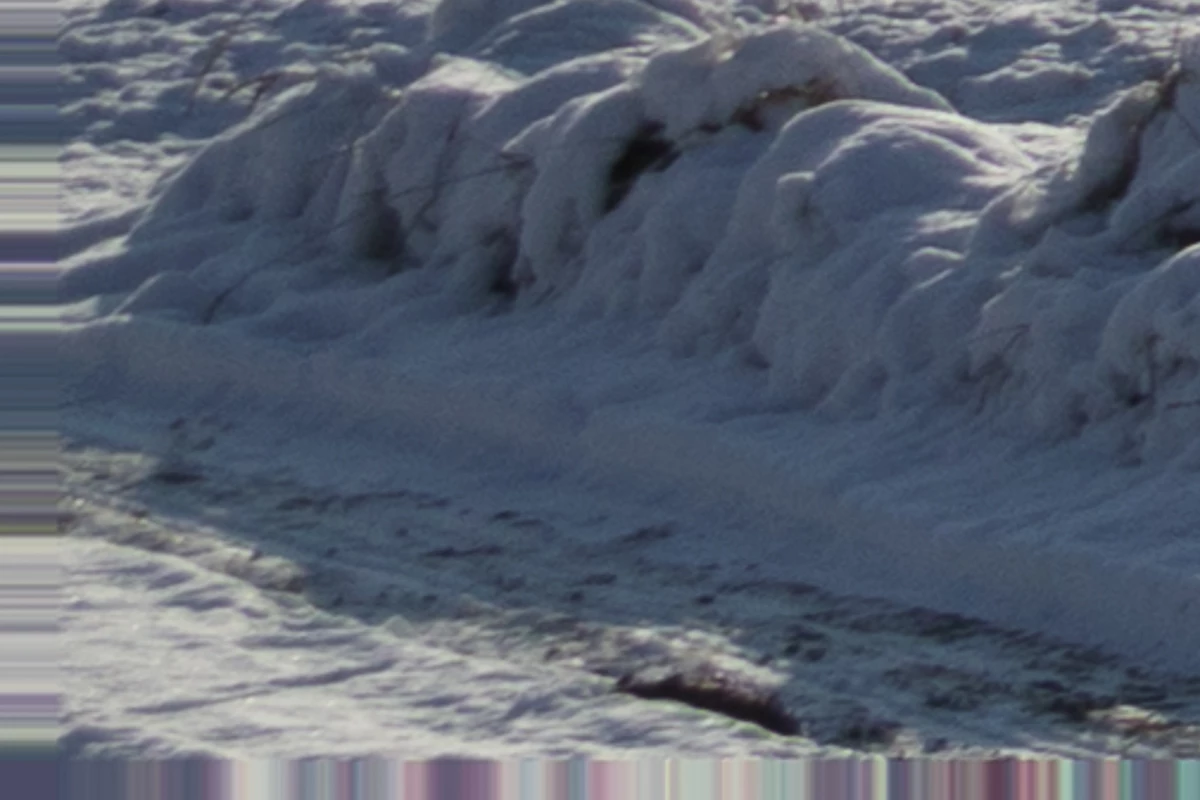
In this update (6.14) LR started support RAW from Canon Powershot G1X MK III. When I imported RAWs to LR, see enclosed picture (corner, 100%)  wahats randmly happened. I transfered same files to Canon DPP and there is no problem. Please fix this bug !
    This topic has been closed for replies.
    Correct answer Just Shoot Me

    That is either a corrupted file or the option to use the GPU is turned on.

    Open the LR Preferences and go to the Performance tab and turn off the option to use the GPU.

    If that doesn't fix the problem then the file is corrupted. that can be cause by a bad SD card, bad card reader, bad cable that goes from the reader to the computer or from camera to computer if you are connecting the camera directly to the computer.

    Post back with results from turning the GPU option off.

    8 replies

    Just Shoot Me
    Legend
    December 29, 2017

    I just did a Google search for this and it seems only you are having this problem.

    In fact the only result about this camera and LR 6.14 is this thread on this forum.

    I see one other post from Dec 9 17 that LR isn't supporting this camera yet but no follow up that once LR did there was a problem.

    So either it is some part of your hardware or the install of LR 6.14 on your computer.

    landov
    landovAuthor
    Known Participant
    January 6, 2018
    John Waller
    Community Expert
    Community Expert
    January 6, 2018

    Nice find. But that tells me that one other guy has encountered the same issue. No indication that it's a Lightroom issue.

    Could you please upload one of your problem CR2 files to Dropbox or similar, and post a link here in these forums, so that we can download it and import it into our Lightroom installations? Then we can see if we can replicate your issue.

    landov
    landovAuthor
    Known Participant
    December 29, 2017

    Just tried open files, which are corrupted in LR 6.14 via Luminar 2018 (which supported RAWs from G1X MK3). Every files are OK. So I think that problem is in  Lightroom 6.14 finally.

    Just Shoot Me
    Legend
    December 29, 2017

    I am 99.99999999% sure the problem is not with LR 6.14.

    Do all images shot with that camera have the corruption at the bottom like the image you supplied in your first post?

    If not then it is not LR.

    landov
    landovAuthor
    Known Participant
    December 29, 2017

    If 2 different RAW converters shows same RAW files from 2 different G1X MK3 cameras correctly, only in LR6.14 is issue, I believe that 99,9% is problem on LR side.

    Just Shoot Me
    Legend
    December 26, 2017

    I just download 9 RAW CR2 images created with that camera from DPReview and none of them are corrupted in any way.

    You either got 2 bad cameras. Or they sent back the same Exact camera you returned (wonder if you recorded the serial number of the first so you can check it against the second). Or you have bad card, bad card reader, bad cable or bad USB port.

    Did you use the exact same memory card, the old one from some other camera, in the second camera you received.

    landov
    landovAuthor
    Known Participant
    December 27, 2017

    New one camera s/n is different.

    I tried new SD card, transfered files to another PC. Still same, BUT Ifind out, that ALL corrupted files are in ca 27-40mm focal lenght. No one below, no one above. I think, that is camera FW problem for sure.

    Just Shoot Me
    Legend
    December 23, 2017

    So you found out it wasn't LR.

    Hope the next camera works out for you.

    landov
    landovAuthor
    Known Participant
    December 23, 2017

    No, I did not. But camera replacing is best way to find it out.

    KR Seals
    Community Expert
    Community Expert
    December 24, 2017

    It may not be that easy. Let us know if the new camera fixes the problem.

    As the other posters have said, other hardware might be the problem. LR does not do this kind of file corruption.

    Ken Seals - Nikon Z 9, Z 8, 14mm-800mm. Computer Win 11 Pro, I7-14700K, 64GB, RTX3070TI. Travel machine: 2021 MacBook Pro M1 MAX 64GB. All Adobe apps.
    landov
    landovAuthor
    Known Participant
    December 23, 2017

    Today I returned camera and awaiting new one. Will see...

    Just Shoot Me
    Legend
    December 22, 2017

    Let me add that we see a lot of post just like yours and 99% of the time it is a corrupted RAW image file. And if the file is not corrupted then it is because of the GPU option.

    There are other RAW file converters available with Free trial periods. I suggest you try one or two to check that file.

    Also is the memory card you are using new or older from some other camera?

    landov
    landovAuthor
    Known Participant
    December 22, 2017

    memory card is from older camera, but was formated twice. Im going try other Raw file converter.

    dj_paige
    Legend
    December 22, 2017

    There are other hardware that can malfunction other than memory card. The list of possible malfunctions (which may not be complete):

    • camera itself (writes the wrong data to the camera card)
    • camera card
    • card reader or USB/Cable and USB port
    • hard disk
    • computer memory
    Just Shoot Me
    Legend
    December 22, 2017

    Oh it's not a bug. It is a hardware problem or as I stated above the GPU option.

    landov
    landovAuthor
    Known Participant
    December 22, 2017

    This is definitely not a hardware bug. Just tried with/without GPU - same result. And, as I wrote , when I open same file via Canon DPP, file is without issue (so no corrupted file).

    Just Shoot Me
    Legend
    December 22, 2017

    What DPP is showing you is the embedded JPG file included with every RAW file. That embedded JPG might not be corrupted.

    If you have PS and ACR installed try opening that file in ACR. If it looks the same, corruption at the bottom, then that file "IS" corrupted.

    Just Shoot Me
    Just Shoot MeCorrect answer
    Legend
    December 22, 2017

    That is either a corrupted file or the option to use the GPU is turned on.

    Open the LR Preferences and go to the Performance tab and turn off the option to use the GPU.

    If that doesn't fix the problem then the file is corrupted. that can be cause by a bad SD card, bad card reader, bad cable that goes from the reader to the computer or from camera to computer if you are connecting the camera directly to the computer.

    Post back with results from turning the GPU option off.