Participant
July 13, 2020
Question

LR and ACR Crash - While editing Ricoh Theta-Z1 DNG files in Develop mode

  • July 13, 2020
  • 2 replies
  • 343 views

In LR and in the ACR(in Bridge), if you can edit first the Theta-Z1 360 Degree Spherical cameras DNG files, and then when I copy the edit settings to another file and after I want to edit, the programs crashes alwayse.
LR and Camera RAW crashes when re-editing previously edited files.
After that, I can't start LR anymore either in normally.
I tried it on both laptops and PCs, the same result. I'm using Windows 10 Professional.
There is no problem with Sony, Panasonic, Nikon, Olympus RAW files.
I hadn’t had this problem about 1 month earlier.


This topic has been closed for replies.

2 replies

Gyorgy69Author
Participant
July 13, 2020

Thank You!

My System Information as Lightroom Classic:

Lightroom Classic version: 9.3 [ 202005281810-476e492c ]
License: Creative Cloud
Language setting: en
Operating system: Windows 10 - Business Edition
Version: 10.0.18363
Application architecture: x64
System architecture: x64
Logical processor count: 12
Processor speed: 3,6 GHz
SqLite Version: 3.30.1
Built-in memory: 32694,8 MB
Real memory available to Lightroom: 32694,8 MB
Real memory used by Lightroom: 1157,2 MB (3,5%)
Virtual memory used by Lightroom: 1399,3 MB
GDI objects count: 648
USER objects count: 1894
Process handles count: 1927
Memory cache size: 151,6MB
Internal Camera Raw version: 12.3 [ 493 ]
Maximum thread count used by Camera Raw: 5
Camera Raw SIMD optimization: SSE2,AVX,AVX2
Camera Raw virtual memory: 304MB / 16347MB (1%)
Camera Raw real memory: 304MB / 32694MB (0%)
System DPI setting: 96 DPI
Desktop composition enabled: Yes
Displays: 1) 2560x1440, 2) 1920x1080
Input types: Multitouch: No, Integrated touch: No, Integrated pen: No, External touch: No, External pen: No, Keyboard: No

Graphics Processor Info:
DirectX: NVIDIA GeForce GTX 1660 SUPER (27.21.14.5148)


Application folder: C:\Program Files\Adobe\Adobe Lightroom Classic
Library Path: D:\LR_Catalog\Lightroom Catalog\Lightroom Catalog.lrcat
Settings Folder: C:\Users\bkova\AppData\Roaming\Adobe\Lightroom

Installed Plugins:
1) AdobeStock
2) Facebook
3) Flickr
4) Nikon Tether Plugin

Gyorgy69Author
Participant
July 13, 2020

And my laptop System Information as Lightroom Classic:


Lightroom Classic version: 9.3 [ 202005281810-476e492c ]
License: Creative Cloud
Language setting: en
Operating system: Windows 10 - Business Edition
Version: 10.0.18363
Application architecture: x64
System architecture: x64
Logical processor count: 12
Processor speed: 2,5 GHz
SqLite Version: 3.30.1
Built-in memory: 16234,6 MB
Real memory available to Lightroom: 16234,6 MB
Real memory used by Lightroom: 1013,9 MB (6,2%)
Virtual memory used by Lightroom: 2685,8 MB
GDI objects count: 647
USER objects count: 2074
Process handles count: 1912
Memory cache size: 9,4MB
Internal Camera Raw version: 12.3 [ 493 ]
Maximum thread count used by Camera Raw: 5
Camera Raw SIMD optimization: SSE2,AVX,AVX2
Camera Raw virtual memory: 137MB / 8117MB (1%)
Camera Raw real memory: 147MB / 16234MB (0%)
System DPI setting: 120 DPI
Desktop composition enabled: Yes
Displays: 1) 1920x1080, 2) 2560x1440
Input types: Multitouch: No, Integrated touch: No, Integrated pen: No, External touch: No, External pen: No, Keyboard: No

Graphics Processor Info:
DirectX: NVIDIA GeForce RTX 2060 (27.21.14.5148)


Application folder: C:\Program Files\Adobe\Adobe Lightroom Classic
Library Path: C:\!LR-Catalog\LR-catalog\LR-catalog.lrcat
Settings Folder: C:\Users\bkova\AppData\Roaming\Adobe\Lightroom

Installed Plugins:
1) AdobeStock
2) ColorChecker Camera Calibration
3) Facebook
4) Flickr
5) Nikon Tether Plugin

GoldingD
Legend
July 13, 2020

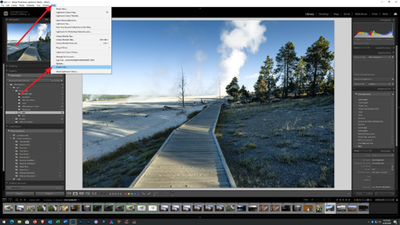
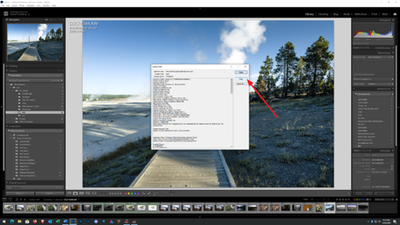
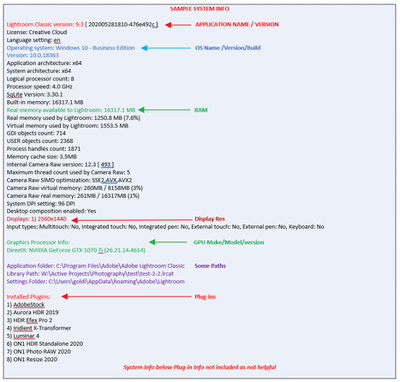
Please post your System Information as Lightroom Classic (LrC) reports it. In LrC click on Help, then System Info, then Copy. Paste that information into a reply. Please present all information from first line down to and including Plug-in Info. Info after Plug-in info can be cut as that is just so much dead space to us non-Techs.