
Oculux
Inspiring
August 20, 2023
Answered

LR Classic 12.5 - Tethered shooting not working for Nikon D700

  • August 20, 2023
  • 2 replies
  • 776 views

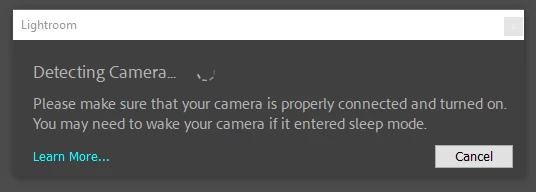
I'm using Windows 10. If I connect my Nikon D700 to my PC via USB, Windows detects the camera just fine, in that it gets mounted as a removable storage drive and I can navigate into de DCIM folder and see NEF files in the memory card. But if I try to tether the camera using LRC 12.5, it gets stuck trying to tether, displaying the dialogue shown below without ever resolving.
I've tried different USB ports and cables, with the same result (camera always gets detected by Windows 10, but never tethers to Lightroom).


This is a pretty big problem for my shooting workflow so I'd appreciate some help getting this issue solved.


Thank you
This topic has been closed for replies.
Correct answer Oculux

Alright, after a lengthy interaction with Adobe support we finally figured out the issue. It was actually something really silly...

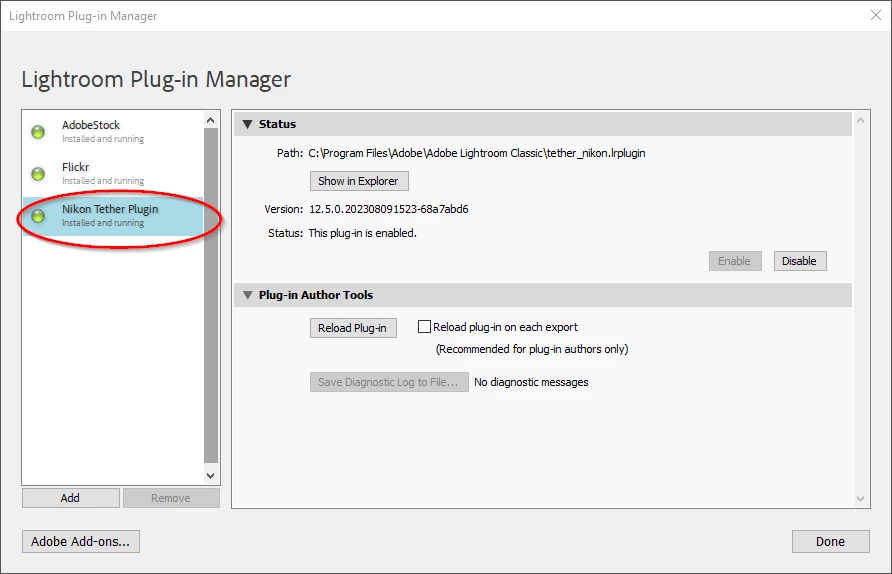
It turns out the Nikon Tether plugin was disabled. I have no idea how or why it was disabled, but it was. Turned it on and presto! Tethering started working. I thought I'd post the solution here as, silly as it is, in all my searches I never ran into any posts that said "make sure your tether plugin is enabled". As a matter of fact until now I was unaware there even was a plugin for tethering.

So hopefully this saves someone else time and headaches.

2 replies

KR Seals
Community Expert
Community Expert
August 20, 2023

If LrC was tethering properly to the D700 in Version 12.4, your best bet is to reinstall that version. You can do that in the Creative Cloud app on the LrC line click on the three dots on the right, then click on "Other Versions". 

Always be sure your catalog is backed up 🙂


Ken Seals - Nikon Z 9, Z 8, 14mm-800mm. Computer Win 11 Pro, I7-14700K, 64GB, RTX3070TI. Travel machine: 2021 MacBook Pro M1 MAX 64GB. All Adobe apps.
Oculux
OculuxAuthor
Inspiring
August 27, 2023

@KR Seals Thanks for the suggestion and sorry it's taken me a while to reply. I haven't been able to test with a rolled back version until today. Unfortunately, though, it's not working for me in 12.4 either.

KR Seals
Community Expert
Community Expert
August 27, 2023

Have you tried resetting the LrC Preferences? That's always a good thing to try when LrC starts doing strange things for no known reason.

I just tested my D700 with Win 11 and LrC V12.5. It's working perfectly here. It worked ok with zero images on the card and also ok with a few images on the card. 

I know you said you checked all the hardward related parts, USB cable and USB ports on the computer? Also, the USB port on the camera. If you are using USB ports on the outside of the computer box, check to see if those are still connected to the motherboard inside.


I was amazed since I haven't used the D700 for a few years. The first battery I tried had at least 3/4 charge so I wasa able to connect it to the computer right away when I saw your last post.


Ken Seals - Nikon Z 9, Z 8, 14mm-800mm. Computer Win 11 Pro, I7-14700K, 64GB, RTX3070TI. Travel machine: 2021 MacBook Pro M1 MAX 64GB. All Adobe apps.
Oculux
OculuxAuthor
Inspiring
August 20, 2023

I should also add that I've tried formatting the memory card, as well as taking it out, as I've seen some posts elsewhere suggesting that tethering won't work unless the card is not completely full, or is completely empty, or is not in the camera at all. But neither worked.