

Bees and Brews
Participant
December 10, 2023
Answered

LR Classic duplicate levels in folders hierarchy

  • December 10, 2023
  • 2 replies
  • 231 views

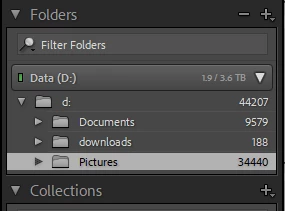
Hi, after moving my library from a NAS drive to a local drive, I have somehow created a glitch in my folder hierarchy where the root drive, D, is shown twice. This has not created any problems with file access or editing, so it did not concern me initially, but I have found that it creates a problem when I perform imports as new copies of the "d:" drive are created under "Data (D:)". This is simple to repair but it is a annoying. I've been online with technical support and none of the fixes they have suggested have helped. Does anyone have any suggestions? 

Thanks Dan
 

This topic has been closed for replies.
Correct answer johnrellis

" I have found that it creates a problem when I perform imports as new copies of the "d:" drive are created under "Data (D:)". "


See if this article helps:

https://www.lightroomqueen.com/capitalization-catalog-error/


If it doesn't, then post a screenshot showing the contents of the Folders panel after you see duplicates. That could give more clues.

2 replies

johnrellis
johnrellisCorrect answer
Legend
December 10, 2023

" I have found that it creates a problem when I perform imports as new copies of the "d:" drive are created under "Data (D:)". "


See if this article helps:

https://www.lightroomqueen.com/capitalization-catalog-error/


If it doesn't, then post a screenshot showing the contents of the Folders panel after you see duplicates. That could give more clues.

Bees and Brews
Participant
December 13, 2023

Thanks so much John, this did the trick. After many hours spent with both MicroSoft and Adobe technical support, this article had the 5 minute solution. Somehow I did have a lower case "d" as reference to hard drive and that was the culprit. I appreciate you're pointing me in the right direction! Cheers.

johnrellis
Legend
December 13, 2023

Glad you got it resolved. The issue with case in file paths is a fundamental architectural design error in LR that would be very expensive for Adobe to fix.

kglad
Community Expert
Community Expert
December 10, 2023

in the future, to find the best place to post your message, use the list here, https://community.adobe.com/

p.s. i don't think the adobe website, and forums in particular, are easy to navigate, so don't spend a lot of time searching that forum list. do your best and we'll move the post (like this one has already been moved) if it helps you get responses.


<"moved from using the community">