
Inspiring
June 13, 2022
Answered

LR Classic synced albums distorted again in web browser

  • June 13, 2022
  • 3 replies
  • 7389 views

LR Classic Version 11.3.1.

LR Classic synced albums are badly distorted again in web browser.   I had this problem a while ago and it seemed to clear up.  I now have some synced albums that are displaying properly.  When this first appeared Adobe said it was because I was syncing photos edited in PS.  But now all photos recently synced even directly out of camera (RAW) are distorted.  See sample attached image.  All photos in this album look like this.  Even if I convert to jpg first they are still distorted.  Am I doing something wrong?
Correct answer Rikk Flohr_Photography

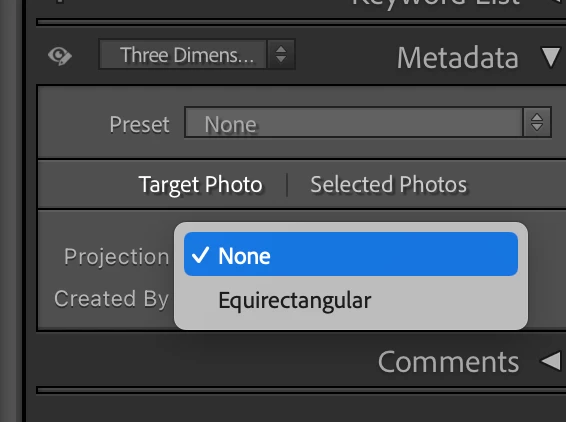
Have you inadvertently set the metadata field either by direct action or metadata preset to Equirectangular? 

3 replies

Rikk Flohr_Photography
Community Manager
Community Manager
June 15, 2022

Have you inadvertently set the metadata field either by direct action or metadata preset to Equirectangular? 

Rikk Flohr: Adobe Photography Org
Inspiring
June 15, 2022

Yep, that's exactly what I wanted to check & why I kept asking for the image files.


  • The raw files provided do not appear to have the equirectangular tag set.
  • Synching those raws with no changes resulted in the expected/desired behavior.   In other words, the images looked normal on the web.
  • Setting the Projection field to Equirectangular in LrC and resyncing caused the images to be displayed in the 360 viewer and appear "distorted".

@cpgilles - Check the value Rikk showed in his screenshot.  If it's set to Equirectangular, try changing it to None.  If you find that field is set on multiple images, I'd suspect you're applying that setting in a preset on import.

Arianne B Mouette
Participating Frequently
November 30, 2023

At the bottom of the Metadata panel with Default selected click on Customize and show Projection.


Thank you @Bob Somrak , I managed to show the Projection and change it. Unfortunately it did not fix the issue - it still looks stretched on the online version of the album/collection. 😞 

dj_paige
Legend
June 14, 2022

I can't view your screen capture, you should use the "Insert Photos" icon to include screen captures. But — distorted photos are highly likely to be a transmission error between your computer and "the cloud". Another possibility is that the distortion comes when the smart previews are created, which could be your hard disk and/or your computer's memory chips. I think you need to check all of those, run diagnostics on your hardware.

cpgillesAuthor
Inspiring
June 14, 2022

Let me use another name instead of distorted.  They are warped.  Are you able to see my uploaded albums?  I have been using this same computer for many years and uploaded hundreds of photos  A while ago this was a problem that was identified by many customers.  I can assure you this is NOT a computer problem but just to be sure I will upload some using a different computer and report back the results.  Can you view this attachment?

dj_paige
Legend
June 14, 2022

Even though I said to use the "Insert Photos" icon, you did not do that.


Until I get home, I cannot view your albums.

Rob_Cullen
Community Expert
Community Expert
June 13, 2022

Would you care to provide a link to one of your albums to check if we see the same distortion?


Regards. My System: Windows-11, Lightroom-Classic 15.1.1, Photoshop 27.3.1, ACR 18.1.1, Lightroom 9.0, Lr-iOS 10.4.0, Bridge 16.0.2 .
cpgillesAuthor
Inspiring
June 14, 2022

Rob,  I can assure you that every photo I uploaded to the shared site is badly distorted just like the sample.  Edited in LR or PS.  I went back through some older albums and some are distorted, some are not.  I see no pattern.  But all the recent ones using the latest version of LR are distorted.  I tried an experiment and took photos on three different cameras all RAW format to make sure it was not the camera.  They are all distorted.  I must be doing something wrong if no one else is screaming about this.  The LR sync to the cloud is worthless like this.  Here are three different links using three different cameras.  Note you have to view in full screen.

https://adobe.ly/3xrWYue

https://adobe.ly/3aVeTSn

https://adobe.ly/3zD9rxW