
Participant
August 21, 2020
Question

Lr color profile Sony A7riv

  • August 21, 2020
  • 4 replies
  • 3540 views

Hello and thank you for reading. I have 2 sony bodies. I have the A7iii and the A7riv

I only use Lr classic. after import with A7iii my color profile selections include the Adobe profiles: color, portrait, landscape etc. It also shows the Sony profiles as well: portrait, landscape, etc.

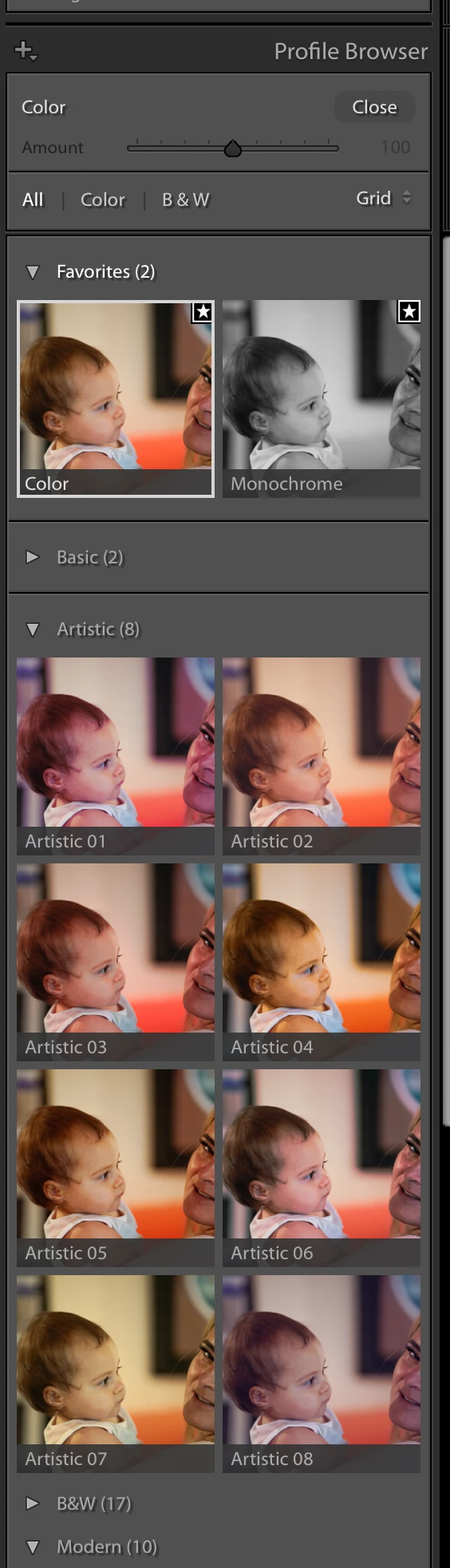
The A7riv does not have either of these profile groups. In other words, No selections for Adobe color, portrait, etc nor Sony color, portrait etc. the only selections I see are a bunch of ones I would never use there is a group called "artistic", "B+W", and "modern"....

I'm not sure how to get the profiles I actually use (adobe and Sony) to populate into my develop module.

Any help is greatly appreciated!!

Chris
 

This topic has been closed for replies.

4 replies

99jon
Legend
August 21, 2020

Are you using v9.4?

Hoopa70Author
Participant
August 22, 2020

This is embarrassing but needs to be said. Somehow, My in camera setting was on JPG. Not sure how, I have never shot JPG. Anyhow, problem solved. Thank you for the help!!

99jon
Legend
August 21, 2020

The latest Sony camera & lens combo has a built-in lens profile – see lens corrections – try switching between default, custom & auto, but normally you should be able to change the basic panel profile.

Have you set any raw defaults for import?

Hoopa70Author
Participant
August 21, 2020

Not that I am aware of.  If you are talking about lens corrections in the develop module, choosing between default, custom and auto does nothing to change the color profile tab selections (just tried it). thank you for the suggestion.

99jon
Legend
August 21, 2020

Do you not have other profiles for ARW files when clicking the profile browser? As well as Adobe I have camera matching:

Clear

Deep

Landscape

Light

Neutral

Portrait

Standard

Vivid

Monochrome

Hoopa70Author
Participant
August 21, 2020

Do you not have other profiles for ARW files when clicking the profile browser? As well as Adobe I have camera matching:

Clear

Deep

Landscape

Light

Neutral

Portrait

Standard

Vivid

Monochrome

Not with my A7r4 only the A7iii. this is the problem! I'm thinking it's an import setting?

GoldingD
Legend
August 21, 2020

And you are talking about RAW files, correct?


Hoopa70Author
Participant
August 21, 2020

yes RAW