


Inspiring
June 9, 2018
Answered

LR crashes when importing images

  • June 9, 2018
  • 2 replies
  • 13005 views

greetings,

windows 7 running the photographers bundle since it started ps and lr.

recently my lightroom updated to classic. since that time i have been unable to import images, i'll get several hundred somtimes several thousand before lr crashes... it seems to loose contact with drive E (external where the images are going)  this has never happened before.  i get among other msgs. autoplay searching for content and all the folders go ? . i'm thinking the problem is associated with this new update.

any help would be appreciated.
    This topic has been closed for replies.
    Correct answer Ian Lyons

    It's a known problem and Adobe are working on a fix.

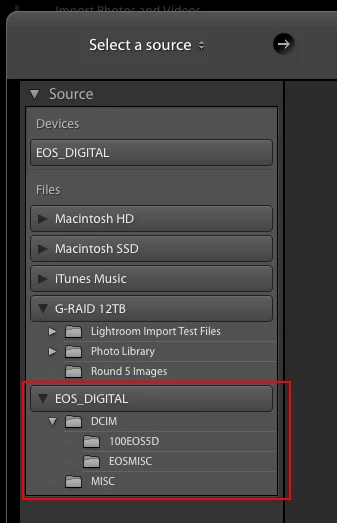
    In meantime, you should try importing via the 'Files' section of import window rather than 'Devices' (see below screenshot). `Note that this import option does not support auto eject, which is one of the underlying causes of Lr crashing.

    2 replies

    Inspiring
    June 20, 2018

    greetings this problem persists!

    lightroom continues to crash when i try to import images, EVEN more irksome is it corrupts the folder and subsequently crashes my windows explorer tree file program... i have tried rolling back to a previous ver but still it is 7 how far back do i have to go to get MY VERY EXPENSIVE AND TROUBLESOME adobe lightroom to rid myself of this adobe lightroom glitch?

    very annoyed,

    tws 

    Participant
    December 29, 2020

    Update from 29.12.2020. Lightroom still crashes when you try to import using the button in the library. 

    Participant
    April 16, 2021

    Adobe should throw their stuff online as freeware. Let the community find all the bugs and then not fix it for 5 years or longer

    Ian Lyons
    Community Expert
    Ian LyonsCommunity ExpertCorrect answer
    Community Expert
    June 9, 2018

    It's a known problem and Adobe are working on a fix.

    In meantime, you should try importing via the 'Files' section of import window rather than 'Devices' (see below screenshot). `Note that this import option does not support auto eject, which is one of the underlying causes of Lr crashing.

    Participant
    July 12, 2018

    still happening... even importing from que device list,  did you known when adobe will fix this??

    JP Hess
    Inspiring
    July 12, 2018

    Updating to 7.4 fixed this for me. What version are you using?