
Participant
October 18, 2024
Answered

LR selects 2 photo's

  • October 18, 2024
  • 3 replies
  • 475 views

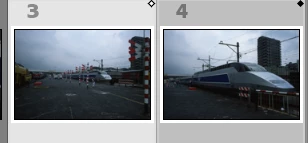
Since today LR selects sometimes 2 photo's (not in compare mode).

1 photo with a white and  1 with a black mark in the upper right corner.

Due to this problem it's no longer possible to choose new photo's with the cursor keys. It's only switching between the 2 selected photo's.


Correct answer GoldingD

Those itty bitty diamonds in the upper right of the thumbnails mean that you are in compare mode. (Keyboard shortcut C)


3 replies

Participant
November 3, 2025

If Lightroom selects two images in Develop mode even when you click one just go to View → Loupe View or press E in Library mode
It resets the selection and keeps only one photo active. 


AxelMatt
Community Expert
Community Expert
October 19, 2024

If pressing the shortcut C to get out of the Compare mode doesn't help try to reset the preferences of Lightroom Classic:  How to reset Lightroom Classic preferences (adobe.com) 


It's recommended to backup your preferences before you reset the preferences to the default settings: 

https://helpx.adobe.com/lightroom-classic/kb/preference-file-and-other-file-locations.html


My System: Intel i7-8700K - 64GB RAM - NVidia Geforce RTX 3060 - Windows 11 Pro 25H2 -- LR-Classic 15 - Photoshop 27 - Nik Collection 8 - PureRAW 5 - Topaz Photo
GoldingD
GoldingDCorrect answer
Legend
October 19, 2024

Those itty bitty diamonds in the upper right of the thumbnails mean that you are in compare mode. (Keyboard shortcut C)


Participant
October 19, 2024

My 2nd screen (switched off) was in compare mode.
Thanks for your tip!