fbx43
Known Participant
March 9, 2022
Answered

LrC and LR and use of 1TB of cloud storage

  • March 9, 2022
  • 1 reply
  • 597 views

I had LRClassic (before it was called classic) and 1 TB of Cloud storage.

I understood that version could use from and save to the cloud

Recently changed to LR (cloud) and am not happy with it yet

Adobe help folk say LRClassic doesn’t use cloud storage, only local drive. (True?)

Didn't LR Classic (before it was Classic) use Creative Cloud?

I have LR (cloud) installed and also a 179 GB file of Lightroom Library.lrlibrary in my Pictures folder

(It may be leftover from old install of LR (classic before it was Classic)).

I've also got, in same folder, a subfolder called Lightroom with 6 files, including Lightroom Catalog.lrcat (and also previews, lrdata, etc). I assume servicing current install of LR (cloud).

The question is: Is it true current LRClassic cannot use cloud storage?

It’s not about the space so much as having all the pictures in the cloud so they can be accessed by iPhone, iPads, etc.

All information on (or near) this topic much appreciated.

This topic has been closed for replies.
Correct answer Rob_Cullen

I had LRClassic (before it was called classic) and 1 TB of Cloud storage.

Earlier 'Perpetual' versions never came with Adobe Cloud storage.

Lightroom-Classic, does come with 20GB Adobe Cloud storage in the Adobe Photography Plan. (You can buy more)

Lightroom (Adobe Cloud version) specifically in the Adobe Lightroom Plan comes with 1TB of storage. (LrC is NOT included in this Plan)

I understood that version could use from and save to the cloud.

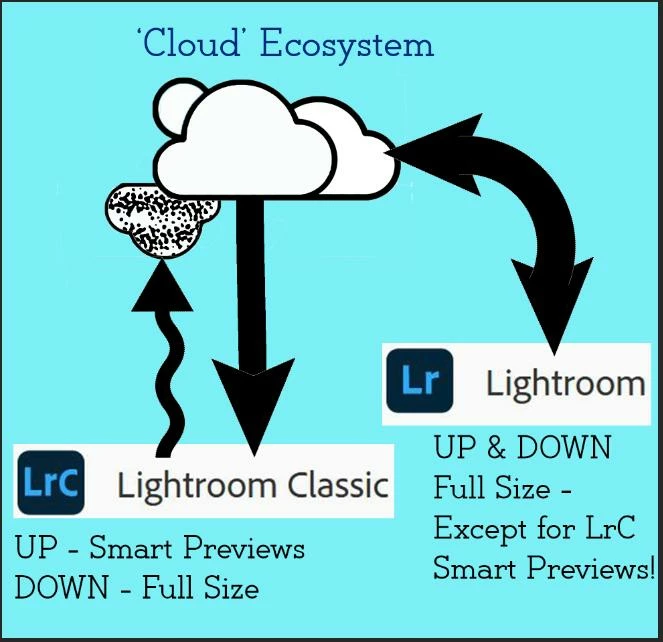
Adobe Lightroom-Classic can only send Proxy (Smart Previews) UP to the Adobe Cloud. These do not use any of the Cloud storage. ALL photos in the Adobe Cloud storage, added by 'Mobile' devices, WILL download (Full-size) when Sync is activated in Adobe Lightroom-Classic .

Recently changed to LR (cloud) and am not happy with it yet

Adobe help folk say LRClassic doesn’t use cloud storage, only local drive. (True?)

True- for photos synced UP from Collections in Lightroom-Classic.

Didn't LR Classic (before it was Classic) use Creative Cloud?

No.

I have LR (cloud) installed and also a 179 GB file of Lightroom Library.lrlibrary in my Pictures folder

These would be 'local' copies of the photos you Added to Lightroom.

(It may be leftover from old install of LR (classic before it was Classic)).

No.

I've also got, in same folder, a subfolder called Lightroom with 6 files, including Lightroom Catalog.lrcat (and also previews, lrdata, etc). I assume servicing current install of LR (cloud).

That is a Lightroom-CLASSIC Catalog with previews. Your assumption is wrong. It would be indexing 'Local' files, not the Adobe Cloud.

The question is: Is it true current LRClassic cannot use cloud storage?

LrC cannot sync full-size files UP to Adobe Cloud.

LrC can sync full-size files DOWN from Adobe Cloud (Photos added by Lightroom). And you can then Edit these images in LrC and the edits sync back up to the Adobe Cloud .

It’s not about the space so much as having all the pictures in the cloud so they can be accessed by iPhone, iPads, etc.

The proxy files from Adobe Lightroom-Classic can be accessed and edited in Mobile devices with Lightroom Apps. The one limitation is you do not have the 'Full-size' files to Export or edit in Photoshop-mobile.
You cannot successfully use both Lightroom and Lightroom-Classic as your 'Primary' editors on your home desktop. It causes too much confusion.



1 reply

Rob_Cullen
Community Expert
Rob_CullenCommunity ExpertCorrect answer
Community Expert
March 9, 2022

I had LRClassic (before it was called classic) and 1 TB of Cloud storage.

Earlier 'Perpetual' versions never came with Adobe Cloud storage.

Lightroom-Classic, does come with 20GB Adobe Cloud storage in the Adobe Photography Plan. (You can buy more)

Lightroom (Adobe Cloud version) specifically in the Adobe Lightroom Plan comes with 1TB of storage. (LrC is NOT included in this Plan)

I understood that version could use from and save to the cloud.

Adobe Lightroom-Classic can only send Proxy (Smart Previews) UP to the Adobe Cloud. These do not use any of the Cloud storage. ALL photos in the Adobe Cloud storage, added by 'Mobile' devices, WILL download (Full-size) when Sync is activated in Adobe Lightroom-Classic .

Recently changed to LR (cloud) and am not happy with it yet

Adobe help folk say LRClassic doesn’t use cloud storage, only local drive. (True?)

True- for photos synced UP from Collections in Lightroom-Classic.

Didn't LR Classic (before it was Classic) use Creative Cloud?

No.

I have LR (cloud) installed and also a 179 GB file of Lightroom Library.lrlibrary in my Pictures folder

These would be 'local' copies of the photos you Added to Lightroom.

(It may be leftover from old install of LR (classic before it was Classic)).

No.

I've also got, in same folder, a subfolder called Lightroom with 6 files, including Lightroom Catalog.lrcat (and also previews, lrdata, etc). I assume servicing current install of LR (cloud).

That is a Lightroom-CLASSIC Catalog with previews. Your assumption is wrong. It would be indexing 'Local' files, not the Adobe Cloud.

The question is: Is it true current LRClassic cannot use cloud storage?

LrC cannot sync full-size files UP to Adobe Cloud.

LrC can sync full-size files DOWN from Adobe Cloud (Photos added by Lightroom). And you can then Edit these images in LrC and the edits sync back up to the Adobe Cloud .

It’s not about the space so much as having all the pictures in the cloud so they can be accessed by iPhone, iPads, etc.

The proxy files from Adobe Lightroom-Classic can be accessed and edited in Mobile devices with Lightroom Apps. The one limitation is you do not have the 'Full-size' files to Export or edit in Photoshop-mobile.

You cannot successfully use both Lightroom and Lightroom-Classic as your 'Primary' editors on your home desktop. It causes too much confusion.


Regards. My System: Windows-11, Lightroom-Classic 15.1.1, Photoshop 27.3.1, ACR 18.1.1, Lightroom 9.0, Lr-iOS 10.4.0, Bridge 16.0.2 .