
Participant
July 23, 2023
Answered

LRC file corruption on import - Windows 11

  • July 23, 2023
  • 2 replies
  • 380 views

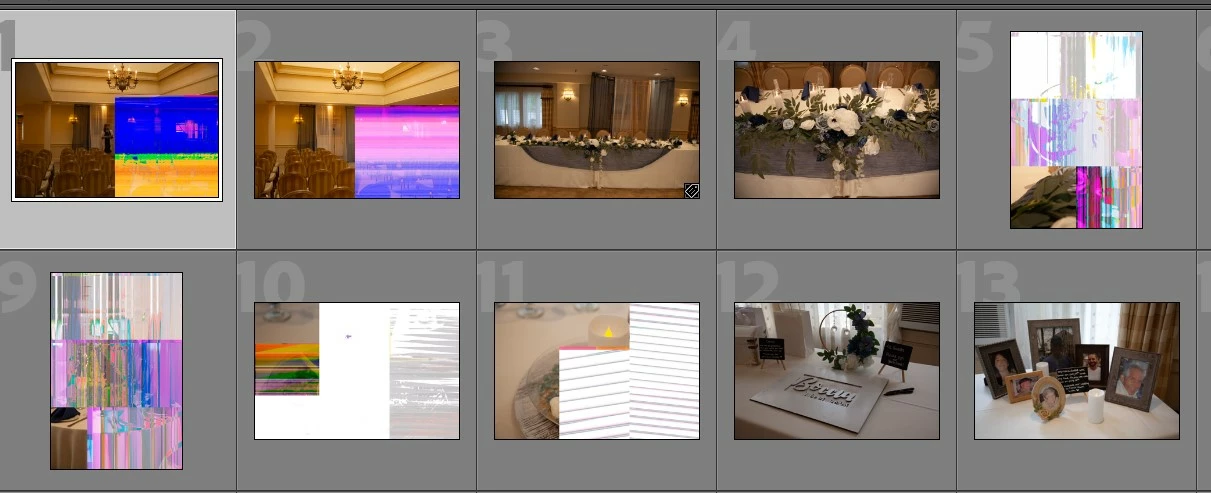
Lightroom Classic v12.4 having issue with importing files.  Strange blocks of color and data loss on random images.  It also happens when opening images with Photoshop,  Other image viewing and editing software prove the images are fine, so it's not the PC, it's Adobe.  Unable to export a clean image from any of the affected image previews.


I performed a clean uninstall and then re-installed LRC and that did not help.  I think, but not sure, there are actually more images showing up corrupted now than before the re-install.
 

This topic has been closed for replies.
Correct answer GoldingD

These are new imports? From  RAW data, Highly likely corrupt RAW data. Possibilities:


  • Problem in card reader
  • Problem in USB cable connecting card reader
  • Problem, a on memory card (hmm, but this one would also effect the embedded JPEG files??)


Some less likely:


  • Problem in cameras processor
  • Problem in hard drive


Some very unlikely:


  • LrC


Some notes, before you state, but in....


  • The image you see in camera is an embedded JPEG, not the actual RAW data. A problem can exist in the RAW data not effecting the embedded JPEG.
  • The image you first see in LrC, in PS (ACR) is that embedded JPEG
  • Many viewers do not show the RAW, they show the embedded JPEG
  •  

Possible fix, or at least something to try as a diagnostic :


  • An assumption is you used a card reader, try a different card reader
  • An even worse assumption is your card reader is external, try a different USB cord, try a  different USB port.
  • Try not using the card reader, instead import via camera connected to computer via USB. (just for this test/workaround)


2 replies

Ian Lyons
Community Expert
Community Expert
July 24, 2023

As @GoldingD has advised, the files are corrupt. So, you could reintstall LrC, etc from now to doomsday and these files will be corrupt. Your task now is to establish where the corruption originates. @GoldingD has made some suggestions as to where, although the memory card, the card reader or USB cable connecting the camera or card reader are the usual suspects.


GoldingD
GoldingDCorrect answer
Legend
July 24, 2023

These are new imports? From  RAW data, Highly likely corrupt RAW data. Possibilities:


  • Problem in card reader
  • Problem in USB cable connecting card reader
  • Problem, a on memory card (hmm, but this one would also effect the embedded JPEG files??)


Some less likely:


  • Problem in cameras processor
  • Problem in hard drive


Some very unlikely:


  • LrC


Some notes, before you state, but in....


  • The image you see in camera is an embedded JPEG, not the actual RAW data. A problem can exist in the RAW data not effecting the embedded JPEG.
  • The image you first see in LrC, in PS (ACR) is that embedded JPEG
  • Many viewers do not show the RAW, they show the embedded JPEG
  •  

Possible fix, or at least something to try as a diagnostic :


  • An assumption is you used a card reader, try a different card reader
  • An even worse assumption is your card reader is external, try a different USB cord, try a  different USB port.
  • Try not using the card reader, instead import via camera connected to computer via USB. (just for this test/workaround)


Participant
July 29, 2023

Thank you for walking through the problem with logic.   I was too close to the problem and frustratied to see what it was ... it was the card reader.  I deleted the images from LRC, then deleted the images from the hard drive.  Then copied the images to the hadr drive from the cards again using a diffrent card reader.  Imported the images to LRC again, and VOILA!  Imags are clean and glorious.  Thanks!