rs68255699
Inspiring
January 23, 2025
Answered

LRC Masks not working

  • January 23, 2025
  • 2 replies
  • 826 views

Hi,


Masks in Lightroom Classic are not working.

Is this a known issue?

Images attached.

Dutch version.


How to solve the problem. Any ideas?


Best Regards

Reina


Correct answer Rob_Cullen

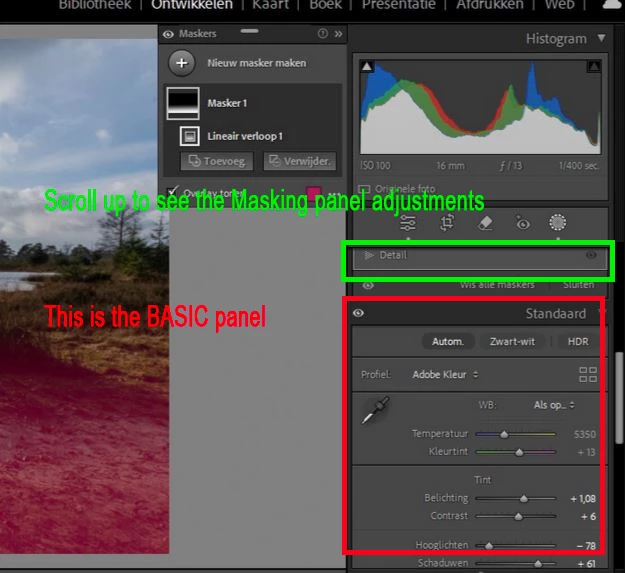
Looking at your screen-clip I might suggest that you are using adjustments in the Basic panel- which are Global adjustments.

Scroll up above the Basic panel to the Masking Panel adjustments and your masks should work correctly.


2 replies

Rob_Cullen
Community Expert
Rob_CullenCommunity ExpertCorrect answer
Community Expert
January 23, 2025

Looking at your screen-clip I might suggest that you are using adjustments in the Basic panel- which are Global adjustments.

Scroll up above the Basic panel to the Masking Panel adjustments and your masks should work correctly.


Regards. My System: Windows-11, Lightroom-Classic 15.1.1, Photoshop 27.3.1, ACR 18.1.1, Lightroom 9.0, Lr-iOS 10.4.0, Bridge 16.0.2 .
rs68255699
Inspiring
January 24, 2025

Oh my... *Blush mode*  You are totally right!

Thanks you so much! (age!!!)


Best Regards

Reina

GoldingD
Legend
January 23, 2025
  1. Please repost your system information, but instead of posting a screenshot, simply select copy, then paste that into a reply. Some info not shown might be helpful, such as library path, and any adapter 2.
  2. In what way are the masks not working? I get no clue from your screenshot.
  3. Your Camera RAW CACHE setting at the default value of 5 GB is way to small. Adobe admits that and calls for increasing it to at least 20 GB. This effects performance in Develop module. (but probably not your masking issue)
rs68255699
Inspiring
January 24, 2025

Hi,

Thanks for your tips. (The problem is solved > See answer  Rob_Cullen)

I keep your tips  in mind and will change de default setting of Camera RAW!


Best Regards

Reina
