Qamera
Inspiring
September 19, 2020
Answered

LrC Seems to have stopped syncing?

  • September 19, 2020
  • 5 replies
  • 5572 views

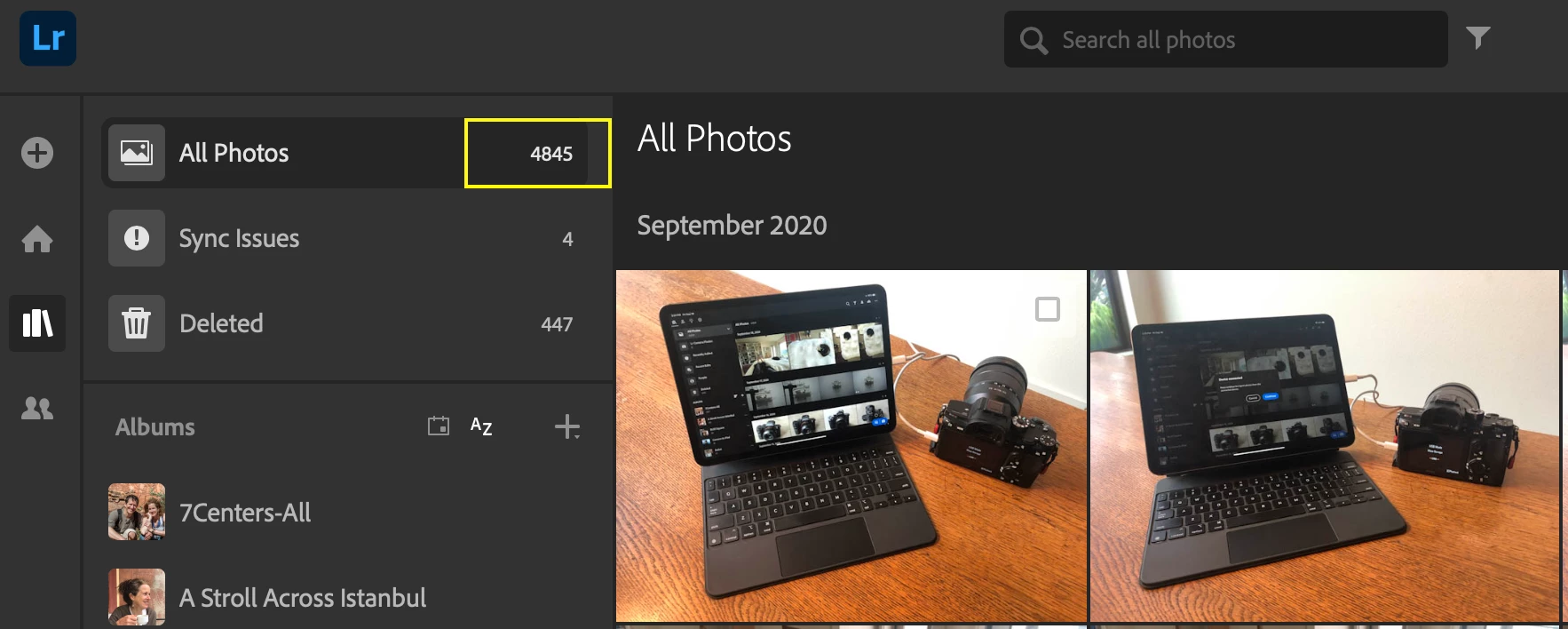
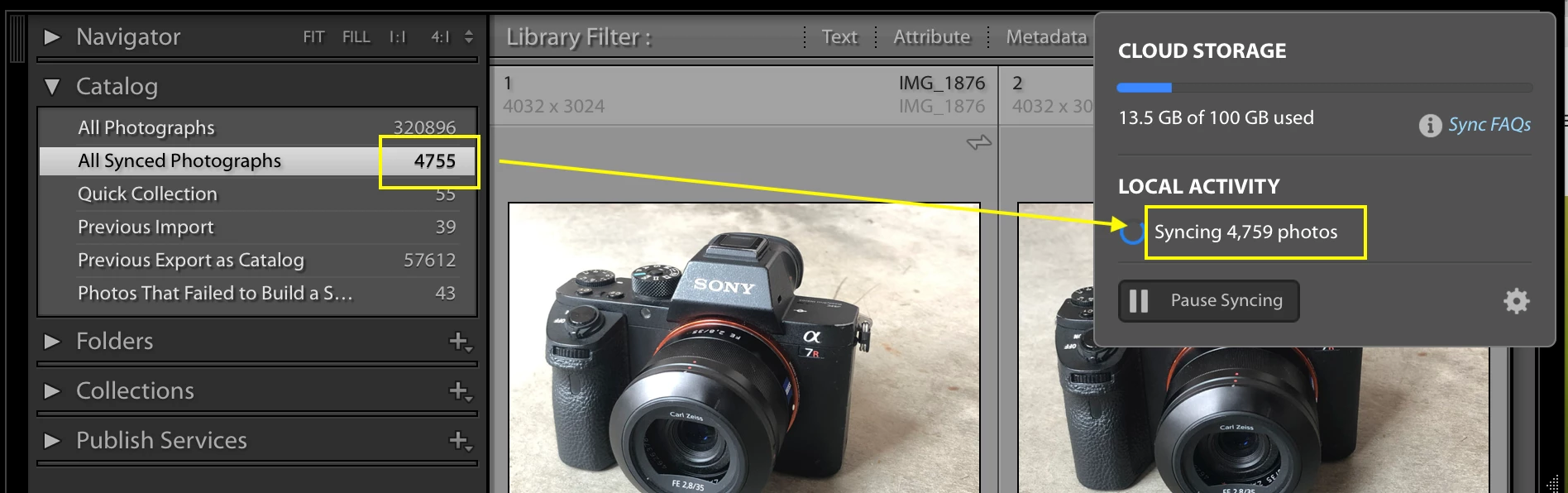
It appears as if LrC has stopped syncing.  From these two screenshots you can see a few issues:


1) On LR Web, I have 4845 photos in the Cloud

2) On LrC, it shows only 4755 photos Synced (I checked; the missing 90 photos are the most recent photos

3) Also on LrC, it says that it is actively syncing 4759 photos.  It has said that for the past two days, no change.


- I tried resetting by going to Preferences > Lightroom Sync > Rebuild Sync Data but that did not do anything. It seems to be 'stuck'. 


Any suggestions? Kick the side of the Coke Machine?


This topic has been closed for replies.
Correct answer Qamera

I found an answer over in the Adobe Photoshop Family community.  On your Mac, just delete the sync.lrdata file, which will force LrC to rebuild the sync cache.  I changed the name of the old file rather than deleting it, just to be safe.  I found the file in my default Lightroom folder on my Mac.


If anyone else has a similar issue, I would recommend first trying to rebuild sync data automatically as follows:


Go to Lightroom preferences>

Lightroom Sync>

Hold down the option key>

click Rebuild Sync Data at the bottom right of the window.

5 replies

Participant
December 23, 2024

Soyaman


Qamera
QameraAuthorCorrect answer
Inspiring
September 25, 2020

I found an answer over in the Adobe Photoshop Family community.  On your Mac, just delete the sync.lrdata file, which will force LrC to rebuild the sync cache.  I changed the name of the old file rather than deleting it, just to be safe.  I found the file in my default Lightroom folder on my Mac.


If anyone else has a similar issue, I would recommend first trying to rebuild sync data automatically as follows:


Go to Lightroom preferences>

Lightroom Sync>

Hold down the option key>

click Rebuild Sync Data at the bottom right of the window.

Michael - Lightroom user since 2006.
Known Participant
June 19, 2023

Todo parece indicar que es un BUG.

DdeGannes
Community Expert
Community Expert
September 20, 2020

https://www.lightroomqueen.com/community/threads/continual-syncing.40796/


See if the info in the thread available at the above link can assist in the problem of the syncing in Lr (cloud-based) which appears to be stuck.

Regards, Denis: iMac 27” mid-2015, macOS 11.7.10 Big Sur; 2TB SSD, 24 GB Ram, GPU 2 GB; LrC 12.5,; Lr 6.5, PS 24.7,; ACR 15.5,; (also Laptop Win 11, ver 24H2, LrC 15.0.1, PS 27.0; ) Camera Oly OM-D E-M1.
Qamera
QameraAuthor
Inspiring
September 24, 2020

Thanks DdeGannes  I read that thread but it was in reference to someone who 'migrated from classic.'  I have no intention of migrating from Classic, but I do have Lightroom  installed as well. I was not aware that it was "either/or" and there are no warnings or notifications or onboarding to that effect, on either LrC or LR.


I did delete LR iPad and re-installed it - it's showing 4,895 in "All Photos" - which, presumably,  have synced down from the Cloud because exactly the same number of photos are showing up in the cloud version lightroom.adobe.com . Meanwhile, back on LrC  "All Synced Photographs" is still stuck at 4755 and Local Activity > 'Syncing' is still stuck at 4759.  


I'm kind of thinking the only way to 'get back' is to delete all synced data and start over:


Michael - Lightroom user since 2006.
Qamera
QameraAuthor
Inspiring
September 24, 2020

Click on the info and post a screen capture of the popup.

What you have to make a decision on is the likelihood that you have original image files at their original location on your computer’s HDD a synced original in storage on you Cloud Storage and another original file that has been downloaded to the selected folder on you computer HDD.


Could you be more specific about "click on the info"?

I'm happy to make a decision once I know what's causing the problem, and how to fix it.

Michael - Lightroom user since 2006.
DdeGannes
Community Expert
Community Expert
September 20, 2020

Just another thought.

Just viewing your screen capture it appears you have synced 4845 original image files from Lr (cloud-based) app to the Cloud Storage and 4 Original image files that are stuck, syncing, are they unsupported files e.g. video files??


The screen capture from LrC appears to indicate that you have 4755 files synced, how many from collections in LrC and how many from Lr (cloud-based) and how many from mobile devices? Also, there are 4957 files, apparently stalled syncing, are these the files from LrC Collections??

These are the questions I cannot answer.

One thing is likely, you have original files in the cloud storage, original files in the original location of your computer, and original files in the download folder on your computer.


Regards, Denis: iMac 27” mid-2015, macOS 11.7.10 Big Sur; 2TB SSD, 24 GB Ram, GPU 2 GB; LrC 12.5,; Lr 6.5, PS 24.7,; ACR 15.5,; (also Laptop Win 11, ver 24H2, LrC 15.0.1, PS 27.0; ) Camera Oly OM-D E-M1.
DdeGannes
Community Expert
Community Expert
September 19, 2020

Are you running LrC (classic) and

Lr (cloud-based) on the same Computer? If so this can create problems, LrC will be syncing smart previews to the from selected collections in the Library Module.

Lr (cloud-based) will sync original files to the Cloud Storage and then sync copies of the original files on your computer to a default or designated folder on your computer.

https://www.lightroomqueen.com/lightroom-cc-vs-classic-features/


Regards, Denis: iMac 27” mid-2015, macOS 11.7.10 Big Sur; 2TB SSD, 24 GB Ram, GPU 2 GB; LrC 12.5,; Lr 6.5, PS 24.7,; ACR 15.5,; (also Laptop Win 11, ver 24H2, LrC 15.0.1, PS 27.0; ) Camera Oly OM-D E-M1.
Qamera
QameraAuthor
Inspiring
September 19, 2020

Thanks for the reply. Yes I am using LR but rarely; sometimes I pull it up just to familiarize myself with the UI. But LrC is what I've been using for years.  Anyhow I closed LR down but am still having the same problems with LrC. Any suggestions?

Michael - Lightroom user since 2006.
DdeGannes
Community Expert
Community Expert
September 20, 2020

Have you used the link I have provided to solve your problem. I am not able to provide any clear solution to your problem.

I see from your screen shot that there 4 files that are not syncing. Are those files are unsupported for syncing like video files?

Regards, Denis: iMac 27” mid-2015, macOS 11.7.10 Big Sur; 2TB SSD, 24 GB Ram, GPU 2 GB; LrC 12.5,; Lr 6.5, PS 24.7,; ACR 15.5,; (also Laptop Win 11, ver 24H2, LrC 15.0.1, PS 27.0; ) Camera Oly OM-D E-M1.