Known Participant
September 7, 2022
Answered

LrC will not open

  • September 7, 2022
  • 7 replies
  • 1064 views

LrC suddenly will not open.

When I'm in the CC app and click to update LrC I'm told that I need to close the LrC program before continuing. But the LrC program is not open!

Can anyone help me with this?

This topic has been closed for replies.
Correct answer Rob_Cullen

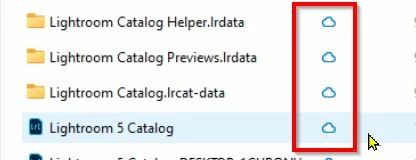
Lightroom-Classic MUST HAVE the catalog file 'Local'.  ie NOT in any form of Cloud, or "online", storage.

You need your Catalog in a 'Local' folder- NOT in OneDrive.


From your screen clip-
 

And from the Microsoft notes about OneDrive-
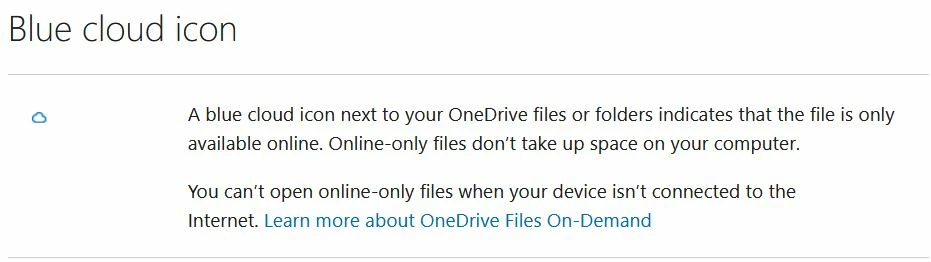
https://support.microsoft.com/en-us/office/what-do-the-onedrive-icons-mean-11143026-8000-44f8-aaa9-67c985aa49b3

7 replies

Rob_Cullen
Rob_CullenCorrect answer
Community Expert
September 19, 2022

Lightroom-Classic MUST HAVE the catalog file 'Local'.  ie NOT in any form of Cloud, or "online", storage.

You need your Catalog in a 'Local' folder- NOT in OneDrive.


From your screen clip-


And from the Microsoft notes about OneDrive-

https://support.microsoft.com/en-us/office/what-do-the-onedrive-icons-mean-11143026-8000-44f8-aaa9-67c985aa49b3

Regards. My System: Windows-11, Lightroom-Classic 15.0, Photoshop 27.0, ACR 18.0, Lightroom 9.0, Lr-iOS 10.4.0, Bridge 16.0 .
DdeGannes
Community Expert
September 19, 2022

Thanks for that info, Rob, hope this helps the Author to solve her problem.

My wife has a Win Laptop and OneDrive is driving her berserk, I have uninstalled it and then a month later it is reinstalled.


Regards, Denis: iMac 27” mid-2015, macOS 11.7.10 Big Sur; 2TB SSD, 24 GB Ram, GPU 2 GB; LrC 12.5,; Lr 6.5, PS 24.7,; ACR 15.5,; (also Laptop Win 11, ver 24H2, LrC 15.0.1, PS 27.0; ) Camera Oly OM-D E-M1.
DdeGannes
Community Expert
September 19, 2022

Another thing that causes LrC not to boot on Windows OS is out of date GPU drivers, I know you have a new computer, however this is still a possibility. Go to the website of the GPU card that is on your computer and see if there is an update available. There may be two "Studio and Gaming", best to use Studio.


Regards, Denis: iMac 27” mid-2015, macOS 11.7.10 Big Sur; 2TB SSD, 24 GB Ram, GPU 2 GB; LrC 12.5,; Lr 6.5, PS 24.7,; ACR 15.5,; (also Laptop Win 11, ver 24H2, LrC 15.0.1, PS 27.0; ) Camera Oly OM-D E-M1.
GoldingD
Brainiac
September 19, 2022

While DdeGannes has provided you with the fix, I will comment on a future problem I see in your screen capture


You have a folder named Backups.


Is this the location you backup your LrC catalog to?


Backups should not be created on the same hard drive as the data you are backing up. That hard drive eats the dust, your catalog eats the dust, then no backup.

Known Participant
September 19, 2022

Thanks. I'm transferring my backups folder to my external hard drive.

DdeGannes
Community Expert
September 19, 2022

If you have installed LrC on the new computer could you do the following. Take a screen capture of the folder where your Lightroom Catalog file is located. By default it should be in your HDD your user account > Pictures > Lightroom.

The Lightroom Catalog ends with the extension .lrcat (LRCAT).

Use the insert photo icon so the image appears in the body of your post.


Regards, Denis: iMac 27” mid-2015, macOS 11.7.10 Big Sur; 2TB SSD, 24 GB Ram, GPU 2 GB; LrC 12.5,; Lr 6.5, PS 24.7,; ACR 15.5,; (also Laptop Win 11, ver 24H2, LrC 15.0.1, PS 27.0; ) Camera Oly OM-D E-M1.
Known Participant
September 19, 2022

Thanks. Is this what you are looking for?


DdeGannes
Community Expert
September 19, 2022

Yes, I believe this would be helpful.

Provided the following is accurate then you can proceed with the steps indicated below.

The screen capture is from the new computer.

Lightroom Classic was closed when the screen capture was taken.

The Catalog file I have marked as 1 (one) is likely from your old version of Lightroom 5.

The Catalog file marked 2 (two) is likely the Catalog created on the new computer when the previous Catalog was upgraded.

First, delete the two files marked with a red X.

Next, double-click on the Catalog file marked 2, this should cause Lightroom Classic to boot and open this Catalog.

See the screen capture.

Let us know if this works.


The 

Regards, Denis: iMac 27” mid-2015, macOS 11.7.10 Big Sur; 2TB SSD, 24 GB Ram, GPU 2 GB; LrC 12.5,; Lr 6.5, PS 24.7,; ACR 15.5,; (also Laptop Win 11, ver 24H2, LrC 15.0.1, PS 27.0; ) Camera Oly OM-D E-M1.
GoldingD
Brainiac
September 19, 2022

So new computer, new install of LrC. Is the catalog new, or as is likely old copied to the new computer? Or perhaps on a old drive in or attached to that new computer?


Known Participant
September 18, 2022

Lightroom classic wouldn't open on my old computer. I bought a new computer because I wanted a new one anyway. Lightroom Classic still won't open. There's just nothing. Can anyone help?

Brainiac
September 7, 2022

Did you try re-starting your computer? 


If that doesn't work, please provide more information: quote the exact complete word-for-word error message; tell us the version NUMBER of your Lightroom Classic; tell us the version NUMBER of your operating system.

Known Participant
September 18, 2022

I don't get any error message. Nothing happens when I try to open LrC.

The version number of my operating system is 21H2

The version of LrC is 11.5

I installed LrC on a brand new computer and it still won't open. Creative Cloud and Lr open fine.