
Participant
July 3, 2022
Question

M1 Mac memory overflow

  • July 3, 2022
  • 1 reply
  • 178 views

I have been using the M1 version mac since last Dec. The memory overflow issue with lightroom classic has been bothering me since then. There are some identical reports but seems the problem has not been fixed. Look at the screenshot attached here. The memory would go from ~3GB to ~19GB after working with several raw files. This is when the "using GPU for image processing" is off. If that setting is on, the memory will be used up even faster. I have 32GB memory but that cannot last long with this bug. Please fix ASAP. This is a very severe problem.


start

after working on several raw files

settings
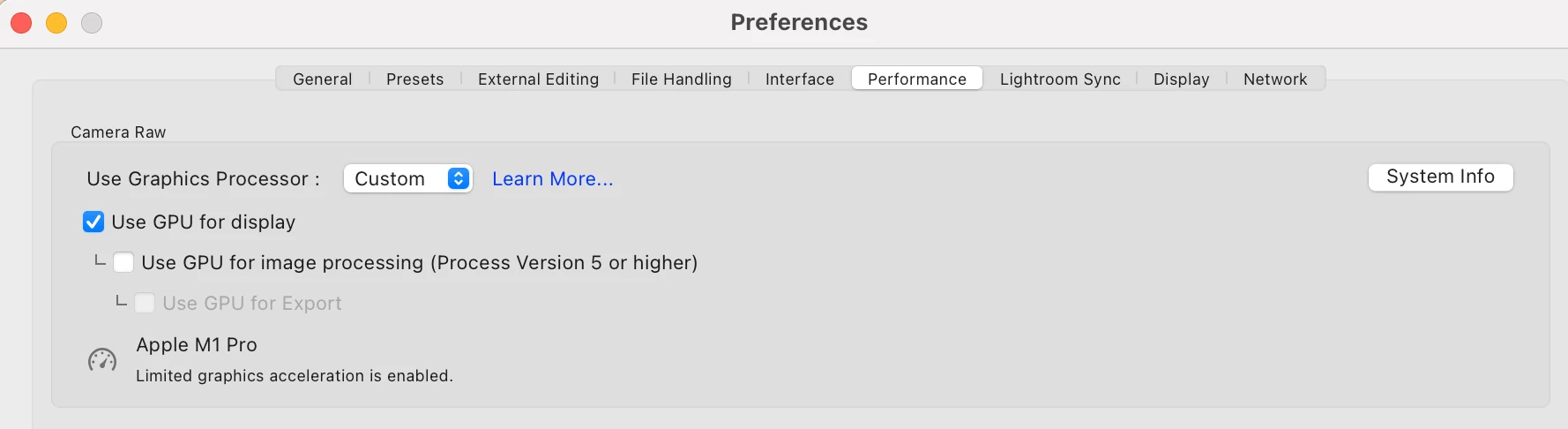


This topic has been closed for replies.

1 reply

Ian Lyons
Community Expert
Community Expert
July 3, 2022

The M1 family of processors uses Unified memory and so shares this with the GPU. It seems that managing the GPU allocation is causing issues with some applications, hence disabling or limiting what it does helps to reduce memory use. Obvioulsy, disabling or limiting GPU support is far from ideal. So, to assist us it's best you provide more information regarding your setup and workflow. For example:


1. LrC 11.4 or 11.4.1

2. macOS version

3. Mac model / spec

4. Are you using a 4K display? If yes, then what resolution?

5. Image type (RAW, JPEG, Mov, etc.)

6. Are you using any third party apps with LrC (e.g. DxO Pure Raw, Topaz, ON1, etc)

7. Are there specific edits / adjustments that seem to make the memory issue worse (e.g. walking though images in Devlop module, Spot Heal/Clone, Masks, etc).

7. Is a swap file being created?


It would also be helpful if you uploaded screenshot showing the Memory tab of Activity Monitor. Ideally, you should capture same with GPU fully enabled and when memory pressure is high (i.e. when close to or above your 32GB).