
Known Participant
December 9, 2022
Answered

Macbook Pro M1 | Nikon Z6 II tethering not working

  • December 9, 2022
  • 3 replies
  • 4813 views

Hello,

I have a Macbook pro M1 and want to use tethered shooting with my Nikon Z6 II.
All device are with the current firmare.


I did everything as described on the Adobe page. Connected my camera via USB-C with MBPro, start LR Classic and Tethering, LR CLassic starts again in Rosetta-mode, starting tethering but cameria will not be recognized.


It's a big problem because I have to shoot my business photography via tethering in front of my clients.
The previous camera Nikon Z6 did it very well, but not with the Nikon Z6 II.


I tried already a lot of things like "disable USB-loading", usage without cards in the camera.

I need very urgent support and solution, because jobs have to be executed.

I hope that somebody can give me right solution.
 

This topic has been closed for replies.
Correct answer Rikk Flohr_Photography

"If you save your catalog on an external drive or if you are tethering with Nikon products, please read before you update your Mac OS to Ventura (13.x)

https://helpx.adobe.com/lightroom-classic/kb/known-issues.html "

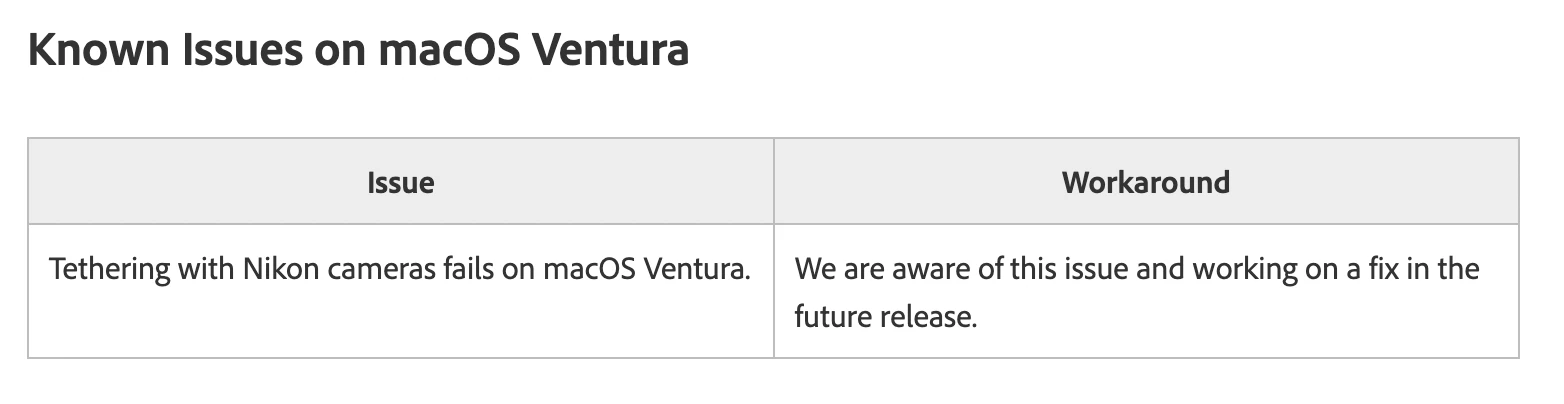
From the link: 


3 replies

ygourvennec
Participating Frequently
December 14, 2022

I ran into the same issue and as I'm shooting with my D850 tethered to Lightroom on my M1 computer, I've had to find a workaround. Here's what I did to solve the issue, if that's any help to you. 


1. I have an older Intel-based MBP. I switched macs in the studio, I shoot tethered on my Intel Mac and select the pictures with my client to delete unnecessary shots, I save all on the local SSD, it synchonises on my Synology SAN, then I go back to my desk with the more powerful M1, it synchronises with the SAN in realtime, I then open the relevant Lighroom catalogue and go into post prod on the M1. The Intel stays in the studio, only the .NEF files are passed to the other side (synchronised through the Synology Drive SW rather), I even use 2 different catalogues to avoid conflicts (I synchronise my Lightroom catalogues between macs via Onedrive at live.com). A bit convoluted but the process works fine and is fast. The trick is to recycle an older Mac and dedicate it to the studio. All postprod being done on a newer, more powerful Mac. I think I will keep this process even after they have updated the firmware because it works fine and it's quite effective.

2. Alternative solution: install darktable, it's free for all and it works fine with my D850 (haven't tried it with the Z7 I wouldn't dream of using the Z7 for my studio work).  In Darktable plug camera into your M1 Mac, switch camera on, click "mount" and you'll be taken to the tethering tab. Display and transfer is much slower but it works fine anyway and it does the job. Next open Lightroom and import files separately and go into post prod. 


I tried to install Nikon NX it did find the D850 but I havent managed to make it work though.


HTH 

Participant
January 24, 2023

I have teh same problem with My Nikon D810. The problkem is within Adobe and they will not solve the problem . I have tested the Nikon software and it works correctly.

So Adobe what will you do abouth it?

Rikk Flohr_Photography
Community Manager
February 28, 2023

Glad I found this thread. This is a very frustrating situation. Luckly I have a few days before a photoshoot. Adobe suggests Rosetta... which keeps crashing for me, useless. My work round is to use my older 2012.5  MacBook Pro with OS 10.13 and Lightroom 9.4. Tethering LR with Nikon has worked great for years with my Nikon D5 on this machine. So much for enjoying my new Mac. Glad I saved my old Mac. Might be good ime to switch to Capture One?


@peterjg1969 This information is outdated. Lightroom Classic 12.2 in conjunction with Ventura 13.2.1 should be working. See:https://community.adobe.com/t5/lightroom-classic-discussions/p-mac-ventura-known-issues-please-read-before-you-upgrade-your-os/m-p/13295031#M295243 

Rikk Flohr: Adobe Photography Org
Community Expert
December 9, 2022

I don't think you can get Nikon tethering in Lightroom working yet on M1 computers. I have tethered on my M1 Mac running Ventura by simply using the Nikon NX Tether app and setting it up to dump images into a folder that gets autoimported into Lightroom Classic. This works fine. Not as nice as tethering straight into Classic but it works.

Known Participant
December 9, 2022

Thank you for your input. 
If the problem cannot be solved, this could be a workaround.

Known Participant
December 9, 2022

Thank you for your idea, but if I understood this article correct, it refers to a local drive for the catalog.
My catalog is on a local drive. 

That means, this article doesn't reflect my Problem, isn't it?

Community Expert
December 9, 2022

Read the whole post. Tethering with Nikon cameras doesn't work on M1 macs and Ventura yet because Nikon hasn't updated their Tethering SDK yet.