

Participating Frequently
July 25, 2023

P: Canon 24-240 lens profile v3

  • July 25, 2023
  • 56 replies
  • 16039 views

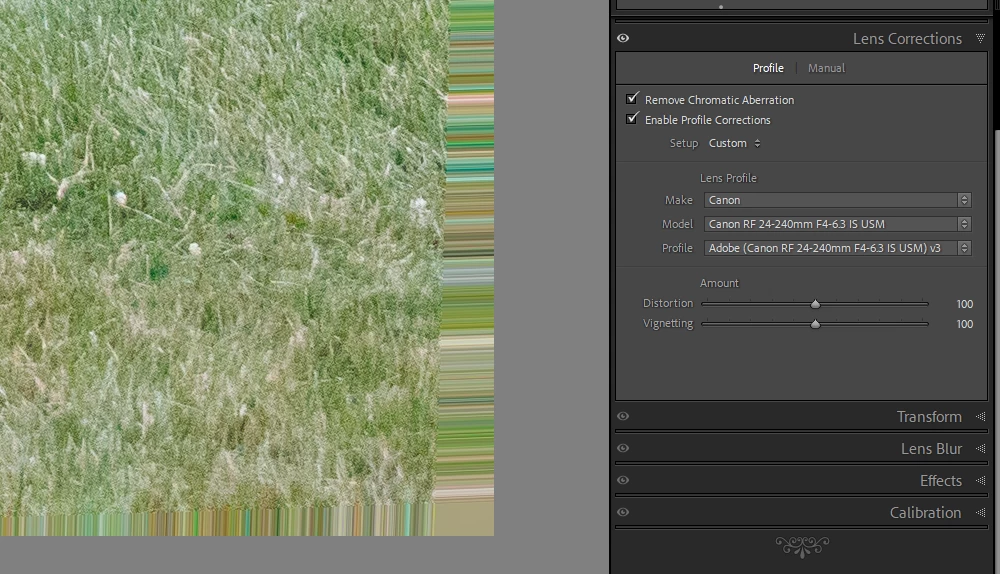
On the latest Lightroom Classic release version 13.5 there is a new lens profile (v3) for the Canon 24-240 lens. It has reintroduced the "bad borders" bug. Workaround is simply to select the older v2 profile.

This topic has been closed for replies.

56 replies

Participant
September 2, 2024

And I shoot with Canon R6 and Canon R6 Mark II

Participant
September 2, 2024

Also. for me, the LR 24-240 profiles show more image than I see in the viewfinder.

I wish they fixed it 'cause I am composing with the zoom and I don't want to do extra cropping.

Correct me if I  am wrong.

Participant
September 2, 2024

I have the same bug. Cropping the image produces an image which is tad wider than the one that Canon Digital Professional Shows.

LR profiles v2 and v1 show a tad wider image than the one shown by v3 after cropping off the stripes.

For now, I am using v2.

Jacky100
Participant
September 1, 2024

I also have thi same problem with the latest version V3 for the Rf 24 240mm Lens , so I just reverted to V2, but it was boggling to find out what was the cause , since I have this lens just a few months ago !

Participant
August 31, 2024

You can even use the version 3 profile within its limits if you find that it improves on version 2 in some aspect.


The bug in the version 3 profile doesn't remove anything from the edges, the bad borders is because it's showing an area outside the original image data.


You can just crop the image to remove the borders, just like the profile was supposed to do. The only drawback is that you get slightly smaller image dimensions.

Participant
August 25, 2024

En la R6 mark ii con objetivo canon serie R. Las fotos el Lightroom en los laterals empasta las imagenes, como si estuvieran movidas y desenfocadas. Sin embargo los Raw estan bien.

Per Berntsen
Community Expert
Community Expert
August 25, 2024
quote

On the R6 mark ii with a Canon R series lens. The photos in Lightroom on the sides blend the images, as if they were shaky and out of focus. However, Raw is fine.


By @Jose2848207309ld


Are you using the 24-200 mm lens?

Use the version 2 lens profile instead of version 3.

See https://community.adobe.com/t5/lightroom-classic-discussions/many-many-images-have-corruped-edge-all-around-the-image-iafter-import-to-lightroom/m-p/14820325#M376545


and https://community.adobe.com/t5/camera-raw-bugs/p-canon-24-240-lens-profile-v3/idc-p/14811923#M5745

Participant
August 25, 2024
GRACIAS
Participant
August 25, 2024

After importing my RAW images to lightroom yesterday I noticed that quite alot of them had a corruped edge added on all around the images which look like streaky vertical lines on the top and bottom edges and streaky lines on the left and right edges.  The images both RAW and JPEG look fine on Windows Explorer. I'd like to re-import those corruped ones but can't. See the original jpeg and the exported jpeg of one of the images.

Per Berntsen
Community Expert
Community Expert
August 25, 2024

Are you using a Canon 24-240 mm lens?

If so, use a version 2 lens profile instead of version 3, the version 2 profile is buggy.

Edit: It's of course the version 3 profile that's buggy.

See https://community.adobe.com/t5/camera-raw-bugs/p-canon-24-240-lens-profile-v3/idc-p/14811923#M5745


Also note that the Windows file explorer cannot display raw files, so it displays the jpg embedded in the raw files.


Ian Lyons
Community Expert
Community Expert
August 25, 2024

@Per Berntsen 


the version 2 profile is buggy.


It's the version 3 profile that's buggy.


Inspiring
August 21, 2024

Perfect, thanks.
Can that be applied automatically to very image in the catalog?

Ian Lyons
Community Expert
Community Expert
August 20, 2024

Using Lightroom Classic


First you need to ensure that you have an image Canon RF 24-240mm lens selected in Lightroom Classic.  You then need to open the 'Lens Corrections' panel. Next, select the 'Profile' drop down menu. You'll see three profile options listed. Select the profile identified as v2 as shown in attached screenshot.


Using Camera Raw


First you need to ensure that you have an image Canon RF 24-240mm lens open in Camera Raw.  You then need to open the 'Optics' panel. Next, select the 'Profile' drop down menu. You'll see three profile options listed. Select the profile identified as v2 as shown in attached screenshot.


Inspiring
August 20, 2024

How do I select v2 profile in Lightroom?