
Inspiring
January 31, 2018
Answered

Map module not finding photos from track log

  • January 31, 2018
  • 1 reply
  • 3837 views

After searching I saw this was an issue in 2012 (and still unanswered apparently) so I thought I would refresh the question...

1) Running LR Classic CC on a 27" retinal iMac on OSX High Sierra all fully updated.

2) Have been on CC for at least 2 years; 44GB catalog size, about 50K images - never had any issues like this before

I have been using followmee.com to download my location as a GPX file and matching them to images in the map module without incident for 6 months (I hadn't known of the capability before then, my bad). Yesterday going through the exact same process, I got the message "no matching photos" - despite the fact that in the develop module I see the time stamp is accurate and, again, this never happened before.

I have repeatedly downloaded GPX tracks from followmee.com with different time intervals - last 6 hours, last 12 hours, etc. - all with same result. When I load the track it does appear on the map itself as a blue line showing my locations, so it would seem that part is working okay.

The one other problematic behavior is that I can no longer move multiple images in the develop view - I can select multiple images but when I attempt to move them by clicking and dragging them to the folder I want to put them in they all deselect.

I have reset PRAM (or is it NVRAM now?) and restarted multiple times, as well as shut down and totally unplugged the iMac altogether, to no avail.

Do I need to uninstall/reinstall LR? If so, how do I go about doing that?
This topic has been closed for replies.
Correct answer johnrellis

You know what? You may be right, and I suspect followmee.com has changed their file system or something.

Case in point - yesterday I took photos at about 1PM and again at about 5PM in the same basic location. Lat night, I downloaded the followmee track for the entire day (this was about 10PM). I selected all the photos but only the ones taken at 1PM connected. So I figured perhaps it has to do with the 7 hour time difference between Mountain time and Universal.

Just now (9AM on 2/2) I downloaded the track for all of 2/1 - and still the 5PM images are not being matched.

Again, the camera clock is correct, the EXIF files show the right time, and I've altered nothing. The iMac time is also correctly showing 9AM.

This just gets weirder and weirder.

I will upload one of the 5PM original images as well as the GPS trck I just downloaded to that same dropbox folder, if anyone wants to take a look.


Just now (9AM on 2/2) I downloaded the track for all of 2/1 - and still the 5PM images are not being matched.

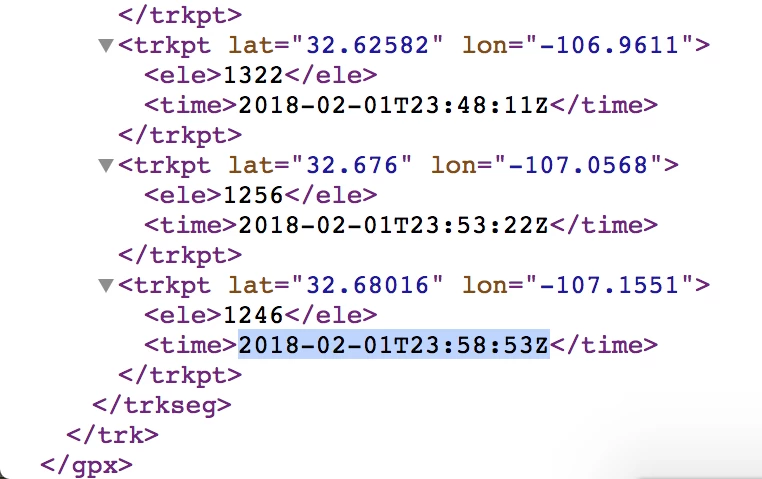
Same problem: The track log for 2/1 ends at 2/1/18 4:58 pm MST, while the capture time recorded in 2018-02-01_Hatch_09.RAF is 14 minutes later, at 2/1/18 5:12 pm.

Perhaps the problem is that followmee.com defines a "day" as 2/1/18 0:00:00 to 2/1/18 23:59:59 in UTC, rather than local time.  The end of this "day" would be 2/1/18 17:00 MST, or 5:00 pm MST -- that's exactly when the track log ends.  Try downloading 2/1 7:00 through 2/2 7:00, which will get a complete "day" in MST.

Here's the end of the log as shown by Chrome:

1 reply

johnrellis
Legend
January 31, 2018

It can annoyingly difficult to troubleshoot problems with tracklogs because LR is fussy and because key information about the logs and in the photos is not easy to see.  You may be tripping over a new or partial incompatibility between Followmee.com and LR. 

I suggest you upload the problem GPX log and one photo to Dropbox or similar and post the sharing link here.  I can take a look at what's going wrong.

f8leeAuthor
Inspiring
February 1, 2018

Thank you for your answer - I uploaded 3 files to the following dropbox linked file:

- First, a new GPX file I just downloaded this evening from followmee.com - this time I set if for the past three days to be all inclusive

- Next, there are two image files, one taken yesterday (the 30th) and one today - both taken from the same spot actually (trying to catch moonrise over the local mountains).

Note that when I load the GPX file into the map module it does show the blue tracing line of my whereabouts (which it has alays done, as usual).

A new weirdness today is that, just for yuks, I attempted to apply the locations to all the shots I took yesterday and today - and this time LR DID assign locations to the files from yesterday! Mind you, yesterday it failed to find mathing photos in the umpteen times i attempted the process - I downloaded various timespan GPX files from followmee at least 6 times yesterday and each time, the map showed the blue trace and yet would not assign coordinates to the photos I took yesterday.

Today it was able to apply locations to yesteday's images, but not todays! Is it somehow running a day behind?

Anyway, do please let me know if it makes any sense to you.

Dropbox - LightroomGPX

Meanwhile, I am still unable to select multiple images in the library modules and drag them to a different folder in the Folders panel - that's another new glitch that just started happening yesterday.

So thank you again for any guidance you can give me,

johnrellis
Legend
February 1, 2018

The photos you uploaded are missing capture dates, so LR uses the file's last-modified times (Feb 1 3:26 AM on my computer).  Are these versions that you exported from LR?  (They're only 800 x 1200.)  Ideally, you could upload the originals you're using in the Map module, or if you're reluctant to do that, when you export them, select the export option Metadata > Include: All Metadata.