[This post contains embedded images that don't appear in email. View the post in your Web browser to see the images.]
"I have a number of images showing the down arrow icon"
Assuming this is the down-arrow icon you're seeing:
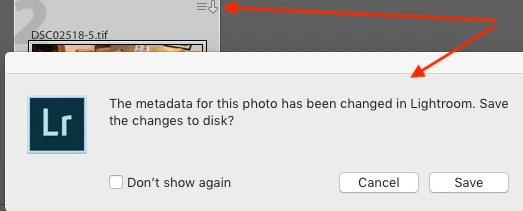
that means you've made changes in LR to the photo's develop settings or metadata (e.g. the Caption field) and those changes have yet been written back to disk (to the .xmp sidecar of a raw file or the photo file itself for non-raws).
"Is there a filter or other option which will allow me to see all the images that need to have its meta data updated"
In the Library Filter bar, use the Metadata browser with the Metadata Status column and click on Has Been Changed:
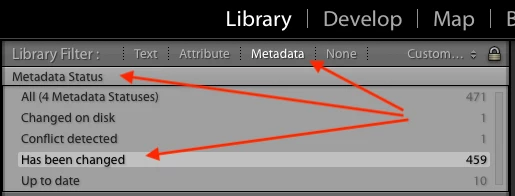
You can select all the changed photos and do Metadata > Save Metadata To File to cause the changed metadata to be saved back to disk. Or you can check the option Catalog Settings > Automatically Write Changes Into XMP, which many of us like to use as a secondary backup if (when) your primary backups of the LR catalog fail (and as a way of backing out changes to individual photos).
"Is there a way to see what if any changes to the meta data will be made"
There's no straightforward way to do it. There are quite tedious low-level ways of doing it using the ExifTool utility (details on request).
Many people have asked for this feature:
https://feedback.photoshop.com/photoshop_family/topics/before_after_comparison_of_metadata_conflicts.
Please add your constructive opinion to the feature request, and be sure to click Vote and Follow in the upper-right corner. That will make it a little more likely that Adobe will pay attention.
[Use the reply button under the first post to ensure replies sort properly.]

 AdChoices