
Participant
July 18, 2023
Answered

Metadata/Keywords Missing

  • July 18, 2023
  • 3 replies
  • 910 views

I've been experiencing some "funny issues" with metadata/keywords.

Today, I was putting some keywords, and what I've done was:
- After edition, I insert keywords, some of them were new, and one was already in the catalog;
- After insert them, I changed the ones that were "person keywords", I mean I converted the keywords into person keywords;
- Then I saved all the metadata (so far I was just doing this in the .raw files, so the save was done in a sidecar file);
- After all I exported all the images that I wanted... On the options of the export I select to have all metadata included;
- Once the export process was done I went to check the file (.jpeg) and only one keyword was saved in the file. That word was the "old" keyword that was already in the catalog, from previous editions.


I got confused, as I really don't get what's the "problem".
Does this happened to someone else?

I am using Lightroom Classic version: 12.4.


Thank you in advance.
This topic has been closed for replies.
Correct answer richardplondon

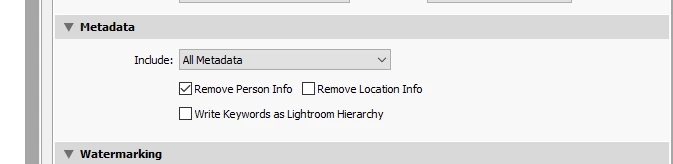
In particular, check the separate (privacy) checkbox "Remove Person Info" - which acts as an override, even if you've otherwise chosen to include "All" (kinds of) Metadata.


3 replies

Participant
July 19, 2023

Alright... Never linked the "Remove Person Info" with Person Keyword.
I thought it was something like my personal info.

And now it make all sense, as not all the times I convert all the new keywords into person keywords before export... And it happens that new keywords come out, but "old" keywords (that in the mean time I already did the convertion) they don't show up.

Thank you very much for the help.

Community Expert
July 19, 2023

AFAICT the idea is that one can classify keywords as "person" type, that have some privacy or confidentiality aspect - over and above LrC's person detection functions. Then one can include / omit such keywords wholesale, depending on the particular purpose being exported for.


Similarly, there is a (separate) privacy option to leave out geolocation information by selecting a different export option instead of "All metadata".


If there are particular known usages that you export for from time to time, the appropriate settings (all settings together) can be efficiently saved out for each purpose, in the form of named export presets. You can opt within this, to have LrC ask you for a destination folder each time. A preset can then be reloaded on demand - resetting everything to that same, tried and tested export setup - avoiding potentially unwanted settings persisting from the previous export.

Participating Frequently
July 18, 2023

In addition to choosing to export with "All Metadata", did you uncheck the box for "Remove Person Info"? If you left that box checked, your People keywords won't be exported.


dj_paige
Legend
July 18, 2023

You are saying (if I am understanding properly) that the keywords exist in LrC (and you have confirmed that in LrC they show up as expected), but then when you export, the keywords are not in the files (and you have confirmed in your OS or other tool that they are not present). 


If that's correct, the only think I can think of that can be causing this is that the option in Export to include all metadata is not selected.


Thus, I am asking you to double-check and triple-check that all of these three things are correct. The only explanation I can think of is that somewhere, you are not doing what you think you are doing. But you said you checked the option and it is set properly.

richardplondonCommunity ExpertCorrect answer
Community Expert
July 18, 2023

In particular, check the separate (privacy) checkbox "Remove Person Info" - which acts as an override, even if you've otherwise chosen to include "All" (kinds of) Metadata.