ThaiWest10146143
Participant
September 12, 2018
Answered

Missing Dehaze Effect in Lightroom Classic CC

  • September 12, 2018
  • 2 replies
  • 10826 views

Within Effects, the Dehaze adjustment is missing! There is only Post-Crop Vignetting and Grain…

    This topic has been closed for replies.
    Correct answer JP Hess

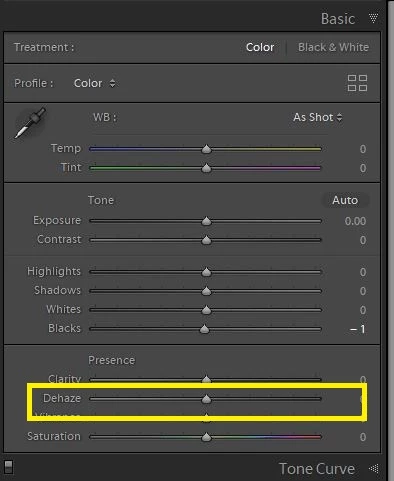
    If that is the version you are using then the dehaze adjustment should be found in the basic panel.
    2 replies

    ThaiWest10146143
    Participant
    September 12, 2018

    This is a applcation wide problem for me… I is totally missing! Not shown in any panel! My Lightroom Classic build is 1186149.

    Also, interetingly, it is missing from Camera RAW as well!

    Akash Sharma
    Legend
    September 12, 2018

    Could you please post the Lightroom Help>>System info report here?

    ~Akash

    ThaiWest10146143
    Participant
    September 12, 2018

    Lightroom Classic version: 7.5 [ 1186149 ]

    License: Creative Cloud

    Language setting: en-US

    Operating system: Mac OS 10

    Version: 10.13.6 [17G65]

    Application architecture: x64

    Logical processor count: 4

    Processor speed: 2.7 GHz

    Built-in memory: 12,288.0 MB

    Real memory available to Lightroom: 12,288.0 MB

    Real memory used by Lightroom: 639.5 MB (5.2%)

    Virtual memory used by Lightroom: 1,610.2 MB

    Memory cache size: 1.2MB

    Internal Camera Raw revision: 1001

    Maximum thread count used by Camera Raw: 3

    Camera Raw SIMD optimization: SSE2,AVX

    Camera Raw virtual memory: 176MB / 6143MB (2%)

    Camera Raw real memory: 177MB / 12288MB (1%)

    Displays: 1) 2560x1440

    Graphics Processor Info:

    OpenGL: AMD Radeon HD 6770M OpenGL Engine

    Check OpenGL support: Passed

    Vendor: ATI Technologies Inc.

    Version: 4.1 ATI-1.68.20

    Renderer: AMD Radeon HD 6770M OpenGL Engine

    LanguageVersion: 4.10

    Total Video Memory: 512 MB

    Application folder: /Applications/Adobe Lightroom Classic CC

    Library Path: /Volumes/OWC 2/Photos/Lightroom/Working Friends Photos/Working Friends Photos.lrcat

    Settings Folder: /Users/ronwest 1/Library/Application Support/Adobe/Lightroom

    Installed Plugins:

    1) AdobeStock

    2) Aperture/iPhoto Importer Plug-in

    3) Athentech Perfect Eyes

    4) Athentech Perfect Skin

    5) Aurora HDR 2017

    6) Aurora HDR 2018

    7) Canon Tether Plugin

    8) ColorChecker Passport

    9) Facebook

    10) Flickr

    11) FX Photo Studio CK

    12) Luminar

    13) Nikon Tether Plugin

    14) ON1 Photo RAW 2017

    15) ON1 Photo RAW 2018

    16) ON1 Resize 2017

    17) ON1 Resize 2018

    18) Perfectly Clear Complete v3

    Config.lua flags: None

    AudioDeviceIOBlockSize: 512

    AudioDeviceName: Built-in Output

    AudioDeviceNumberOfChannels: 2

    AudioDeviceSampleRate: 44100

    Build: Uninitialized

    CoreImage: true

    GL_ACCUM_ALPHA_BITS: 0

    GL_ACCUM_BLUE_BITS: 0

    GL_ACCUM_GREEN_BITS: 0

    GL_ACCUM_RED_BITS: 0

    GL_ALPHA_BITS: 8

    GL_BLUE_BITS: 8

    GL_DEPTH_BITS: 24

    GL_GREEN_BITS: 8

    GL_MAX_3D_TEXTURE_SIZE: 16384

    GL_MAX_TEXTURE_SIZE: 16384

    GL_MAX_TEXTURE_UNITS: 8

    GL_MAX_VIEWPORT_DIMS: 16384,16384

    GL_RED_BITS: 8

    GL_RENDERER: AMD Radeon HD 6770M OpenGL Engine

    GL_SHADING_LANGUAGE_VERSION: 1.20

    GL_STENCIL_BITS: 8

    GL_VENDOR: ATI Technologies Inc.

    GL_VERSION: 2.1 ATI-1.68.20

    OGLEnabled: true

    GL_EXTENSIONS: GL_ARB_color_buffer_float GL_ARB_depth_buffer_float GL_ARB_depth_clamp GL_ARB_depth_texture GL_ARB_draw_buffers GL_ARB_draw_elements_base_vertex GL_ARB_draw_instanced GL_ARB_fragment_program GL_ARB_fragment_program_shadow GL_ARB_fragment_shader GL_ARB_framebuffer_object GL_ARB_framebuffer_sRGB GL_ARB_half_float_pixel GL_ARB_half_float_vertex GL_ARB_imaging GL_ARB_instanced_arrays GL_ARB_multisample GL_ARB_multitexture GL_ARB_occlusion_query GL_ARB_pixel_buffer_object GL_ARB_point_parameters GL_ARB_point_sprite GL_ARB_provoking_vertex GL_ARB_seamless_cube_map GL_ARB_shader_objects GL_ARB_shader_texture_lod GL_ARB_shading_language_100 GL_ARB_shadow GL_ARB_shadow_ambient GL_ARB_sync GL_ARB_texture_border_clamp GL_ARB_texture_compression GL_ARB_texture_compression_rgtc GL_ARB_texture_cube_map GL_ARB_texture_env_add GL_ARB_texture_env_combine GL_ARB_texture_env_crossbar GL_ARB_texture_env_dot3 GL_ARB_texture_float GL_ARB_texture_mirrored_repeat GL_ARB_texture_non_power_of_two GL_ARB_texture_rectangle GL_ARB_texture_rg GL_ARB_transpose_matrix GL_ARB_vertex_array_bgra GL_ARB_vertex_blend GL_ARB_vertex_buffer_object GL_ARB_vertex_program GL_ARB_vertex_shader GL_ARB_window_pos GL_EXT_abgr GL_EXT_bgra GL_EXT_bindable_uniform GL_EXT_blend_color GL_EXT_blend_equation_separate GL_EXT_blend_func_separate GL_EXT_blend_minmax GL_EXT_blend_subtract GL_EXT_clip_volume_hint GL_EXT_debug_label GL_EXT_debug_marker GL_EXT_draw_buffers2 GL_EXT_draw_range_elements GL_EXT_fog_coord GL_EXT_framebuffer_blit GL_EXT_framebuffer_multisample GL_EXT_framebuffer_object GL_EXT_framebuffer_sRGB GL_EXT_geometry_shader4 GL_EXT_gpu_program_parameters GL_EXT_gpu_shader4 GL_EXT_multi_draw_arrays GL_EXT_packed_depth_stencil GL_EXT_packed_float GL_EXT_provoking_vertex GL_EXT_rescale_normal GL_EXT_secondary_color GL_EXT_separate_specular_color GL_EXT_shadow_funcs GL_EXT_stencil_two_side GL_EXT_stencil_wrap GL_EXT_texture_array GL_EXT_texture_compression_dxt1 GL_EXT_texture_compression_s3tc GL_EXT_texture_env_add GL_EXT_texture_filter_anisotropic GL_EXT_texture_integer GL_EXT_texture_lod_bias GL_EXT_texture_mirror_clamp GL_EXT_texture_rectangle GL_EXT_texture_shared_exponent GL_EXT_texture_sRGB GL_EXT_texture_sRGB_decode GL_EXT_timer_query GL_EXT_transform_feedback GL_EXT_vertex_array_bgra GL_APPLE_aux_depth_stencil GL_APPLE_client_storage GL_APPLE_element_array GL_APPLE_fence GL_APPLE_float_pixels GL_APPLE_flush_buffer_range GL_APPLE_flush_render GL_APPLE_object_purgeable GL_APPLE_packed_pixels GL_APPLE_pixel_buffer GL_APPLE_rgb_422 GL_APPLE_row_bytes GL_APPLE_specular_vector GL_APPLE_texture_range GL_APPLE_transform_hint GL_APPLE_vertex_array_object GL_APPLE_vertex_array_range GL_APPLE_vertex_point_size GL_APPLE_vertex_program_evaluators GL_APPLE_ycbcr_422 GL_ATI_blend_equation_separate GL_ATI_blend_weighted_minmax GL_ATI_separate_stencil GL_ATI_texture_compression_3dc GL_ATI_texture_env_combine3 GL_ATI_texture_float GL_ATI_texture_mirror_once GL_IBM_rasterpos_clip GL_NV_blend_square GL_NV_conditional_render GL_NV_depth_clamp GL_NV_fog_distance GL_NV_light_max_exponent GL_NV_texgen_reflection GL_NV_texture_barrier GL_SGI_color_matrix GL_SGIS_generate_mipmap GL_SGIS_texture_edge_clamp GL_SGIS_texture_lod

    Akash Sharma
    Legend
    September 12, 2018

    Hi thaiwest1,

    Dehaze effect is in the Effects panel. It is also available with selective tools, brush, radial & gradient filters.

    You may also refer this discussion for more info: Dehaze slider missing after updating Lightroom Classic CC to v7.3.1

    Thanks,

    Akash

    John Waller
    Community Expert
    Community Expert
    September 12, 2018

    Akash,

    That screenshot must be from version 7.2 or older since Dehaze moved to the Basic panel in 7.3 back in April.