
richardc15314144
Participant
October 4, 2018
Answered

Missing Folders, Missing Presets, Missing EVERYTHING!

  • October 4, 2018
  • 2 replies
  • 558 views

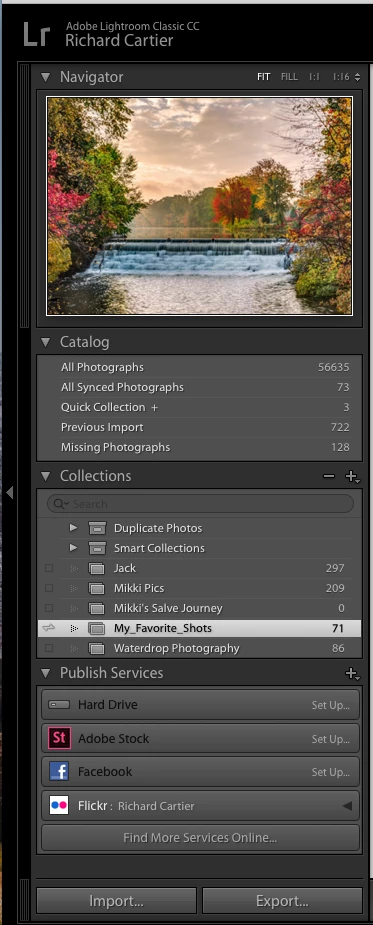
1. Sometime during one of the last two updates to Lightroom Classic CC (Mac version 7.5 is the one I got today) all my folders in the Library disappeared.  All 56K+ of my pictures are there, however they're ALL under the single Catalog heading of "All Photographs."  I've been using LR for years and have spent that much time keeping my pictures organized to easily find them when I need/want.  My images are all on an external drive, which is fully accessible and the hierarchy is all intact...it just doesn't show up in LR.

2. Also, at the same time it seems that all my Presets are gone as well.  On the Develop tab, literally nothing shows up under Presets, Snapshots, and History.  Only a few image folders show up under Collections.  I found and followed the steps to re-connect my presets, but that didn't work.  (UPDATE: Just as I was typing this, something changed!  Although I've been trying all day to get my presets, when I went to get a screenshot just now they seem to have returned.  I'm going to leave this here in case it's a clue to the first issue above.)

I've attached a screenshot from the library tab to demonstrate what I mean.  I would greatly appreciate if someone could help me understand what changed and what I need to do to fix it.  Thanks.
    This topic has been closed for replies.
    Correct answer Per Berntsen

    You have hidden the Folders panel.

    Right click one of the other panel headings (like Catalog), and choose Folders from the context menu.

    Is the History panel still empty when you open an image in Develop?

    2 replies

    richardc15314144
    Participant
    October 4, 2018

    I'll be darned!  In all these years, I had never known that was there, and had never experienced it before.  Searching was useless, which is how I ended up here.

    Thanks so much!  A simple user error but incredibly frustrating when you don't know what happened.

    Per Berntsen
    Community Expert
    Community Expert
    October 4, 2018

    It's possible that you hid the panel by accidentally pressing the shortcut to hide or show it – Ctrl+Shift+2.

    You can also show and hide panels by going to Window > Panels.

    Per Berntsen
    Community Expert
    Per BerntsenCommunity ExpertCorrect answer
    Community Expert
    October 4, 2018

    You have hidden the Folders panel.

    Right click one of the other panel headings (like Catalog), and choose Folders from the context menu.

    Is the History panel still empty when you open an image in Develop?