

ThomasH_on_the_web
Inspiring
May 20, 2023
Answered

Missing lens profiles, wrong camera selected

  • May 20, 2023
  • 2 replies
  • 965 views

I hava seriedof images made with Z50, and the aptly called "vacation zoom" Z DX 18-140 f/3.5-6.3 VR.
When I select "Make" Nikon, LR shows "Nikon Coolpix A" to my astonishement, despite the fact that the make and model is clearly recognized in the EXIF of the image.  Even worse: When I select Model. I see pages and pages of lenses, of which none is Nikkor Z, and clearly, there are no Nikon Z models listed.  ALl this YEARS after their release.  This issue with lens selection exists since the beginning of LR (I am using it LR 1 to LR 6.14, and after several years of break, now LRc 12.3) I finally selected the old F-mount AF-S DX Nikkor 18-140, but its of course a rough approximation at best.

When this will be finally improved, please?  You speak of AI and all such, how about some AI for lens selection?
This topic has been closed for replies.
Correct answer johnrellis

[This post contains formatting and embedded images that don't appear in email. View the post in your Web browser.]


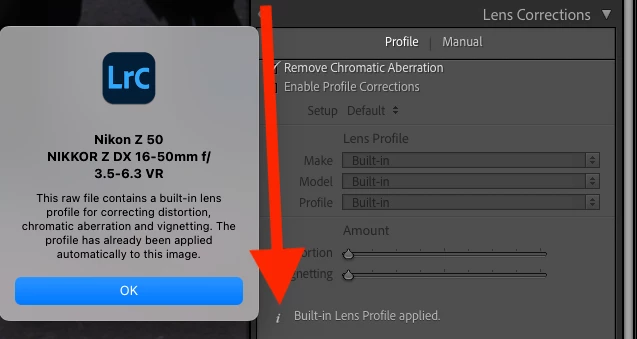
Adobe doesn't provide any profiles for Nikon Z lenses. Instead, the Nikon Z cameras embed their own lens profiles in the raw, and LR applies them automatically. For older Z cameras, including the Z 50, you'll see the message "Built-in Lens Profile applied", and if you click on the little "i" you'll see more information:


For these older cameras, you can't disable the application of the built-in profile, though you can for newer Z cameras (Adobe is following Nikon's wishes, so complain to Nikon).


"When I select "Make" Nikon, LR shows "Nikon Coolpix A" to my astonishment, despite the fact that the make and model is clearly recognized in the EXIF of the image."


When you select Enable Profile Corrections, LR looks for a lens profile best matching the camera model and lens identifiers recorded in EXIF.   Since there aren't any installed profiles for the Z 50 or its lenses, LR is showing you a silly "close match".


It's unfortunate that Adobe's documentation on this is incomplete and years out of date.


2 replies

johnrellis
johnrellisCorrect answer
Legend
May 21, 2023

[This post contains formatting and embedded images that don't appear in email. View the post in your Web browser.]


Adobe doesn't provide any profiles for Nikon Z lenses. Instead, the Nikon Z cameras embed their own lens profiles in the raw, and LR applies them automatically. For older Z cameras, including the Z 50, you'll see the message "Built-in Lens Profile applied", and if you click on the little "i" you'll see more information:


For these older cameras, you can't disable the application of the built-in profile, though you can for newer Z cameras (Adobe is following Nikon's wishes, so complain to Nikon).


"When I select "Make" Nikon, LR shows "Nikon Coolpix A" to my astonishment, despite the fact that the make and model is clearly recognized in the EXIF of the image."


When you select Enable Profile Corrections, LR looks for a lens profile best matching the camera model and lens identifiers recorded in EXIF.   Since there aren't any installed profiles for the Z 50 or its lenses, LR is showing you a silly "close match".


It's unfortunate that Adobe's documentation on this is incomplete and years out of date.


ThomasH_on_the_web
Inspiring
May 23, 2023

Thank you! I have not noticed that. It speaks maybe about my limited ability to be observant, or maybe also about the ergonomics (design) of the information in this widget. I would have placed that information atop, next to the check box "Enable lens profile."
Agree totally about the conclusion: Details out of date. And much more. For example, if the EXIF shows a lens (say) 25-50mm, why to show the barrage of irrelevant primes outside of this range?  Adobe should finally implement a selector with some "NI" (natural intelligence) or else use AI to the rescue :-).

ThomasH_on_the_web
Inspiring
May 20, 2023

No edit in Adobe forum?? I made so many typosd, I wanted to correct these.

TheDigitalDog
Inspiring
May 20, 2023

Can you upload one of the raws to something like Dropbox so we can examine the lens profile? 

Post editing comes after you've posted a few times here. 

Author “Color Management for Photographers" & "Photoshop CC Color Management/pluralsight"